Introduction
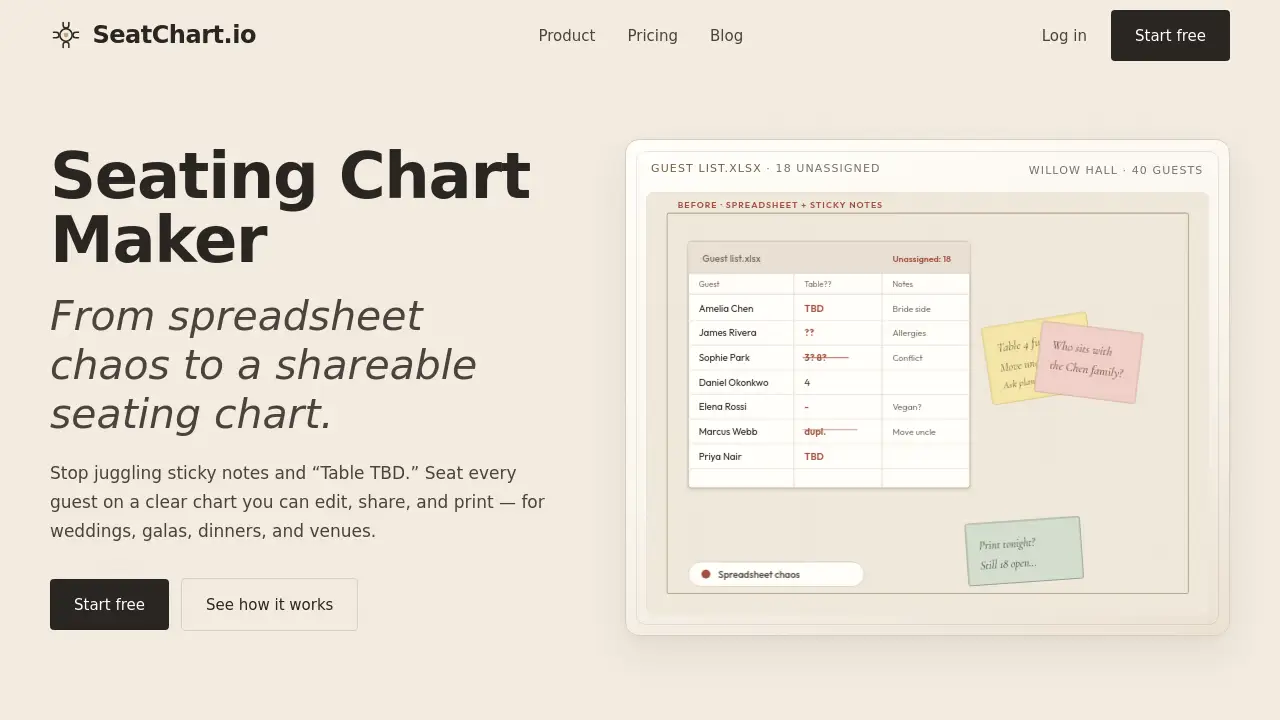
A seating chart maker should remove confusion from wedding and event planning. SeatChart.io gives users a simple online space to place tables, assign guests, and share a clear chart. Built for weddings, galas, receptions, and corporate gatherings, this online seating chart tool turns spreadsheet chaos into an understandable plan before the big night.
What is SeatChart.io?
SeatChart.io is an online seating chart maker for weddings, galas, dinners, venues, and event planners. It solves the common problem of keeping guest lists, table assignments, and dietary notes in one place. Instead of sticky notes and undecided guests, users can view an event floor, add groups, then share or print the final layout.
This matters because a seating chart maker removes last-minute guesswork and gives guests a faster way to find their seats. It is designed for event planners who need clear floor plans and couples who want a controlled wedding seating chart. The tool focuses on visual planning, which makes it easier to see where every person will sit.
Key Features of SeatChart.io
Build the seating chart on a visual canvas
Users can place round and rectangular tables on an architectural-style canvas. Add venue zones such as a stage, dance floor, bar, buffet, entrance, and restrooms to make the event layout clear.
Import and organize guest groups
The tool manages a guest list with groups, parties, dietary requirements, and comments. CSV import and bulk assignment speed up the seating chart process, while visual links connect each guest to their assigned seat.
Start with a ready-made event template
Ready-made layouts for weddings, galas, birthdays, corporate dinners, restaurants, and conferences help users avoid a blank canvas. After choosing a template, hosts can refine every table and seat until the event seating chart feels right.
Share, print, and let guests find their seats
SeatChart.io can export print-ready seating charts, share plan links, and generate a QR seat finder. This feature is especially useful for online seating chart users because guests can check a mobile link on the night of the event.
Use Cases for SeatChart.io
Wedding seating chart
Couples can group family members, friends, and colleagues at the right tables. A wedding seating chart also keeps special requests visible so the venue can handle final details smoothly.
Event seating chart for galas and benefits
Planners can organize guests by sponsor level or seating preference. The event seating chart can place VIPs near the stage while keeping clear access routes for catering staff.
Corporate dinners and venue events
Corporate teams and venues can manage multiple events, import guest lists, and update seating plans quickly. This is helpful for changing RSVPs and private dining layouts.
Restaurant and banquet use
Restaurant operators can use the canvas to test different table setups and share the floor plan with front-of-house staff. Banquet teams can also use printed charts to keep service fast and organized.
How to Use SeatChart.io
The seating chart maker works through a few simple steps:
- Choose a template such as wedding, gala, corporate dinner, or conference.
- Import your guests from a CSV file or add names directly.
- Arrange guests by dragging them to tables and seats.
- Refine the layout with venue zones, groups, and notes.
- Share or print the chart using a link, print-ready file, or QR code.
This approach helps users start quickly and prevents the chaos of managing seats through spreadsheets alone.
Target Audience for SeatChart.io
- Wedding couples and families
- Wedding and event planners
- Gala and benefit organizers
- Corporate event managers
- Venue and restaurant operators
- Catering and banquet staff
Is SeatChart.io Free?
Yes, SeatChart.io has a Free plan that does not require a credit card. The page also offers one-time purchase options for users who want more events and AI floor plan imports.
| Plan | Price | Main Features |
|---|---|---|
| Free | $0 | Full design editor, templates, guest list import, export, share links, QR seat finder, 1 event, 3 AI floor plan imports |
| Starter | $8 one-time | 20 events, full design editor, AI floor plan imports up to 10 |
| Professional | $14 one-time | 50 events, 3 collaborators, AI floor plan imports up to 50 |
| Event Manager | $25/month | Unlimited events, unlimited collaborators, unlimited AI floor plan imports |
For complete plan details, the official pricing page is available at SeatChart.io/pricing.
SeatChart.io's Pros and Cons
| Aspect | Pros | Cons |
|---|---|---|
| Pricing | Free plan and low-cost one-time payment options are available. | The Event Manager plan is billed monthly rather than one-time. |
| Free plan | Includes export, share links, QR seat finder, templates, and version history. | The Free plan is limited to 1 event. |
| Event limits | Starter and Professional allow 20 and 50 events for a single payment. | Users with many events may need the monthly Event Manager plan. |
| Features | Templates, CSV import, and visual floor planning cover common event needs. | AI floor plan imports are capped at 3 on the Free plan and 10 on Starter. |
| Collaboration | Collaborator support appears across the listed plans. | The Professional plan clearly limits collaborators to 3. |
Frequently Asked Questions about SeatChart.io
What does SeatChart.io do?
SeatChart.io is a seating chart maker for weddings and events. It helps users create a floor plan, place guests at tables, and share a printable chart so everyone knows where to sit.
Does SeatChart.io have a free plan?
Yes. Users can start with the Free plan without a credit card. It includes one event, the full design editor, templates, guest list import, export, share links, QR seat finder, and 3 AI floor plan imports.
Can a couple create a wedding seating chart?
Yes. The wedding template and table tools make it easy to arrange family groups and friends. Couples can update the wedding seating chart after final RSVPs and share the finished version with the venue or coordinator.
How do I import guests into SeatChart.io?
Users can import a guest list using CSV import. The tool then lets them group guests, add comments, note dietary needs, and assign seats in bulk during the seating chart maker workflow.
What sharing methods are available?
SeatChart.io supports printable charts, shareable plan links, and QR seat finder codes. These options allow both staff and guests to view the table plan without having to ask for directions.
Is SeatChart.io only for weddings?
No. The product includes templates for galas, birthdays, corporate dinners, restaurants, and conferences. It is designed for event planners, venues, and anyone who needs a clear event seating chart.
SeatChart.io Tags
seating chart maker, event seating chart, wedding seating chart, online seating chart, seating chart software, table planner, seating chart for weddings, QR seat finder, event planning tool, seating chart templates, reception seating chart, guest seating chart