Introduction
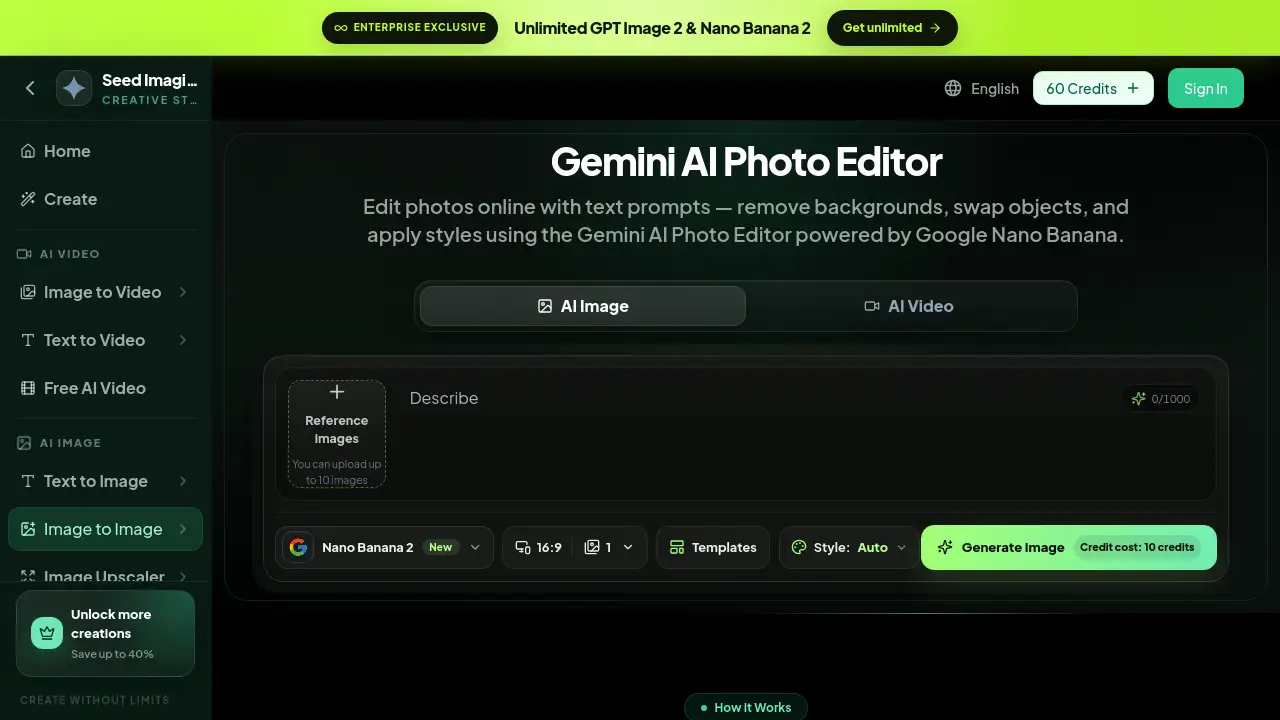
Gemi AI Photo is an online AI photo editor that lets users edit images with simple text prompts. Powered by Google Nano Banana, this tool helps people remove backgrounds, delete objects, enhance portraits, and apply styles without installing software. It is a fast and friendly way to improve photos from any browser.
What is Gemi AI Photo?
It is a browser-based photo editing tool built around Google's Nano Banana image model. It solves the main problem of traditional editing: complexity. Instead of learning layers, masks, and brush tools, users describe a change in plain language. The AI photo editor then handles the visual work. This makes it suitable for marketers, small business owners, designers, and casual users who need quality results quickly. Because the tool works online, there is no heavy software to download. It matters because it lowers the barrier for creative editing, allowing more people to produce professional-looking images with just a few words.
Key Features of Gemi AI Photo
These features focus on practical image editing tasks.
Background Changer and Remover
Use text prompts to swap or remove photo backgrounds instantly. This helps create clean product shots or artistic scenes without manual masking.
Object and People Remover
Tell the AI to delete unwanted objects, people, or blemishes, and it fills those areas naturally. This is useful for cleaning up real estate photos or personal pictures.
Style Transfer and Filters
Apply artistic looks, cinematic color grades, or brand-consistent themes by describing the style in words. No need to adjust sliders or use presets.
Portrait and Face Editing
Enhance portraits, adjust facial features, change expressions, or add professional retouching with simple prompts. It makes headshots and social photos look polished.
Lighting and Color Adjustment
Change the mood, time of day, or color temperature of an image using natural language. Turn a daytime scene into golden hour or add a cooler tone.
Outfit and Product Photo Editing
Modify clothing, swap product backgrounds, or create e-commerce images directly in the browser. This feature helps online sellers produce consistent visuals.
Use Cases for Gemi AI Photo
The tool works in many everyday scenarios.
Social Media Content Creation
Creators can turn ordinary photos into eye-catching posts by changing backgrounds and adding styles in seconds. This saves time when planning content calendars.
E-commerce Product Photography
Online store owners can edit product images with AI photo editor features, such as removing messy backgrounds and creating uniform shots. Consistent product photos help stores look more professional.
Personal Photo Cleaning
Remove photobombers, random objects, or text from memories without using complicated editing tools. The text prompt workflow keeps the process simple for anyone.
Marketing and Branding
Designers can apply consistent color palettes and visual styles across campaign images. This helps brands maintain a clean, recognizable look on websites, emails, and social ads.
How to Use Gemi AI Photo
Using the Gemini AI Photo Editor online takes three simple steps.
- Upload a photo: choose a PNG, JPG, or WEBP file up to 8MB from your device.
- Describe the edit: type a clear text prompt that tells the AI what to change, such as removing the background or changing the lighting.
- Generate and download: click generate, review the result, and refine with a follow-up prompt if needed. The final image can be downloaded right away.
Target Audience for Gemi AI Photo
- Social media creators
- E-commerce sellers
- Small business owners
- Marketing teams
- Photographers
- Casual users who want quick edits
Is Gemi AI Photo Free?
The free tier gives new users credits to start editing without payment. For higher usage, the platform provides paid plans. According to the product page, enterprise users can access unlimited GPT Image 2 and Nano Banana 2 features. Check the official pricing page for current prices.
| Plan | Price | Features |
|---|---|---|
| Free | $0 | Limited free credits, text-prompt editing, background removal, style transfer |
| Paid/Enterprise | Varies | More credits, unlimited access to GPT Image 2 and Nano Banana 2 |
Gemi AI Photo's Pros and Cons
| Aspect | Pros | Cons |
|---|---|---|
| Pricing | Free credits to start; paid plans for higher usage | Unlimited access appears tied to enterprise plans |
| Ease of Use | Simple text prompt editing; no design skills needed | Complex edits may need multiple attempts |
| Features | Background removal, object removal, portrait editing, style transfer | AI results depend on source photo quality |
Frequently Asked Questions about Gemi AI Photo
What can the editor do?
It uses Google Nano Banana to edit images from text prompts. It can change backgrounds, remove objects, enhance portraits, and apply styles.
How do I use the Gemini AI Photo Editor?
Upload a PNG, JPG, or WEBP image up to 8MB, write a text prompt describing the edit, and click generate. The AI produces a new version of the photo that you can refine or download.
Does it require software installation?
No. It works entirely in a web browser. Users can upload, edit, and download images without installing any software.
Is it free to use?
Users can start with free credits. For more features or higher usage, paid plans are available, and enterprise options include unlimited access to certain AI models.
What image formats are supported?
The tool accepts PNG, JPG, and WEBP files up to 8MB.
What is Google Nano Banana?
Nano Banana is the image model behind this tool. It helps the AI understand text prompts and generate consistent, high-quality photo edits, including the newer Nano Banana 2 version.
Gemi AI Photo Tags
Gemi AI Photo, Gemini AI Photo Editor, AI photo editor, text prompt image editing, background remover, object remover, Nano Banana, online photo editor, AI portrait editor, product photo editor, AI image editing