Introduction
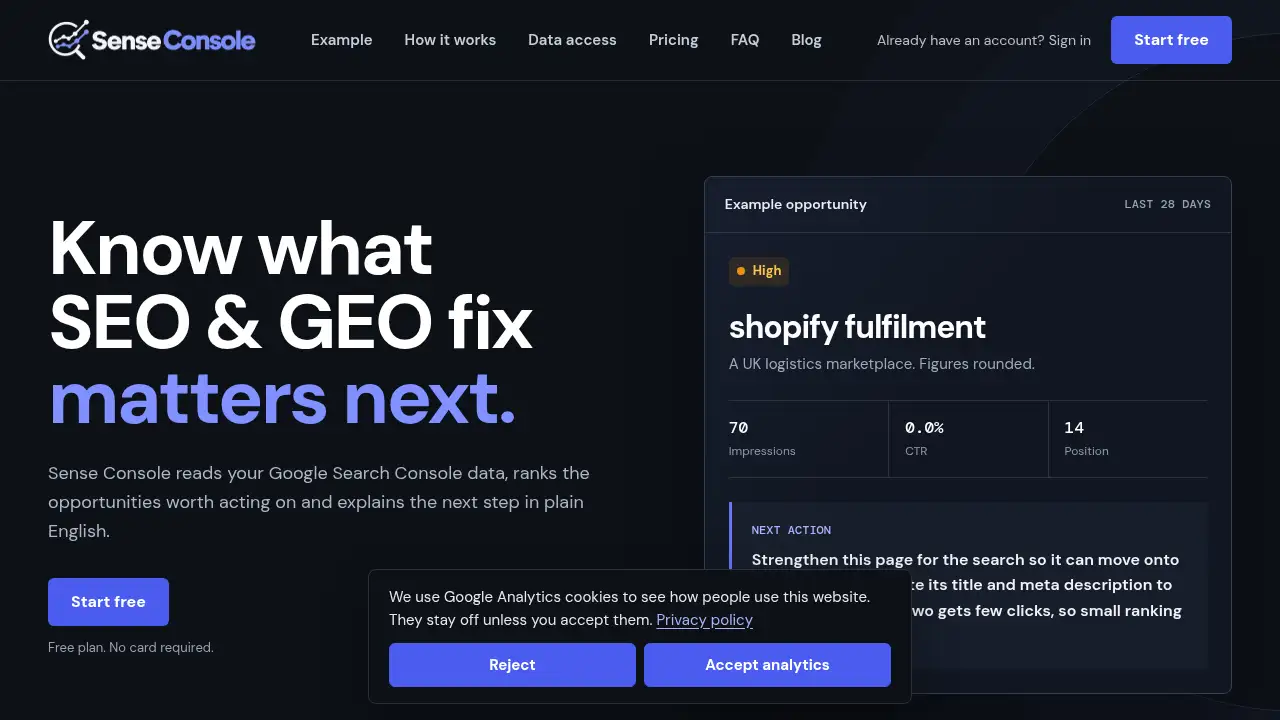
Sense Console is a Google Search Console SEO tool built for people who want a decision rather than another dashboard. It reads your existing GSC data, ranks the SEO opportunities worth acting on, and explains the next step in plain English. Instead of scrolling through reports, solo founders and small teams open a single prioritised list of SEO fixes. This review covers what the tool does, how it works, who it suits, and what it costs.
What is Sense Console?
Sense Console is a web app that connects to Google Search Console and turns raw search data into prioritised SEO tasks. Google Search Console shows impressions, click-through rate and average position; Sense Console interprets those numbers and translates them into a specific recommendation, such as strengthening a page for a query that sits on page two, or adding a newly appearing search term to a content plan.
The problem it addresses is familiar: Search Console is full of useful data, but it does not say what to change first. Sense Console acts as a lightweight decision engine for SEO opportunities, aimed at founders and small teams where SEO is part of the job rather than the whole job. Each signal ends with an action, the evidence behind it stays visible, and the connection to Google is read-only, so the tool can recommend changes but cannot edit a site.
Key Features of Sense Console
Read-only Google Search Console connection
Connect a verified property through Google OAuth using read-only access. The tool analyses the selected property only, cannot publish pages, and the connection can be revoked from your Google account at any time.
Opportunity scoring across two 28-day periods
Compare the last 28 days of Google Search Console data with the 28 days before it. Queries are flagged for low click-through rates, new visibility and lost visibility, with ranking position weighted so searches near page one rank higher.
Plain-English next actions
Read a short, specific instruction for every SEO opportunity instead of interpreting charts. Recommendations explain what to do and why it matters, which keeps the workflow usable for non-specialists.
Priority badges with visible evidence
See a High, Medium or Low badge alongside the impressions, CTR and position behind it. The order is a guide to where to look first rather than a forecast of results, and deep rankings still appear further down the list.
Done tracking with before-and-after checks
Mark a fix as done and the tool records the starting clicks and average position. After 28 days of new data, plus a short delay for Google to publish final figures, the item shows the change under a "change since you marked this done" heading.
Save, dismiss and keep a record
Save an opportunity, mark it done or dismiss it permanently. A record of completed work builds up over time, which helps when reviewing what has already been tried on a site.
Use Cases for Sense Console
Solo founders running their own SEO
Open one ranked list of SEO fixes instead of learning every Search Console report. Founders with limited time can start with the highest-value task and work down the list week by week.
Small agencies managing client sites
Review a client property's prioritised SEO opportunities without rebuilding the same comparison spreadsheet for each account. Each connected site is imported and scored separately, so signals never mix between clients.
Teams replacing a manual spreadsheet
Automate the export-two-date-ranges workflow that most small teams build by hand. Every query is compared automatically, saving the ongoing maintenance that spreadsheets require.
How to Use Sense Console
- Create a free account and sign in to the Sense Console dashboard.
- Connect a verified property through Google OAuth, granting read-only access to the Google Search Console property you want to analyse.
- Review the ranked list of SEO opportunities, checking the priority badge and the evidence shown on each card.
- Complete the suggested fix on your own site, then mark the item as done to start the tracking window.
- Return after the tracking period to see the before-and-after comparison in clicks and average position.
The first scan typically completes in under a minute, and there are no reports or dashboards to configure beforehand.
Target Audience for Sense Console
- Solo founders handling their own SEO without a specialist
- Small agencies reviewing several client properties
- Small in-house marketing teams with limited SEO resources
- Non-specialists who need clear next steps rather than raw data
- Freelancers and consultants delivering prioritised SEO tasks to clients
Is Sense Console Free?
Sense Console offers a free plan with no card required, plus two paid tiers.
| Plan | Price | Features |
|---|---|---|
| Free | £0 | 1 site, 25 keywords, 10 opportunities shown, highest priority first, refreshed every 28 days, no card needed |
| Starter | £29/month | More keywords and opportunities, more frequent refreshes, additional sites available via upgrade packs |
| Pro | £99/month | Largest keyword and opportunity limits, the most frequent refreshes, extra sites via upgrade packs |
Free does not expire while the account is in use. Leaving a paid plan moves the account back to Free without deleting data to fit its limits. Current details are listed on the official pricing page.
Sense Console's Pros and Cons
| Aspect | Pros | Cons |
|---|---|---|
| Pricing | Free plan with no card required; paid tiers are modest for a small team | Paid plans are per-site focused, and extra sites require add-on packs |
| Ease of use | Plain-language recommendations suit non-specialists | Users wanting full technical SEO audits will need other tools |
| Data access | Read-only connection limits risk; access is revocable | No site changes are made automatically, so work still relies on the user |
| Workflow | Ranked SEO opportunities replace manual spreadsheet comparison | Tracking depends on a 28-day wait before results appear |
| Transparency | Priority badges keep the underlying evidence visible | Priority order is a guide to where to look first, not a results forecast |
Frequently Asked Questions about Sense Console
Can Sense Console change my website?
No. The Google Search Console connection is read-only. The tool can recommend an action, but you decide whether to make the change yourself.
Do I need SEO experience to use it?
No. The product is designed for founders and small teams without specialist knowledge, with technical evidence translated into a specific next step for each SEO opportunity.
How are the SEO opportunities prioritised?
The tool compares the last 28 days of Google Search Console data with the 28 days before, looking at impressions, clicks and ranking position. It flags queries shown without turning into clicks, newly appearing searches and searches that lost visibility. Position matters, so a query near page one is rated higher than one far down the results.
What does the free plan include?
Free tracks one site with 25 keywords and shows 10 opportunities, highest priority first, refreshed every 28 days. It requires no card and does not run out while the account is in use.
Can agencies connect more than one website?
Yes, on a paid plan. Free covers a single site, while Starter and Pro include one site each with additional sites available through upgrade packs. Each property is imported and scored separately.
Does it prove that a fix caused a ranking change?
No. The before-and-after view is a comparison, not proof of causation, and the tool says so when data is too thin to report a figure reliably.
Sense Console Tags
Sense Console, Google Search Console SEO tool, SEO opportunities, prioritised SEO tasks, GSC data analysis, SEO recommendations for founders, search console insights, SEO fixes tracker, SEO tool for solo founders, SEO software for small agencies, GSC opportunity scoring, plain-English SEO actions