Introduction
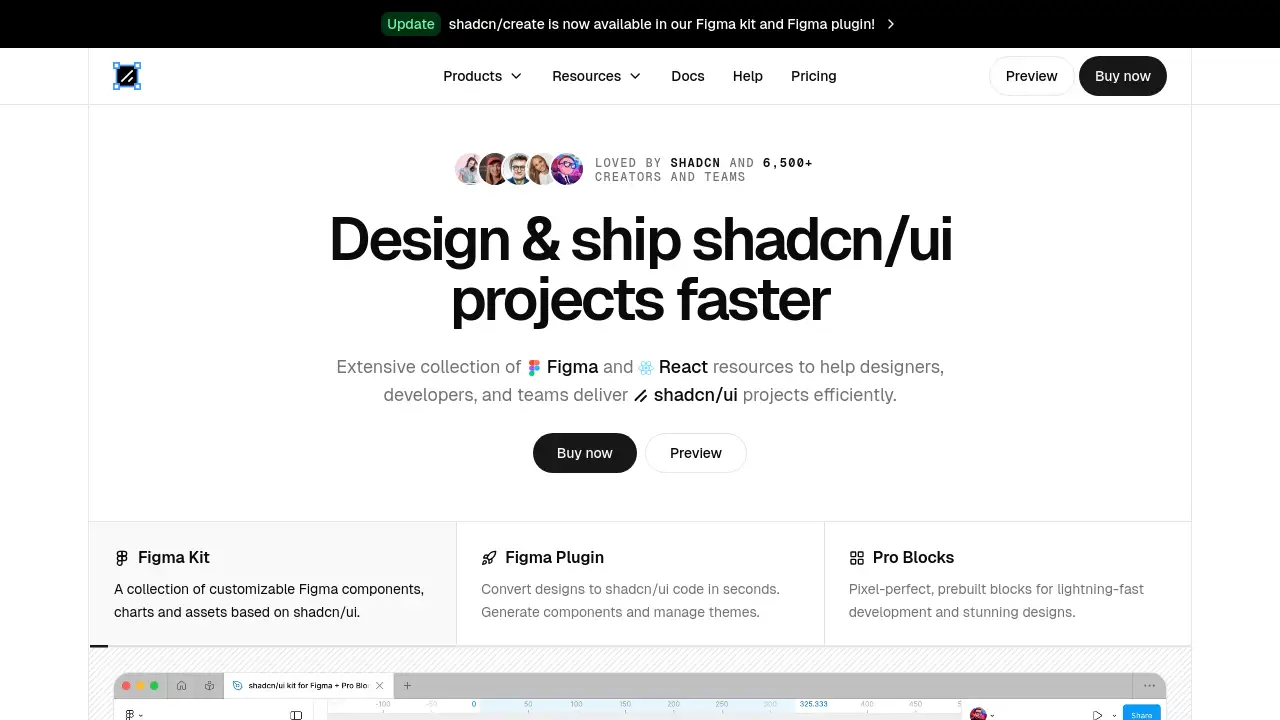
A comprehensive shadcn/ui Figma kit and plugin ecosystem for faster design and development.
What is ShadcnDesign?
ShadcnDesign is a complete resource ecosystem built for designers and developers who use the popular shadcn/ui component library. It solves the common problem of disconnect between design tools like Figma and the final production code. The product provides a meticulously crafted Figma kit with over 2,000 components, a powerful plugin for converting designs to clean code, and production-ready Pro Blocks. It is suitable for individual creators, designers, developers, and teams who want to streamline their workflow and ship high-quality, consistent user interfaces faster using shadcn/ui and Next.js.
Key Features of ShadcnDesign
Pixel-Perfect Figma Kit
The core offering is an extensive shadcn/ui Figma kit with components that perfectly mirror the actual code, ensuring accurate Tailwind CSS alignment and eliminating design-to-development mismatches.
Figma to Code Plugin
A dedicated Figma plugin allows users to instantly convert selected design elements into clean, production-ready shadcn/ui and Next.js code, saving significant development time.
Production-Ready Pro Blocks
Users get access to pre-built, pixel-perfect blocks for common sections like hero areas, footers, and feature lists, available as both Figma components and React code for lightning-fast assembly.
Comprehensive Design System
The kit includes a full, AI-ready design system with auto-layout, variants, and integrated Tailwind CSS variables, making it easy to maintain consistency and customize for any brand.
Always Updated Resources
The components, blocks, and plugin are actively maintained and updated to stay in sync with the latest shadcn/ui releases, ensuring long-term usability and reliability.
Integrated Academy & Docs
Beyond components, ShadcnDesign offers extensive documentation and an Academy with tutorials to help users learn, design, and build effectively with shadcn/ui best practices.
Use Cases for ShadcnDesign
Accelerating UI/UX Design
Designers can use the Figma kit to create high-fidelity, interactive prototypes 10x faster, using pre-built components and blocks that developers can build without reinterpretation.
Streamlining Developer Handoff
Teams can use the Figma plugin to generate clean shadcn/ui code directly from designs, drastically reducing communication overhead and manual coding during the handoff process.
Building Landing Pages & Applications
Developers and founders can leverage the Pro Blocks and templates to quickly assemble landing pages, SaaS application interfaces, or e-commerce sites with a professional, consistent look.
Establishing Design Consistency
Product teams and managers can adopt the ecosystem as a single source of truth to ensure brand and UI consistency across all projects and between design and engineering departments.
How to Use ShadcnDesign
- Purchase and Access: Visit the ShadcnDesign website, choose a pricing plan, and complete the one-time purchase to gain access to all resources.
- Install the Figma Kit: Duplicate the official ShadcnDesign Figma file into your workspace to start using the 2,000+ components and design assets.
- Use the Figma Plugin: Install the "Figma to shadcn/ui" plugin from the Figma Community. Use it to export design variables, generate component code, or install Pro Blocks directly into your files.
- Implement Pro Blocks: For development, copy the provided React (Next.js) code from the Pro Blocks library and integrate it into your project to build complex layouts rapidly.
- Leverage Learning Resources: Refer to the documentation and Academy videos to understand best practices, customization options, and advanced workflow tips.
Target Audience for ShadcnDesign
- UI/UX Designers who design with Figma and need components that translate perfectly to developer code.
- Frontend Developers who build with React, Next.js, and shadcn/ui and want to accelerate development.
- Product Managers & Startup Founders who need to ship polished products quickly with limited resources.
- Development Teams seeking to improve collaboration, reduce handoff friction, and maintain design system consistency.
Is ShadcnDesign Free?
ShadcnDesign operates on a one-time payment model rather than a subscription. A free preview of the Figma kit is available, but full access to all components, the plugin, Pro Blocks, and resources requires a purchase.
| Plan | Price | Key Features |
|---|---|---|
| Full License | One-time payment | Access to the complete Figma kit, Pro Blocks, Figma plugin, templates, charts, Academy, documentation, and future updates. |
For the most current pricing details, visitors should check the official ShadcnDesign pricing page.
ShadcnDesign's Pros and Cons
| Aspect | Pros | Cons |
|---|---|---|
| Workflow & Efficiency | Drastically reduces design-to-development time; all-in-one ecosystem. | Primarily beneficial for teams committed to the shadcn/ui and Next.js stack. |
| Quality & Accuracy | Pixel-perfect, code-aligned components endorsed by shadcn; always updated. | The wealth of resources (2,000+ components) may have a slight learning curve. |
| Cost Structure | One-time payment provides lifetime access and updates, good long-term value. | Higher upfront cost compared to some free or limited individual component kits. |
| Support & Learning | Includes comprehensive docs, Academy, and direct support from the founder. | As a specialized tool, it's less relevant for projects not using shadcn/ui or Figma. |
Frequently Asked Questions about ShadcnDesign
What is included in the ShadcnDesign purchase?
The purchase grants lifetime access to the complete shadcn/ui Figma kit with 2,000+ components, the Figma-to-code plugin, all Pro Blocks and templates, charts, icons, the video Academy, documentation, and all future updates.
Does the Figma kit work with the latest shadcn/ui version?
Yes, a core promise of ShadcnDesign is that the Figma components, variables, and generated code are actively maintained to stay perfectly aligned with the latest shadcn/ui releases.
Can I use ShadcnDesign for client projects?
Yes, the standard license allows use in an unlimited number of personal and commercial projects for you or your team. You cannot resell the kit or components as your own product.
How does the Figma plugin generate code?
The plugin analyzes selected layers in your Figma design and exports clean, production-ready React component code using shadcn/ui primitives, complete with proper structure and Tailwind CSS classes.
Is there a free trial or refund policy?
A free preview of the Figma kit is available. The paid product comes with a 14-day refund policy, allowing users to test it thoroughly and request a refund if it doesn't meet their needs.
Who is the founder behind ShadcnDesign?
ShadcnDesign was created by Matt Wierzbicki, who has over 7 years of experience building Figma resources and maintaining the Ant Design System, ensuring the product is built with professional insight.
ShadcnDesign Tags
shadcn/ui Figma kit, shadcn design, Figma to shadcn/ui plugin, shadcn components, Next.js UI kit, production-ready React blocks, Figma design system, Tailwind CSS Figma, design to code, UI design resources, frontend development tools, shadcn/ui templates