Introduction
Sky Clock is the essential real-time event tracker for Sky: Children of the Light players.
What is Sky Clock?
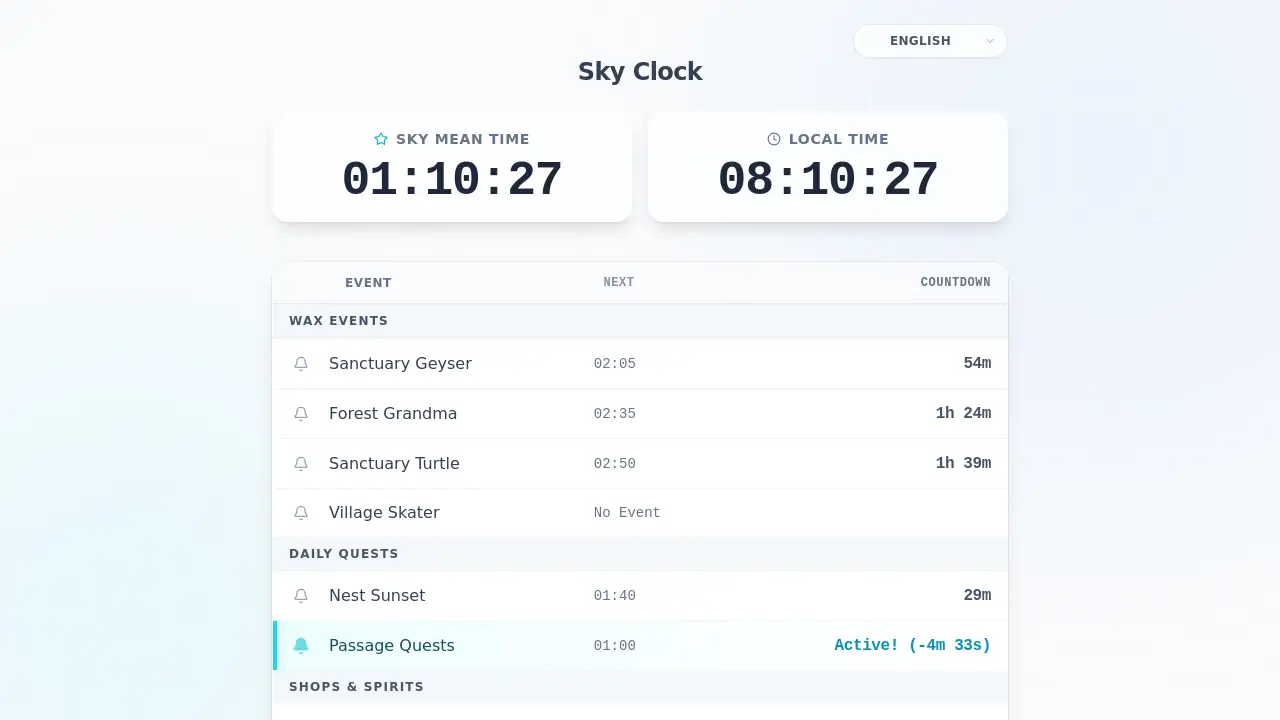
Sky Clock is a free web-based tool designed specifically for players of the popular game Sky: Children of the Light. It solves a universal problem for the game's global community: confusing timezone conversions. The game operates on a fixed schedule based on Sky Mean Time (Pacific Standard Time), but players are located all over the world. Sky Clock automatically converts all in-game event times to the user's local time, displaying live countdowns for events like the Sanctuary Geyser, Grandma's Dinner, the Sanctuary Turtle, and the Aurora Concert. This tool is suitable for everyone, from new players learning the daily routine to veterans looking to optimize their candle runs and ensure they never miss a valuable event.
Key Features of Sky Clock
Real-Time Local Timezone Countdowns
The core feature is its live, updating countdown for each event, displayed directly in your local time, eliminating the need for manual timezone math before every gaming session.
Comprehensive Event Coverage
It tracks all major timed events including wax events like the Geyser and Grandma, the Sanctuary Turtle, the Aurora Concert schedule, and daily or weekly resets, all in one place.
Browser-Based and Instant Access
Sky Clock runs directly in any modern web browser with no download, installation, or account creation required, offering instant access from any device.
Multi-Language Interface
The interface supports multiple languages, including English, Chinese, Japanese, Korean, and Spanish, making it accessible to a wide international player base.
Always Accurate and Synced
The tool synchronizes with the official Sky Mean Time, ensuring its event timings are precise and match the in-game schedule exactly for reliable planning.
Completely Free and Ad-Free
Every feature of Sky Clock is available at no cost, with no advertisements or premium tiers, making it a freely accessible resource for all players.
Use Cases for Sky Clock
Optimizing Daily Candle Runs
Players can sequence their gameplay efficiently by using the countdowns to plan routes, catching the Geyser, then Grandma, and then the Turtle in one optimized cycle.
Preventing Missed Event Frustration
New or casual players use it to avoid the common disappointment of logging in just minutes after a major wax event like Grandma's Dinner has ended.
Planning Around Special Events
During limited-time seasonal events or Aurora concerts, players rely on Sky Clock to know exactly when special activities begin in their local time.
Quick Session Planning
Before launching the game, a player can quickly check the website to see if an event is starting soon, helping decide the best time to log in.
How to Use Sky Clock
Using Sky Clock is straightforward and takes just seconds.
- Visit the Website: Open your web browser and go to
skyclock.app. - View the Dashboard: The page will instantly load, showing two clocks (Sky Time and your local time) and a list of all tracked events.
- Read the Countdowns: Each event displays the time of its next occurrence and a live countdown timer. Events highlighted in green are currently active.
- Plan and Play: Use this information to time your gameplay. Bookmark the site for easy access before every Sky: Children of the Light session.
Target Audience for Sky Clock
- New Sky Players learning the game's daily event schedule.
- Veteran Players focused on maximizing candle and wax collection.
- International Players across all time zones who struggle with PST conversions.
- Casual Players who want to log in at the right time for specific events like the Aurora Concert.
Is Sky Clock Free?
Yes, Sky Clock is completely free. Based on the reference information, there is no paid version or subscription plan.
| Plan | Price | Features |
|---|---|---|
| Free | $0 | All features: real-time countdowns, local timezone conversion, full event tracking, multi-language support, no ads. |
Sky Clock's Pros and Cons
| Aspect | Pros | Cons |
|---|---|---|
| Cost & Access | Completely free, no ads or accounts; instant browser access. | Requires an internet connection to use. |
| Functionality | Solves the core timezone problem perfectly; accurate, live countdowns. | Does not track player-specific data like candle count or quest completion. |
| Usability | Extremely simple, intuitive interface; works on any device. | Limited to event timing; no in-game integration or alerts. |
| Coverage | Tracks all major timed events and seasonal activities. | Focus is solely on event timing, not other game guides or maps. |
Frequently Asked Questions about Sky Clock
What is Sky Clock?
Sky Clock is a free web tool that tracks all timed events in Sky: Children of the Light, displaying when they occur in your local timezone with live, updating countdowns.
How accurate is Sky Clock?
Sky Clock is highly accurate as it syncs directly with Sky Mean Time (PST), the official timezone the game uses for its event schedule. The countdowns are precise to the second.
Do I need to download an app to use Sky Clock?
No download or installation is needed. Sky Clock is a web application that runs directly in your phone, tablet, or computer's browser.
What events does Sky Clock track?
It tracks all major recurring events: the Sanctuary Geyser, Grandma's Dinner, the Sanctuary Turtle, the Aurora Concert, daily quest resets, weekly traveling spirit arrivals, and special seasonal events.
Is Sky Clock really free?
Yes. Sky Clock is completely free to use with no hidden costs, no premium features, and no advertisements.
Can I use Sky Clock on my phone?
Absolutely. The website is responsive and works perfectly on mobile devices, making it easy to check while you are playing the game.
Sky Clock Tags
Sky Clock, Sky Children of the Light event tracker, Sky event timer, Geyser timer, Grandma schedule, Sanctuary Turtle time, Aurora Concert schedule, candle run helper, Sky Mean Time converter, local time Sky events, free Sky tool, wax farming guide, real-time countdown