Introduction
Sorry I Lied turns one photo into a TikTok costume trend.
What is Sorry I Lied?
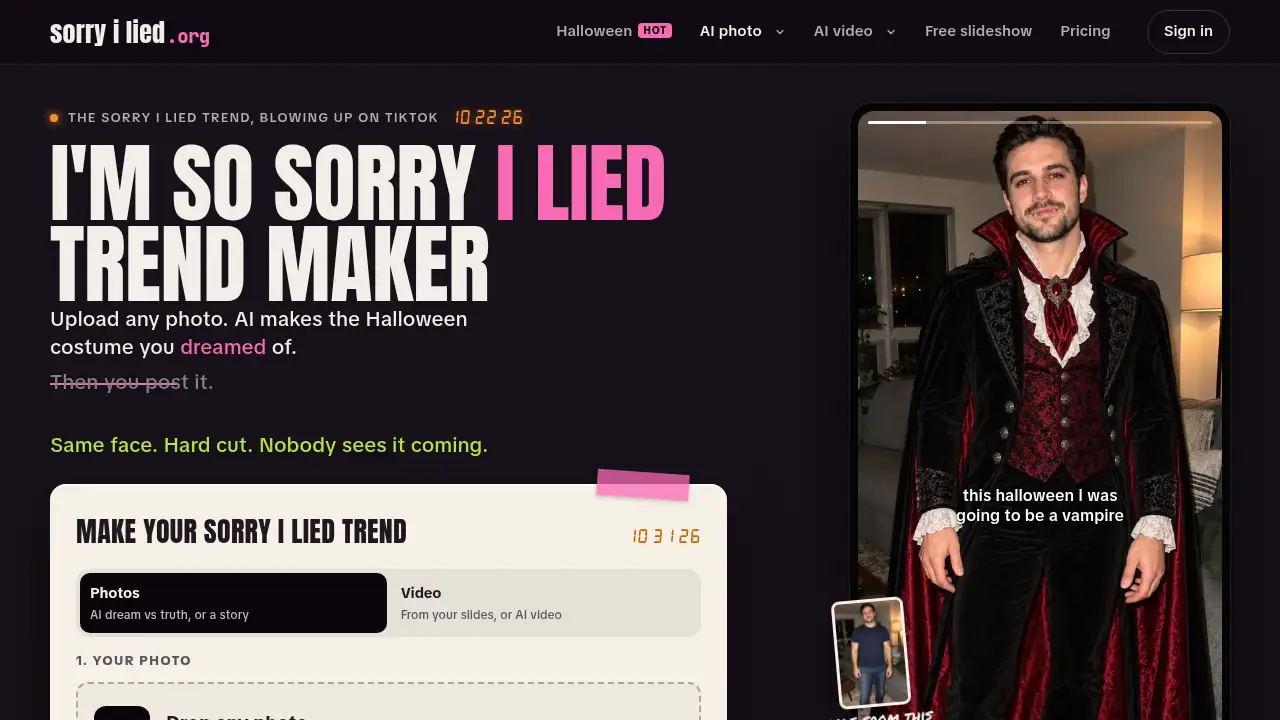
Sorry I Lied is a browser-based tool for creating the “sorry I lied” trend, a TikTok photo carousel format that contrasts the Halloween costume someone dreamed of with the one they actually got. The platform solves a simple content problem: it builds matching slides from one uploaded photo, so the face, pose, and room stay consistent while the costume changes. It is suitable for TikTok and Instagram creators, Halloween fans, pet owners, and anyone who wants a fast dream vs truth costume post without learning a full editing suite.
The site also supports a no-AI route. Users can make a sorry I lied slideshow with crops, zooms, captions, and free templates. For paid AI features, Sorry I Lied creates an AI Halloween costume image and a matching “truth” slide, then lets users download slides or turn them into a short video. The product is best understood as a trend-specific costume generator and slideshow maker, not a general-purpose photo editor.
Key Features of Sorry I Lied
One-Photo AI Costume Generator
Upload one normal photo and let the sorry I lied AI build the dream costume and the actual costume from the same source. The tool aims to keep the face, pose, and background recognizable so the hard cut still lands.
Dream vs Truth Slides
Create a two-slide sorry I lied trend post with one dream image and one truth image. This is the simplest format for TikTok photo carousel posts and works well when the joke depends on a sharp contrast.
Story Mode with 3–5 Slides
Generate a short story that falls apart one caption at a time, such as the dream outfit, the cheaper version, and the final confession. Users can choose a style or write each slide caption manually.
Real Photo as the Truth
Use a real childhood Halloween costume photo as the final slide and let AI create the dream slides before it. This option keeps the real photo untouched and is useful for people who already have a funny or cursed costume picture.
AI Video and Photos-to-Video
Turn the lie-to-truth moment into a short AI video, including a jumpscare or melting transition. The free photos-to-video tool can also combine slides with hard cuts, page turns, zooms, and music in the browser.
Free Slideshow Maker and Captions
Build a sorry I lied slideshow without AI by cropping, zooming, adding captions, and arranging slides in 9:16 or 4:5 formats. This makes the platform useful even for users who prefer a manual, no-AI workflow.
Use Cases for Sorry I Lied
TikTok Halloween Costume Trend
Create a ready-to-post sorry I lied trend carousel with a dream costume and a funny reality check. Download the slides, upload them to TikTok as a photo post, and add the suggested sound.
Instagram Carousel or Stories
Use the 4:5 slides for an Instagram carousel or the 9:16 version for Stories. The format fits costume humor, pet jokes, and confession-style captions.
Pet Costume Posts
Make a pet look like royalty in slide one and reveal a chaotic reality in the final slide. The same sorry I lied AI workflow works with a normal pet photo.
Oversold Life Moments
Apply the dream vs truth costume format to prom dresses, haircuts, holiday photos, or any situation where the expectation did not match the result. The structure is flexible beyond Halloween.
No-AI Photo Storytelling
Use the free slideshow maker to crop, zoom, caption, and sequence photos without AI generation. This suits creators who want the joke but prefer to keep every edit manual.
How to Use Sorry I Lied
- Open sorryilied.org and choose the AI costume tool or the free slideshow maker.
- Upload one clear photo if using AI, then select Dream vs truth or Story mode.
- Pick a style or write captions for each slide in the sorry I lied trend.
- Download the finished slides in TikTok or Instagram dimensions, or generate a short video.
- Post the carousel on TikTok or Instagram and add the recommended sound.
Target Audience for Sorry I Lied
- TikTok and Instagram creators who follow photo carousel trends
- Halloween costume fans who want a funny before-and-after post
- Pet owners making costume or “royalty vs reality” jokes
- People with real childhood costume photos and people without them
- Social media users who want a fast trend template without advanced editing skills
Is Sorry I Lied Free?
Sorry I Lied offers free tools and paid AI credits. The free slideshow maker, photos-to-video tool, templates, and no-AI options can be used without buying AI generation. AI images and videos use credits.
| Plan | Price | Features |
|---|---|---|
| Free tools | $0 | Slideshow maker, photos-to-video tool, templates, and no-AI options; AI generation requires credits |
| Starter credits | $4.99 one-time | 160 credits, about 5 dream-vs-truth sets, credits do not expire |
| Lite membership | $9.90/month | Site lists a monthly Lite plan with member discounts on credit packs; check the site for current credit details |
| Best value credits | $129 one-time | 5,840 credits; member pricing is available with Lite |
According to the site, every AI photo costs 16 credits, so a dream vs truth set costs 32 credits and a 4-slide story costs 64 credits. AI video starts at 30 credits. A real photo used as the final truth slide is free.
Sorry I Lied's Pros and Cons
| Aspect | Pros | Cons |
|---|---|---|
| Pricing | Free tools and a low-cost starter credit pack | AI slides require paid credits |
| Features | One-photo workflow, trend-specific templates, slides and video | Results depend on the quality of the source photo |
| Usability | Browser-based with simple steps | Credit system may be confusing for occasional users |
| Content | Supports a no-AI route and real childhood photos | Trend-focused tool has narrower use beyond social posts |
Frequently Asked Questions about Sorry I Lied
What is Sorry I Lied?
Sorry I Lied is a web tool for making the sorry I lied trend, a TikTok photo carousel that shows a dream Halloween costume and then the real or worse version. It creates slides, captions, and optional short videos from uploaded photos.
How does Sorry I Lied make an AI Halloween costume?
The user uploads one photo, and the sorry I lied AI generates a costume image while trying to keep the face, pose, and room consistent. It then creates a matching truth slide for the dream vs truth format.
How many photos do I need for the sorry I lied trend?
One photo is enough for AI generation. The tool can build every slide from that single upload, or users can add a real childhood costume photo as the final truth slide.
Is Sorry I Lied free?
The free slideshow maker, photos-to-video tool, and templates are available without payment. AI costume generation and AI video use credits, with a starter pack listed at $4.99 for 160 credits.
Can I use a real childhood Halloween costume photo?
Yes. The “Your photo is the REAL truth” option keeps the real childhood photo as the final slide and uses AI only for the dream slides before it.
What song is used for the sorry I lied trend?
The site points users to “Coming Up Roses” by Harry Styles and related TikTok sound clips. For TikTok, the page recommends searching “coming up roses” in the Add sound menu.
Sorry I Lied Tags
Sorry I Lied, sorry I lied trend, sorry I lied AI, AI Halloween costume, TikTok photo carousel, dream vs truth costume, sorry I lied costume generator, AI costume generator, Halloween costume AI, TikTok slideshow maker, sorry I lied slides, AI Halloween video