Introduction
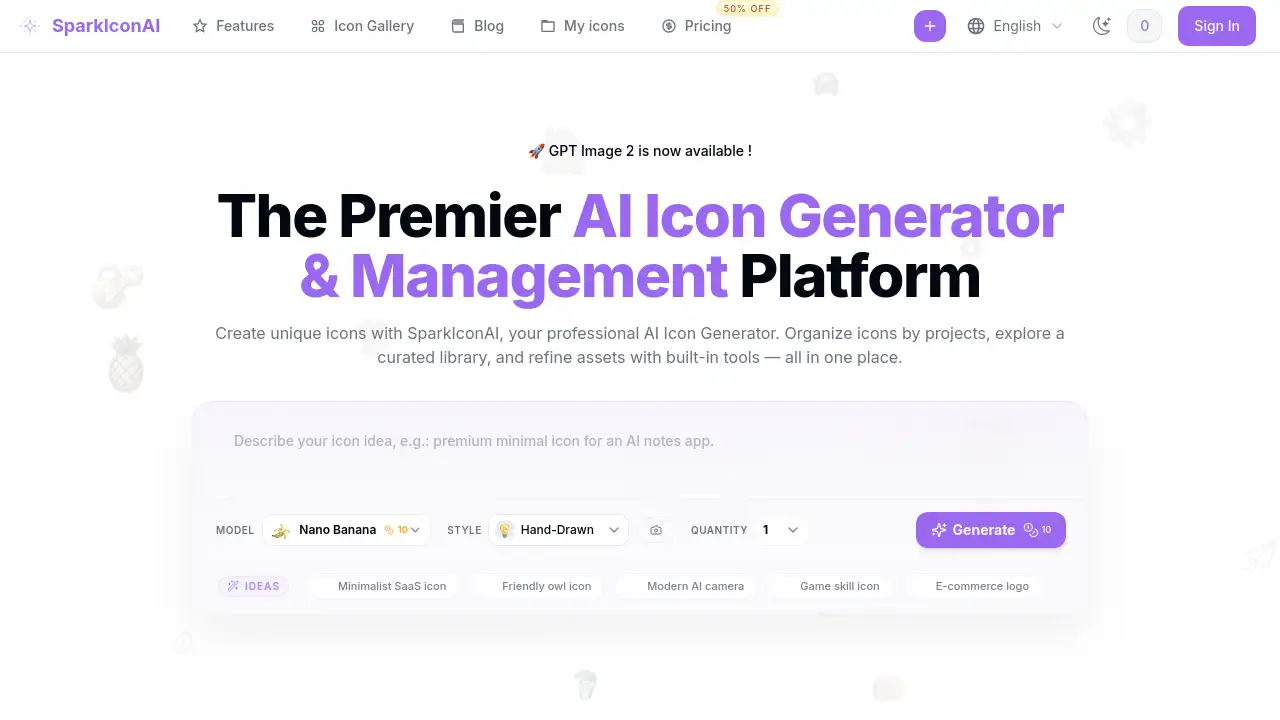
SparkIconAI is a comprehensive AI icon generator and management platform for creating unique icons.
What is SparkIconAI?
SparkIconAI is a professional AI icon generator and management platform. It solves the common design workflow problem of sourcing, creating, and organizing icons by providing an all-in-one solution. This tool allows users to generate custom icons from text prompts, manage them in project-based libraries, and refine them with built-in editing tools. It is suitable for designers, developers, and product teams who need high-quality, consistent iconography for their projects. The platform matters because it streamlines the entire icon creation and asset management process, saving significant time and effort.
Key Features of SparkIconAI
Powerful AI Icon Generation
The platform leverages advanced AI models to generate crisp, high-quality 1024×1024 icons in over 10 distinct styles, including Hand-Drawn, 3D, and Neon, ensuring visual diversity and prompt fidelity.
Reference Image Guidance
Users can upload brand assets to guide the AI icon generator, ensuring the output aligns with specific compositions, color palettes, and desired moods for brand consistency.
Project-Based Organization
Icons can be grouped into projects for better classification, collaboration, and reuse, making asset management efficient for ongoing product development.
Curated Icon Gallery & Packs
The platform features a gallery of community creations and curated icon packs, allowing users to discover styles, preview details, and instantly add purchased icons to their projects.
Built-in AI Tools
Integrated tools like a one-click background remover and an image compressor allow users to clean up edges and optimize file sizes directly within the platform.
Smart Export Presets
The AI icon generator supports exports in PNG, ICO, WEBP, and SVG formats with ready-to-use presets for Favicon, PWA, iOS, Android, and social media platforms.
Use Cases for SparkIconAI
Mobile App Development
Developers can use this AI icon generator to create consistent sets of app icons and interface elements tailored for iOS and Android guidelines.
Website & Brand Design
Designers can generate unique favicons, social media icons, and brand mascots that align perfectly with a company's visual identity and color scheme.
Game Asset Creation
Indie game developers can quickly produce varied in-game item icons, UI buttons, and character status indicators in pixel or other stylistic themes.
Marketing Material Design
Marketing teams can create custom icons for presentations, infographics, and advertisements to enhance visual communication without relying on stock imagery.
How to Use SparkIconAI
Using SparkIconAI is a straightforward process designed for an efficient workflow:
- Start a Project: Create a new project to organize your icons.
- Generate Icons: Use the AI icon generator by selecting a style, entering a text prompt, and optionally uploading a reference image for guidance.
- Refine & Manage: Review the generated icons, use the built-in tools to remove backgrounds or compress files, and organize them within your project.
- Export: Select your icons and choose a suitable export format and preset (e.g., Favicon, iOS App Icon) before downloading.
Target Audience for SparkIconAI
- UI/UX Designers needing custom icon sets for digital products.
- Software and App Developers requiring app icons and UI assets.
- Product Managers and Startup Founders building brand assets on a budget.
- Marketing Professionals creating visuals for campaigns and content.
- Indie Game Developers looking for stylized in-game icons.
Is SparkIconAI Free?
SparkIconAI offers a freemium model. While specific pricing details are best confirmed on their official website, the reference information indicates a tiered structure:
| Plan | Key Features |
|---|---|
| Free | Core icon generation capabilities. |
| Pro (Paid) | Unlocks HD exports, more export presets, batch generation and export, and higher quotas for generating icon variants. |
SparkIconAI's Pros and Cons
| Aspect | Pros | Cons |
|---|---|---|
| Platform Scope | All-in-one solution for generation, management, and export. | May have more features than a user needs for simple, one-off generation. |
| Workflow | Excellent project organization and built-in editing tools streamline the process. | Learning the full suite of features may take some initial exploration. |
| Output & Flexibility | High-quality 1024px icons, multiple styles, and reference image guidance. | The quality and accuracy of AI generation can vary depending on the prompt. |
| Accessibility | Free tier available to test core functionality. | Advanced features like batch export require a paid subscription. |
Frequently Asked Questions about SparkIconAI
What makes SparkIconAI different from other AI icon generators?
SparkIconAI distinguishes itself as a complete platform, combining a powerful AI icon generator with project-based asset management, a curated icon gallery, built-in editing tools, and smart export presets in one place.
Can I use icons generated with SparkIconAI for commercial purposes?
Yes. According to the platform, icons you generate with this AI icon generator are yours to use commercially, including in products and for resale.
Does SparkIconAI support batch icon generation?
Yes. The Pro version of the AI icon generator supports submitting multiple prompts at once, managing them as batches with progress tracking.
What file formats can I export my icons in?
This AI icon generator supports exporting icons in PNG, ICO, WEBP, and SVG formats. It also offers one-click presets for specific use cases like Favicon and mobile apps.
How does the project and asset management feature work?
Users can group icons created with the AI icon generator into dedicated projects. This system helps track versions and batches, and manages all assets with metadata and previews in a unified interface.
What is the Icon Gallery and how do I use it?
The Icon Gallery is a curated library within the platform where users can explore styles, preview icon packs, and purchase them using credits. Purchased icons can be added directly to your AI icon generator projects.
SparkIconAI Tags
AI icon generator, icon maker, create icons, icon design software, AI design tool, generate app icons, brand icon creator, project management for icons, icon gallery, batch icon generation, export icons, favicon generator, UI icon design, developer tools, graphic design platform