Introduction
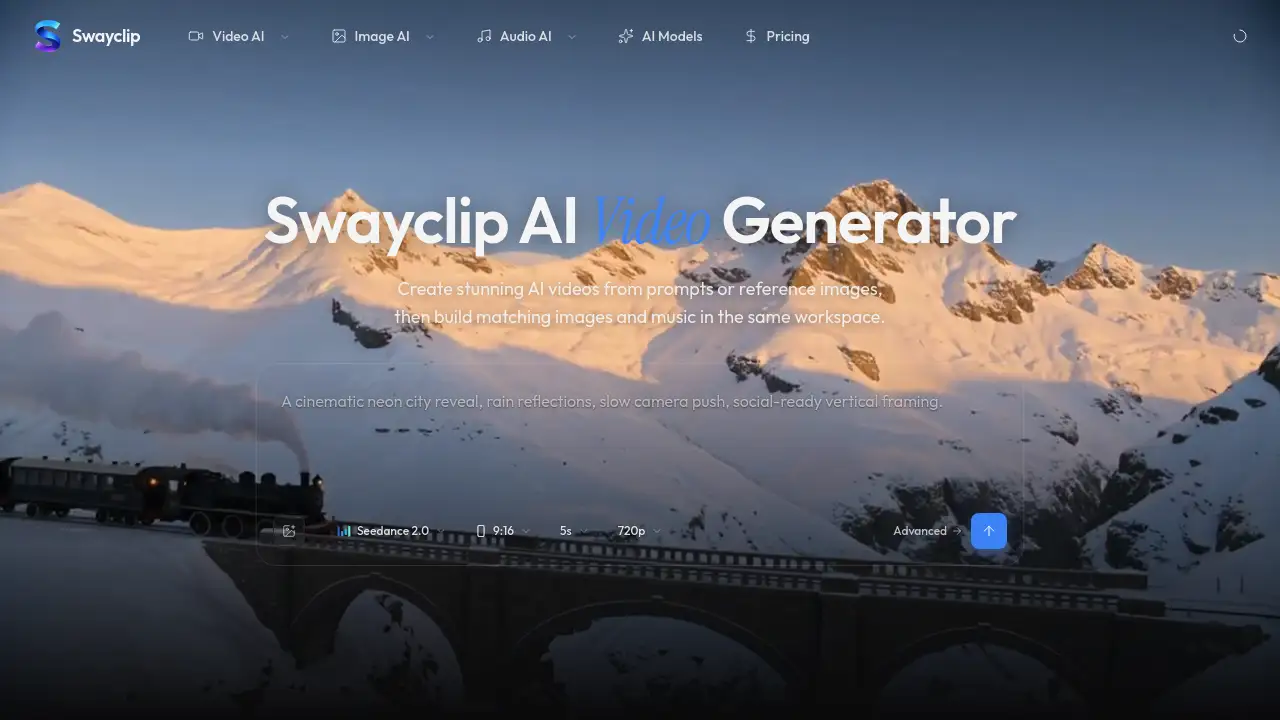
Swayclip AI Video Generator is an all-in-one creative workspace designed for fast-paced video and content creation.
What is Swayclip AI Video Generator?
The Swayclip AI Video Generator is an innovative online platform that consolidates leading generative AI models for video, image, and music into a single, unified browser workspace. It addresses the common creative challenge of juggling multiple, disparate AI tools by providing a streamlined environment where creators can generate cinematic videos from simple text prompts or reference images and then seamlessly create matching images and music tracks. This product is suitable for content creators, marketers, social media managers, filmmakers, and anyone needing to produce high-quality visual and audio content efficiently without requiring extensive technical expertise or software.
Key Features of Swayclip AI Video Generator
All-in-One Creative Workspace
Swayclip integrates top-tier AI models like Veo, Kling, Flux-2 Pro, and Suno for video, image, and music generation, eliminating the need to switch between different applications or services.
Text-to-Video and Image-to-Video
Users can generate cinematic video clips either by typing a descriptive text prompt or by uploading a reference image for the AI model to interpret and animate, offering flexible starting points for creation.
Unified Asset Creation
After generating a video, users can stay within the same workspace to create stylistically consistent images and prompt-to-music tracks that complement their video content, ensuring a cohesive final project.
Browser-Based Accessibility
The entire tool operates within a web browser, requiring no complex software downloads or installations, making it instantly accessible from most devices with an internet connection.
Curated Model Selection
The platform provides access to a curated selection of leading AI models, allowing creators to leverage the specific strengths of each model—such as cinematic quality, style consistency, or music composition—without having to source them individually.
Use Cases for Swayclip AI Video Generator
Social Media Content Creation
Ideal for quickly producing engaging, high-quality short-form videos, promotional clips, and branded content for platforms like Instagram Reels, TikTok, and YouTube Shorts.
Marketing and Advertising
Marketers can use it to create concept videos, ad variations, and visual assets for campaigns, enabling rapid prototyping and A/B testing of creative ideas.
Filmmaking and Pre-Visualization
Independent filmmakers and creators can generate mood videos, storyboard concepts, and visual references to pitch ideas or plan shoots more effectively.
Personal and Educational Projects
Educators, hobbyists, and personal users can create explainer videos, presentations, or artistic projects without needing professional video editing skills.
How to Use Swayclip AI Video Generator
- Access the Platform: Navigate to the Swayclip website in your web browser.
- Start a New Project: Choose to create a new video clip either by entering a text prompt or uploading a reference image.
- Generate Content: Select your preferred AI model (e.g., for video or image generation) and initiate the generation process.
- Refine and Expand: Once your initial video is generated, use the integrated tools to create matching images or background music within the same workspace.
- Export and Use: Download your final AI-generated video, images, and music tracks for use in your projects.
Target Audience for Swayclip AI Video Generator
- Content Creators and Influencers
- Digital Marketers and Advertising Professionals
- Social Media Managers and Agencies
- Independent Filmmakers and Video Editors
- Educators and Trainers
- Small Business Owners
- Hobbyists and Enthusiasts interested in AI-generated art
Is Swayclip AI Video Generator Free?
While specific pricing tiers were not detailed in the available reference information, the homepage suggests users can "Start creating" and "Make your first clip in one prompt," which typically indicates the availability of a free trial or a freemium model. For the most accurate and up-to-date information on pricing plans, features, and any usage limits, it is recommended to visit the official Swayclip pricing page directly.
Swayclip AI Video Generator's Pros and Cons
| Aspect | Pros | Cons |
|---|---|---|
| Workflow | Streamlines creation by unifying video, image, and music generation in one place. | Being browser-based may depend on internet connection stability and speed. |
| Accessibility | Easy to start with no software installation; lowers the barrier to entry for AI video creation. | The quality and style of outputs are inherently tied to the capabilities of the underlying AI models. |
| Features | Provides access to a curated set of leading AI models, offering high-quality, cinematic results. | Specific pricing, commercial licensing terms, and detailed feature limits per plan are not immediately clear from the homepage. |
Frequently Asked Questions about Swayclip AI Video Generator
What AI models does Swayclip use?
Swayclip integrates several leading AI models for different media types. For video generation, it uses models like Veo and Kling. For images, it includes models such as Flux-2 Pro. For music creation, it incorporates platforms like Suno.
Can I use Swayclip for commercial projects?
Users should consult the official Swayclip terms of service and licensing agreements for specific details regarding commercial use rights for generated content, as these terms can vary between the integrated AI models.
Do I need any prior video editing experience?
No, the Swayclip AI Video Generator is designed to be user-friendly. The primary method of creation is through text prompts or reference images, making it accessible even for beginners without traditional video editing skills.
What kind of videos can I create?
The platform is versatile, capable of generating a wide range of video styles, from sweeping cinematic shots and dramatic portraits to product-focused clips and social media-friendly vertical videos, as showcased on its homepage.
How long does it take to generate a video?
Generation time depends on the complexity of the prompt, the selected AI model, and server load. Typically, AI video generation can take from a few seconds to several minutes to complete.
Can I edit the videos after they are generated?
The reference information focuses on the generation process within the Swayclip workspace. For advanced editing like cutting, splicing, or adding text overlays, users would likely need to export the generated clip and use separate video editing software.
Swayclip AI Video Generator Tags
AI video generator, text to video, AI video creation, image to video, AI creative workspace, AI video maker, generate video from prompt, AI content creation, cinematic AI video, video and music generator, AI tools for creators, online video maker