Introduction
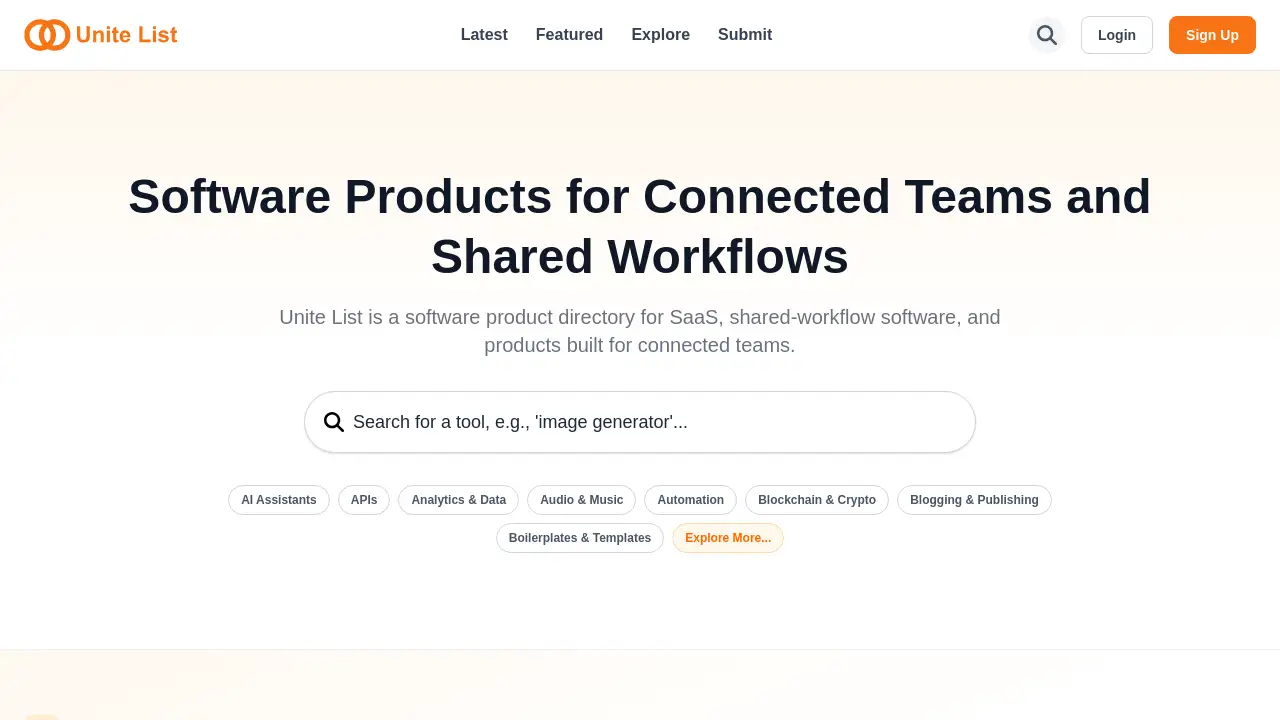
Unite List is a comprehensive software product directory focused on SaaS, shared-workflow software, and tools for connected teams.
What is Unite List?
Unite List is a specialized software product directory designed to help professionals, teams, and businesses discover and compare modern digital tools. It specifically curates listings for SaaS (Software as a Service), shared-workflow software, and products built for connected teams. The platform addresses the common challenge of information overload when searching for reliable business software. By providing a centralized, categorized, and searchable directory, it saves users time and effort in evaluating tools that can enhance team collaboration and productivity. Whether you're a project manager, a marketer, a developer, or a startup founder, Unite List serves as a valuable resource for finding the right software solutions to streamline workflows and foster better teamwork.
Key Features of Unite List
Curated SaaS Directory
The platform offers a handpicked collection of SaaS applications, ensuring users can discover high-quality and relevant software tools across numerous categories without sifting through low-quality options.
Specialized Category Filtering
Users can easily explore products by specific niches like AI Assistants, Automation, Productivity & Management, Marketing, and Dev Tools, making the search process highly efficient for targeted needs.
Detailed Product Listings
Each product listing includes a clear description, direct links, and key details, providing users with the essential information needed to make an informed comparison and evaluation.
Focus on Connected Teams
A core feature is its emphasis on tools built for connected teams and shared-workflow software, highlighting solutions that improve communication, collaboration, and process integration within organizations.
Regular Updates with New Tools
The directory is frequently updated with the latest products and launches, helping users stay on the cutting edge of new software and AI innovations in the market.
Use Cases for Unite List
Discovering New Productivity Tools
A team lead can use the Unite List directory to find new productivity and management software that integrates with their existing stack, aiming to eliminate bottlenecks in their shared workflow.
Evaluating Software for a Specific Function
A marketing manager looking for a new social media scheduling tool can browse the Marketing or Social Media categories to compare features, pricing, and reviews of different SaaS options in one place.
Sourcing AI and Automation Solutions
A business analyst tasked with improving operational efficiency can explore the AI Assistants and Automation categories to identify intelligent tools that automate repetitive tasks for connected teams.
Researching Competitor Tools
A startup founder can use the directory to see what kinds of software and SaaS products competitors in their space are using or have launched, gaining insights into market trends.
How to Use Unite List
- Visit the Website: Navigate to the Unite List homepage at
https://unitelist.com. - Browse or Search: You can either scroll through the "Explore All Products" section to see the latest additions or use the category list to filter tools by your area of interest (e.g., Design Tools, E-commerce, No Code).
- Explore Product Details: Click on any product card, such as "FindExams" or "Dokie AI," to view a more detailed description of that specific software product.
- Visit the Product: Use the provided direct link on the product's detail page to go to the official website for further information, trials, or purchase.
Target Audience for Unite List
- Business Professionals and Team Leaders seeking tools to improve team efficiency.
- Startup Founders and Entrepreneurs researching software to build and scale their operations.
- Product Managers and Developers looking for Dev Tools, APIs, or boilerplates.
- Marketers, Designers, and Content Creators in need of specialized software for their creative workflows.
- IT and Procurement Managers responsible for evaluating and sourcing new SaaS applications for their organization.
- Freelancers and Consultants who need to recommend or use reliable tools for client projects.
Is Unite List Free?
Based on the available reference information, Unite List appears to be a free-to-use directory for discovering software. The site does not show any indication of a paid subscription for browsing or accessing product listings. The listed products themselves, such as PlutoBa, may offer free trials or paid plans, but using Unite List to find them is free. For the most accurate and current information, users should refer to the official Unite List website.
Unite List's Pros and Cons
| Aspect | Pros | Cons |
|---|---|---|
| Scope & Focus | Highly focused on modern SaaS and team collaboration tools, reducing noise. | May not include very niche or legacy enterprise software outside its core themes. |
| Usability | Simple, clean interface with easy browsing by category. | Lacks advanced filtering options like price range or user rating sliders. |
| Content Depth | Provides direct links and concise descriptions for quick evaluation. | Listings may not include in-depth reviews, user testimonials, or comparison matrices. |
| Cost | Completely free for users to access the software product directory. | Monetization model is unclear; could potentially feature sponsored listings in the future. |
Frequently Asked Questions about Unite List
What types of software are listed on Unite List?
Unite List primarily features SaaS (Software as a Service) applications, shared-workflow software, and tools specifically designed for connected teams. This includes categories like AI, marketing, productivity, development, and design tools.
Is there a cost to use the Unite List directory?
No, accessing and browsing the Unite List directory to discover software products is completely free for users.
How are products added to the directory?
While the exact process isn't detailed, the directory appears to be curated, meaning products are selected and listed by the Unite List team, likely based on relevance to their focus on modern SaaS and team-centric tools.
Can I submit my own software product to Unite List?
The reference information does not specify a submission process. To inquire about having a product listed, you would need to contact the Unite List team directly through their official website.
How often is the directory updated?
The platform has an "Explore All Products" section and categories that are populated with tools, indicating it is actively maintained. The inclusion of new and trending products suggests regular updates.
Does Unite List provide software reviews or ratings?
Based on the provided content, Unite List functions more as a discovery directory with descriptions and links. It does not currently show user-submitted ratings, reviews, or editorial scores for the listed products.
Unite List Tags
software product directory, SaaS directory, shared-workflow software, tools for connected teams, business software discovery, AI tools directory, productivity software, team collaboration tools, find business apps, compare SaaS products, software for startups, digital tool directory