Introduction
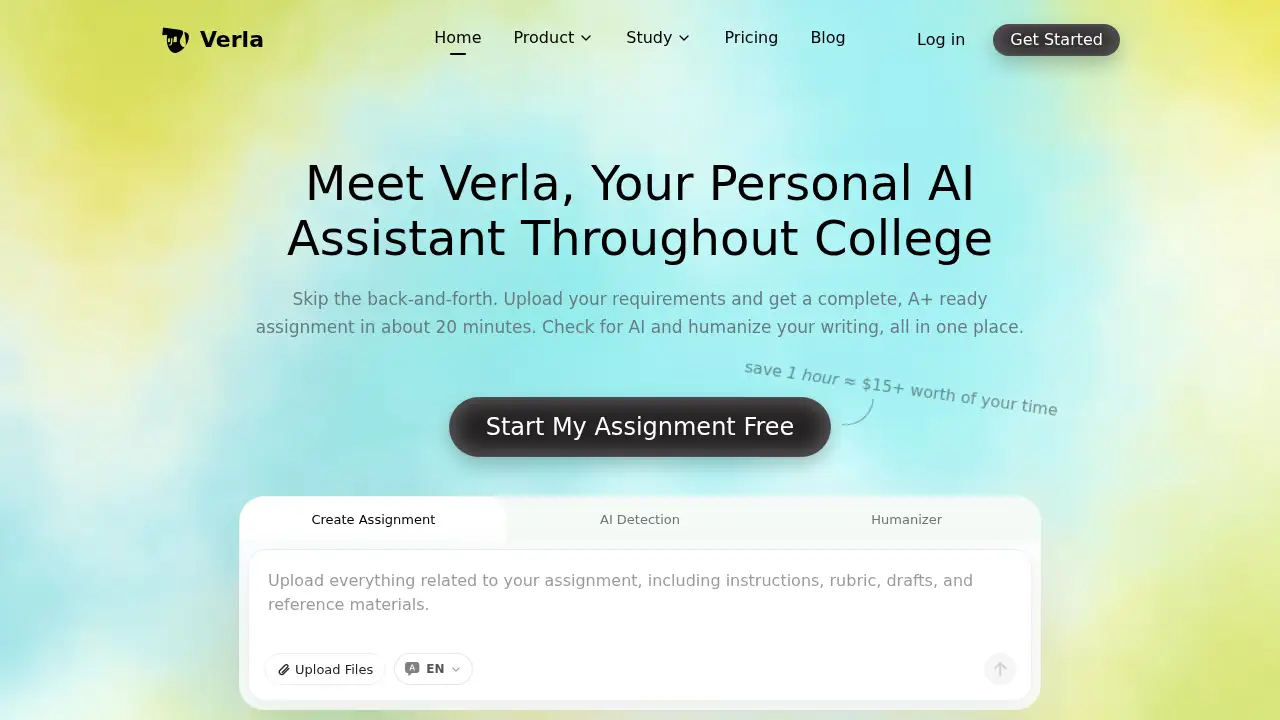
Verla AI is a personal AI academic writer built for college students. It turns uploaded requirements and rubrics into a complete assignment draft in about 20 minutes, then checks AI risk and humanizes the text — all inside one workspace.
What is Verla AI?
Verla AI is an online academic writing tool that combines three connected functions: an AI assignment writer, an AI detection checker, and an AI humanizer. The problem it addresses is fragmentation. Students normally draft in one app, check originality in a second, and rewrite in a third, losing time and consistency along the way. Verla AI merges those steps into a single workflow.
Users upload a brief, rubric, lecture notes, PDFs, books, datasets, or sample work. Verla AI reads those files, researches traceable academic sources, and produces a structured draft with references in APA, MLA, Chicago, IEEE, Harvard, or Vancouver style. The difference matters because most AI writing assistants for students stop at text generation; this tool also covers the review and refinement stage that decides whether a submission is actually ready.
The homepage reports an average saving of 13.8 hours per week per student, use across 2,000+ universities, support for 50+ majors, and coverage of 30+ assignment types — from essays and literature reviews to slide decks and Python or SQL tasks.
Key Features of Verla AI
Rubric-Aware Assignment Generation
Upload instructions, a rubric, readings, or datasets, and the AI assignment writer produces a complete draft that follows the required structure, evidence style, and formatting.
Traceable Academic References
Verla AI generates citations that open and verify, exportable in all major styles, so the reference list is something students can actually check line by line.
AI Detection with Passage Analysis
The built-in AI detection returns a likelihood score plus sentence- and paragraph-level highlights, showing exactly which passages read as machine-written before submission.
AI Humanizer
The AI humanizer rewrites flagged passages to lower detectable AI patterns while preserving meaning, evidence, and citations, so the finished text still reflects the student's own argument.
Presentation and Coding Coverage
Beyond essays, Verla AI builds slide decks with speaker notes, pitch decks, case presentations, Jupyter notebooks, data analysis, and coding projects.
Online Editing and Exports
Verla AI lets users edit the draft in the browser, then export to Word, PDF, slides, or code files, with email and browser alerts when a long generation finishes.
Use Cases for Verla AI
Essay and Research Paper Drafting
Students on tight deadlines can upload a prompt and rubric and receive a structured essay draft to review, revise, and cite-check rather than starting from a blank page.
AI Risk Checking Before Submission
Writers can run a finished report through AI detection to see which paragraphs may flag, then fix only those sections instead of rewriting the whole document.
Polishing Second-Language Writing
The AI humanizer improves tone and flow across more than 20 languages, helping international students keep their meaning while sounding more natural.
Coding and Data Assignments
Computer science, statistics, and economics students can generate Python, R, or SQL work, notebooks, and visualizations that follow the assignment brief.
How to Use Verla AI
- Create an account and open a new assignment from the dashboard.
- Upload the brief, rubric, notes, PDFs, or datasets the task requires.
- Choose the output type — essay, report, presentation, or code — then set language and citation style.
- Run the generation and wait roughly 20 minutes; Verla AI sends an email or browser alert when the draft is ready.
- Review the draft in the editor, run AI detection, humanize weak passages, then export the final file.
Target Audience for Verla AI
- Undergraduate and graduate students across 50+ majors
- International students writing in a second or third language
- Business, economics, and social science students handling case studies and reports
- STEM students with coding, data analysis, and lab report assignments
- Researchers preparing proposals, literature reviews, and annotated bibliographies
Is Verla AI Free?
The homepage advertises a free start option and links to a separate pricing page, but it does not publish plan prices or credit limits. A free entry point clearly exists, while the cost of sustained use is not visible from the homepage alone. Readers should visit https://verla.io/pricing for current plans, credits, and any student discounts.
| Plan | Price | Features |
|---|---|---|
| Free start | $0 to try | Account creation and a first assignment attempt |
| Paid plans | Not listed on homepage | Full generation, AI detection, humanizer, and exports — see the official pricing page |
Verla AI's Pros and Cons
| Aspect | Pros | Cons |
|---|---|---|
| Workflow | Assignment creation, AI detection, and humanizing in one place | Requires an account before features can be tested |
| Output | Rubric-aware structure and verifiable citations | Quality depends on how detailed the uploaded rubric is |
| Speed | Drafts in about 20 minutes with completion alerts | Long projects still need manual review and editing |
| Coverage | 50+ majors, 30+ assignment types, 20+ languages | Coding output may need testing in the user's own environment |
| Pricing | Free start available | Plan prices and usage limits are not shown on the homepage |
| Privacy | Uploaded materials are described as private and never publicly shared | Users should still avoid uploading sensitive personal data |
Frequently Asked Questions about Verla AI
Is Verla AI a replacement for my own writing?
No. It produces a structured draft. Students still need to review it, verify citations, and adjust the argument, which is exactly what the editor and humanizer are built for.
How accurate is the AI detection score?
Verla AI states that its results align closely with Turnitin evaluations and provides passage-level highlights. Treat the score as a revision guide rather than a guarantee of how a specific instructor's tool will respond.
Does the AI humanizer change citations or evidence?
The company says meaning, evidence, citations, and academic quality are preserved. Any rewrite should still be compared against the original sources.
Which citation styles are supported?
APA, MLA, Chicago, IEEE, Harvard, and Vancouver are listed, with references described as real and traceable.
Can Verla AI handle coding assignments?
Yes. Python, R, SQL, algorithm tasks, Jupyter notebooks, and data visualization appear among the supported assignment types, with code file exports.
Is Verla AI free to try?
A free start is advertised on the homepage. Full pricing and plan limits sit on the official pricing page, since the homepage does not list them.
Verla AI Tags
Verla AI, AI academic writer, AI assignment writer, AI detection tool, AI humanizer, academic writing tool for students, AI writing assistant, rubric-aware assignment help, AI essay checker, humanize AI text academically, citation generator for students, AI homework assistant