Introduction
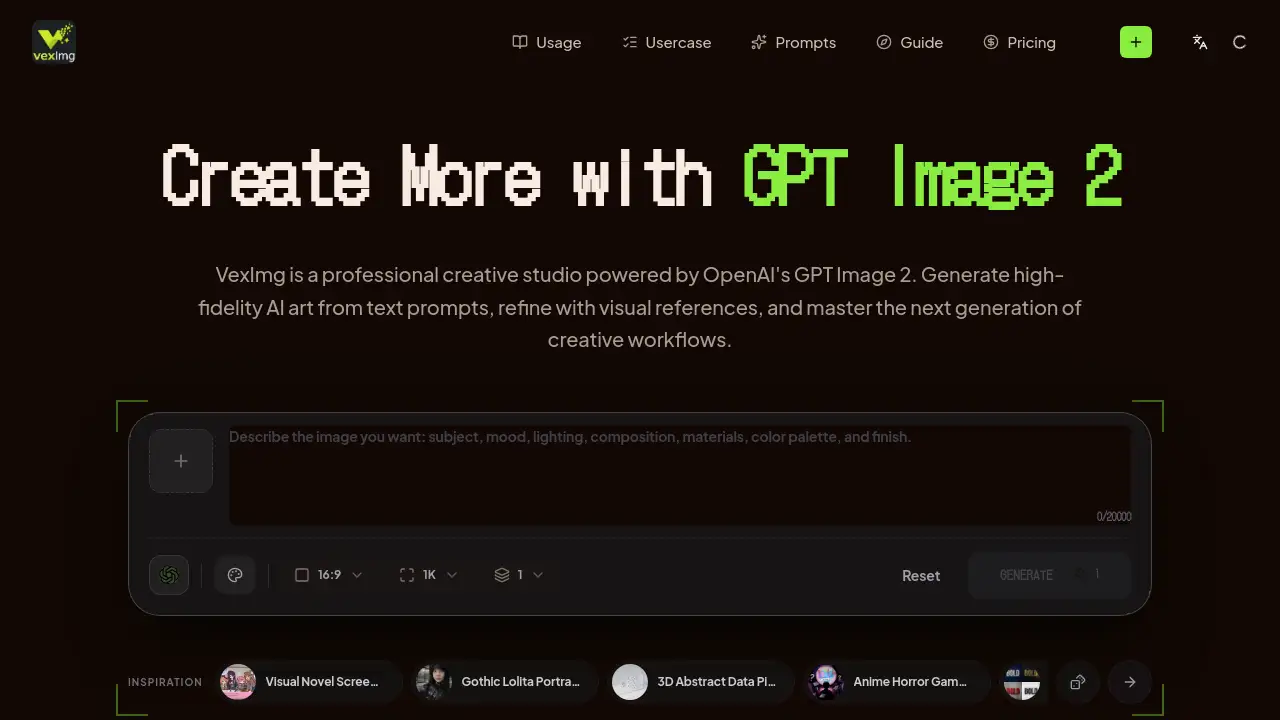
VexImg is a professional creative studio designed to help users master the advanced capabilities of the GPT Image 2 AI image generator.
What is VexImg?
VexImg is a dedicated online platform that serves as a professional studio for OpenAI's GPT Image 2 model. It is designed to solve the common challenges creators face when using advanced AI image generators, such as achieving consistent, high-quality results and effectively managing complex GPT Image 2 prompts. The platform provides expert guides, an extensive prompt library, and real user examples to streamline the creative process. It is suitable for professionals and enthusiasts who need to produce high-fidelity AI art, marketing assets, or product visuals with a level of precision and reliability that standard AI tools often lack. By focusing on the unique strengths of GPT Image 2, VexImg helps users transition from simple image generation to a controlled, professional creative workflow.
Key Features of VexImg
Studio-Grade Optical Fidelity
VexImg leverages GPT Image 2's advanced understanding of physics to generate images with exceptional realism, featuring accurate lighting, material textures, and environmental depth that rival professional photography.
Typography-Native Rendering
The platform harnesses the model's unique ability to render text clearly and accurately, supporting major global languages and allowing for the creation of graphics with integrated logos, posters, and branded text without artifacts.
Logical Creative Continuity
Users can maintain perfect consistency across multiple image generations, ensuring characters, product details, and specific design elements remain unchanged, which is crucial for commercial projects and storytelling.
Adapts to Different Visual Styles Naturally
Beyond applying filters, VexImg enables GPT Image 2 to natively generate images in a wide range of authentic styles, from anime and cinematic scenes to product mockups and editorial photography, based on user direction.
Expert Prompt Library & Guides
The platform offers a vast collection of professional prompts and step-by-step guides to help users craft effective instructions and master the nuances of the GPT Image 2 AI image generator for optimal results.
Rapid Iteration Workspace
VexImg provides a dedicated interface for quickly generating multiple image variants, comparing results side-by-side, and refining outputs, facilitating an efficient and experimental creative process.
Use Cases for VexImg
Consistent Character & Storytelling
Ideal for game developers and storyboard artists who need to generate and maintain visually consistent characters and scenes across a narrative or project.
Cinematic Photorealistic Campaigns
Marketing teams and advertisers can produce stunning, hyper-realistic campaign visuals with perfect lighting and textures to capture audience attention and build trust.
Scalable E-Commerce Photography
E-commerce managers and small business owners can generate studio-quality product shots for their entire inventory, transforming simple sketches into high-conversion assets.
Growth-Driven Marketing Assets
Content creators and brand managers can design posters, social media banners, and infographics with flawlessly integrated text, ensuring all visuals align with brand identity.
Agile UI & Design Exploration
UI/UX designers and product teams can rapidly prototype interface layouts, icons, and visual styles to bridge the gap between initial concepts and final designs.
Seamless Global Localization
Businesses operating internationally can adapt marketing and product visuals for different regions by generating accurate multilingual text within their images.
How to Use VexImg
Using VexImg to create with the GPT Image 2 AI image generator involves a straightforward process within its dedicated workspace:
- Input Your Concept: Start by typing a detailed text prompt describing your desired image. Alternatively, you can upload a reference image to use as a visual guide for the AI.
- Select a Visual Style (Optional): Choose from a library of professional style presets to guide the aesthetic of your output, or specify the style directly within your text prompt.
- Generate and Compare: Initiate the generation process. The platform will quickly produce multiple variants, allowing you to compare different interpretations and select the one that best fits your vision.
- Refine and Export: Based on the results, you can further refine your prompt for a new generation or make adjustments. Once satisfied, download the high-resolution image for use in your projects.
Target Audience for VexImg
- Digital Artists and Illustrators seeking to incorporate high-fidelity AI art into their work.
- Marketing Professionals and Advertisers needing rapid, cost-effective production of campaign-quality visuals.
- E-commerce Managers and Product Photographers looking to create scalable product imagery.
- UI/UX Designers and Product Developers prototyping visual concepts and interfaces.
- Content Creators and Social Media Managers requiring branded graphics with text.
- Writers and Storytellers visualizing characters and scenes for books, games, or comics.
Is VexImg Free?
Specific pricing details for VexImg are not provided in the available reference information. The homepage indicates access to a GPT Image 2 Beta Studio, suggesting there may be a free tier or trial period available for users to test the platform's capabilities. For the most accurate and current information regarding subscription plans, features, and any costs, it is recommended to visit the official VexImg website.
VexImg's Pros and Cons
| Aspect | Pros | Cons |
|---|---|---|
| Output Quality | Leverages GPT Image 2 for exceptional optical fidelity and realistic detail. | As a beta-stage tool, output consistency might vary with highly complex prompts. |
| Text Handling | Excellent typography rendering solves a major pain point in AI image generation. | May require precise prompting to achieve perfect text alignment in complex layouts. |
| Workflow & Tools | Provides a structured studio environment with guides and a prompt library for better results. | Being a specialized platform for one model, it lacks the model variety of some all-in-one AI art tools. |
| Use Case Fit | Highly effective for professional, commercial-grade creation requiring consistency and quality. | The focus on professional workflows might have a steeper learning curve for complete beginners. |
Frequently Asked Questions about VexImg
What is GPT Image 2?
GPT Image 2 is an advanced AI image generator developed by OpenAI. It represents a significant improvement in understanding natural language and physical logic, allowing for the creation of highly realistic, contextually accurate images that can natively render typography and maintain complex details.
How is VexImg different from using GPT Image 2 directly?
VexImg is not the AI model itself but a professional studio interface built around it. It provides added value through expert-crafted GPT Image 2 prompts, style libraries, a comparison workspace, and educational guides designed to help users achieve better, more reliable results than they might through a basic text-to-image interface.
Can VexImg really generate images with readable text?
Yes, a standout feature of the GPT Image 2 AI image generator is its typography-native rendering. VexImg is specifically built to harness this capability, allowing users to create images with clear, accurate, and artifact-free text in multiple languages, which is ideal for logos, posters, and marketing materials.
Can I use images created with VexImg for commercial projects?
The commercial usage rights would depend on the terms of service set by both OpenAI for the GPT Image 2 model and VexImg for its platform. Users should review the official licensing and terms on the VexImg website to understand any restrictions or guidelines for commercial use of the generated imagery.
What kinds of visual styles can I create?
VexImg enables the creation of a wide range of visual styles. Thanks to GPT Image 2's deep style understanding, you can generate everything from photorealistic portraits and cinematic scenes to vibrant anime, fashion editorials, technical product shots, and illustrative artwork, all guided by your prompts.
How do I get started with VexImg?
To begin, visit the VexImg website. You can start experimenting by entering a descriptive text prompt into the studio. Utilizing the provided prompt library and guides is highly recommended to learn effective techniques for communicating your creative vision to the AI image generator.
VexImg Tags
GPT Image 2, AI image generator, VexImg, GPT Image 2 prompts, AI art studio, high-fidelity AI art, typography rendering, professional AI tools, creative workflow, prompt library, AI image creation, consistent character generation, marketing asset generator, e-commerce photography AI