Introduction
Transform your photos into high-quality cartoon images online with a free AI photo to cartoon converter.
What is Photo to Cartoon?
Photo to Cartoon is a free online tool that uses artificial intelligence to convert standard photographs into cartoon-style images. It solves the problem of needing design skills or expensive software to create fun, artistic visuals. This product is suitable for a wide range of users, including social media enthusiasts, content creators, and anyone looking to add a creative touch to their photos. It matters because it makes digital art creation accessible, fast, and completely free, removing barriers like cost, technical complexity, and the need for downloads or registration.
Key Features of Photo to Cartoon
Multiple Cartoon Styles
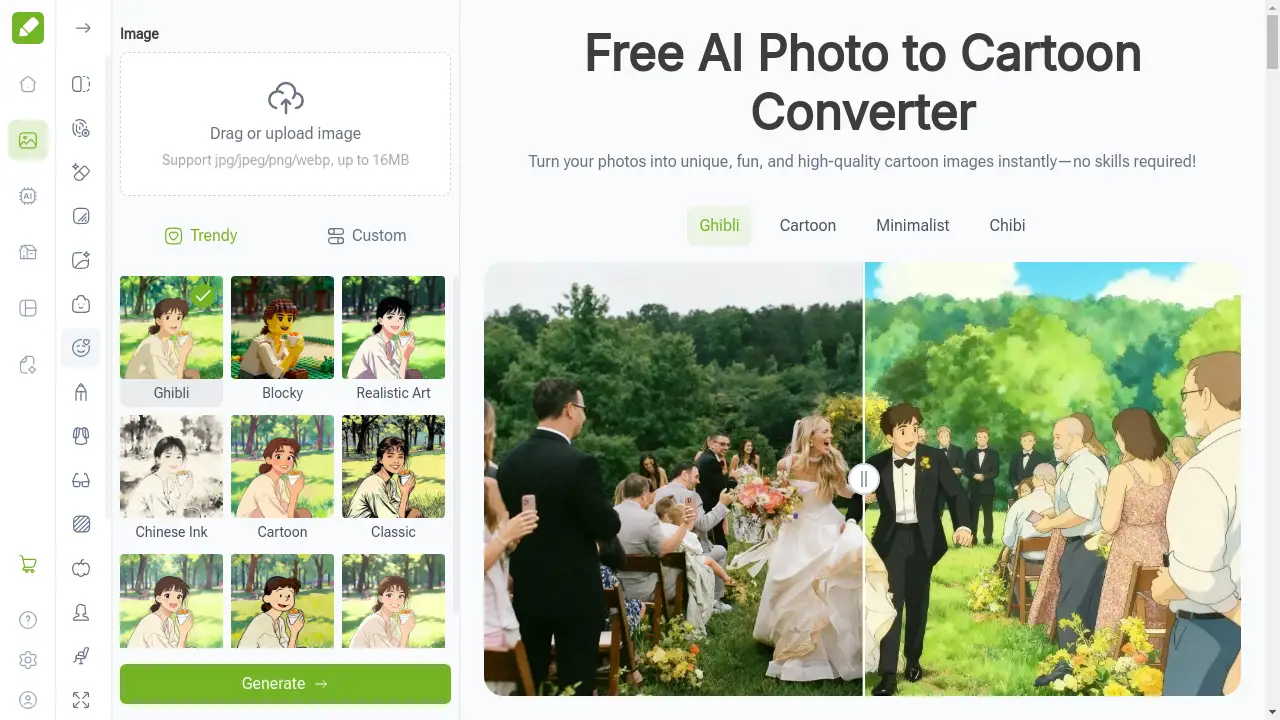
Users can choose from a variety of predefined artistic styles, such as Ghibli, Chibi, Kawaii, and Minimalist, to achieve the exact cartoon look they desire for their image.
High-Quality HD Output
The tool generates crisp, high-definition cartoon images that are suitable for both digital use and print, ensuring details remain sharp and colors are vibrant.
Instant Processing and Fast Results
Leveraging efficient AI, the photo to cartoon converter provides near-instantaneous transformation, delivering your cartoonized photo in seconds without long waiting times.
No Watermark or Sign-up
All cartoon images created are completely free of watermarks, and the service requires no account creation or sign-in process, offering immediate access.
User-Friendly Online Tool
The entire process happens directly in a web browser through a simple, intuitive interface, making it easy for anyone to use without a learning curve.
Use Cases for Photo to Cartoon
Creating Unique Social Media Avatars
Turn personal selfies into distinctive cartoon profile pictures to stand out on platforms like Instagram, Facebook, and gaming communities.
Enhancing Blog and Video Content
Content creators can generate engaging cartoon illustrations for blog headers, YouTube video thumbnails, and online advertisements to capture audience attention.
Designing Personalized Gifts and Merchandise
Transform photos of friends, family, or pets into custom cartoon artwork for prints, t-shirts, or memory books, creating memorable and sentimental gifts.
Developing Brand Mascots and Marketing Materials
Small businesses and startups can use the tool to quickly prototype cartoon versions of products or create friendly mascots for their branding and promotional content.
How to Use Photo to Cartoon
Using the Photo to Cartoon converter is a straightforward process that requires no technical expertise.
- Upload Your Photo: Click the upload area on the tool's homepage and select a photo from your device. The tool supports common formats like JPG, JPEG, and PNG.
- Select a Cartoon Style: Browse through the available cartoon styles, such as Anime, Classic, or Blocky, and select the one that best fits your vision.
- Generate the Cartoon: Click the "Generate" button. The AI will process your image and display the cartoon version almost instantly.
- Download and Share: Once satisfied with the result, download the high-quality, watermark-free image directly to your device or use the share function to post it online.
Target Audience for Photo to Cartoon
- Social Media Users and Influencers
- Digital Content Creators and Bloggers
- Graphic Designers and Artists
- Marketing Professionals and Small Business Owners
- Parents and Individuals Looking for Creative Gifts
Is Photo to Cartoon Free?
Yes, Photo to Cartoon is completely free to use. The service operates on a generous free plan that includes access to all its cartoon styles, instant processing, and the ability to download high-definition output images without any watermarks. There is no mention of premium or paid options, making all its core features available at no cost and without any usage limitations.
Frequently Asked Questions about Photo to Cartoon
How does the AI convert a photo into a cartoon?
The AI analyzes the uploaded photo, identifying key elements like edges, facial features, and color regions. It then reprocesses this information using artistic algorithms that simplify details, enhance lines, and flatten colors to create a stylized cartoon effect based on the selected style.
What image formats are supported for upload?
The Photo to Cartoon tool supports popular image formats including JPG, JPEG, PNG, and WEBP. Uploaded files can be up to 16MB in size.
Do I need to create an account to use the tool?
No, sign-up is not required. You can access the Photo to Cartoon converter directly from its webpage, upload your photo, and generate your cartoon image immediately without providing any personal information.
Can I use the cartoon images for commercial purposes?
The product description and homepage do not specify any restrictions on usage rights. However, it is always recommended to review the website's terms of service for detailed information regarding commercial use of the generated images.
What kinds of photos work best with the Photo to Cartoon converter?
Photos with clear subjects, good lighting, and a relatively uncluttered background typically yield the best results. Well-lit portraits, selfies, and pet photos are ideal as the AI can more easily identify and stylize the main features.
Is there a limit to how many images I can convert?
Based on the available information, the tool appears to be free and unlimited. There is no indication of a daily cap or limit on the number of photos you can transform into cartoons.
Photo to Cartoon Tags
photo to cartoon, cartoonize photo, AI cartoon converter, free cartoon maker, online photo editor, cartoon avatar creator, turn photo into cartoon, AI image tool, free cartoonizer, cartoon profile picture, create cartoon from photo, AI art generator