Introduction
Vocallab AI is a powerful platform that generates realistic AI voiceovers for YouTube, TikTok, and other short-form videos. With over 300 natural-sounding voices, voice cloning, karaoke-style captions, and one-click MP3 and SRT exports, it helps creators produce professional audio in seconds — all free to start with no credit card required. This review explores its features, use cases, pricing, and whether it lives up to the hype.
What is Vocallab AI?
Vocallab AI is a web-based AI voice generator designed for modern content creators. The tool solves a common problem: producing high-quality, human-sounding voiceovers without expensive recording equipment or voice talent. It is especially suited for YouTubers, TikTokers, educators, marketers, and anyone who needs fast, natural narration for videos. Unlike many text-to-speech tools, Vocallab AI offers expressive voices that include natural breaths, laughs, and pauses — making the output feel genuinely human. The platform also includes voice cloning, word-level caption timing, and full commercial licenses, making it a complete solution for professional video production.
Key Features of Vocallab AI
300+ Professional and Expressive Voices
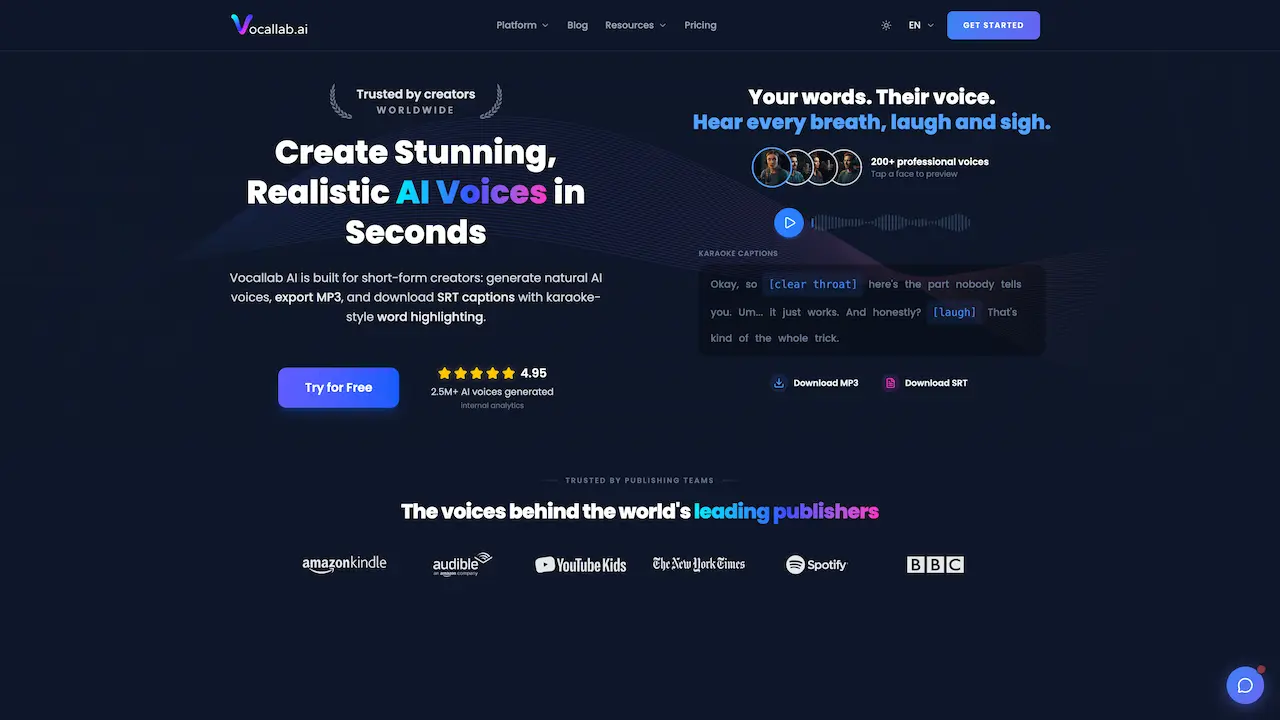
Vocallab AI provides a vast library of over 300 voices, ranging from professional narrators to character voices. Each voice is designed to sound natural, with realistic intonation and pacing. Users can preview voices by tapping a face on the homepage, making selection easy.
One-Click Voice Cloning
With voice cloning, creators can build a consistent narrator for their entire channel. Simply upload an audio sample, and Vocallab AI clones the voice in seconds. This feature is perfect for maintaining brand identity across episodes, ads, or Shorts without re-recording.
Karaoke-Style Word Highlighting Captions
The platform auto-generates captions with word-by-word timing and smooth highlight animations. This proven retention technique keeps viewers watching longer on TikTok and YouTube Shorts. The captions are exported as SRT files with precise timestamps.
MP3 + SRT Export in One Click
Users can download both the audio (high-quality MP3) and caption file (SRT with word-level timestamps) simultaneously. These files integrate directly into editing tools like CapCut, Premiere Pro, DaVinci Resolve, and Final Cut Pro, streamlining the workflow.
Full Commercial Rights on All Pro Voices
Every professional voice in Vocallab AI comes with a full commercial license. Creators can use the generated audio in monetized YouTube videos, TikTok ads, podcasts, client work, and more — without attribution or additional fees. No fine print.
Use Cases for Vocallab AI
YouTube Tutorials and Educational Videos
Vocallab AI produces clear, professional narration for how-to videos, online courses, and explainer content. The natural pacing helps maintain viewer engagement, and the voice cloning feature ensures a consistent instructor voice across a series.
TikTok and YouTube Shorts Storytelling
Short-form creators benefit from fast voiceover generation and karaoke captions that boost watch time. Vocallab AI is ideal for storytime videos, skits, and trending content where speed and retention are critical.
Podcast Intros, Transitions, and Character Segments
Podcast hosts use the tool for intro narration, transition announcements, or even character voices. Voice cloning helps maintain a uniform audio identity across episodes, while MP3 export makes integration effortless.
Product Demos and App Walkthroughs
App developers and marketers generate clean, background-noise-free voiceovers for product demos on TikTok and YouTube. The commercial license allows safe use in paid ads and client presentations.
How to Use Vocallab AI
- Sign Up for Free – Go to vocallab.ai and click "Get Started." No credit card is required.
- Choose a Voice – Browse the library of 300+ voices, or upload an audio sample to clone a custom voice.
- Enter Your Script – Type or paste your text into the editor. The tool automatically adds natural pauses and inflections.
- Generate and Preview – Click to generate the AI voiceover. Listen to the result and adjust pacing or phrasing if needed.
- Export – Download the MP3 audio file and the SRT caption file with word-level highlighting. Drop them into your video editor.
Target Audience for Vocallab AI
- YouTube Content Creators – Especially those making tutorials, vlogs, and Shorts.
- TikTokers and Instagram Reel Makers – Need fast voiceovers and captions for viral content.
- Educational and E-Learning Producers – Require clear, consistent narration for courses.
- Video Marketers and Advertisers – Use voiceovers in paid ads and brand videos.
- Podcasters – For intros, transitions, and character segments.
- Small Business Owners – Create professional explainer videos without hiring voice talent.
- Game and Story Content Creators – Need expressive, character-driven narration.
Is Vocallab AI Free?
Vocallab AI offers a free tier that allows users to generate AI voiceovers without providing a credit card. The free plan includes access to a selection of voices and basic features. For unlimited use, advanced voices, voice cloning, and full commercial rights, paid plans are available. Below is a general pricing overview based on the information found on the product page:
| Plan | Price | Features |
|---|---|---|
| Free | $0 | Limited voice selection, basic generation, MP3 export, SRT export |
| Pro | Starts around $X/month (check site) | 300+ voices, voice cloning, commercial license, priority support |
Note: Visit the official pricing page at vocallab.ai/pricing for the most current details.
Vocallab AI's Pros and Cons
| Aspect | Pros | Cons |
|---|---|---|
| Voice Quality | Highly realistic with natural breaths, laughs, pauses. | Some voices may still sound slightly synthetic in very long sentences. |
| Feature Set | Voice cloning, karaoke captions, commercial rights – all in one platform. | Voice cloning requires a clean audio sample for best results. |
| Ease of Use | Simple three-step workflow: pick voice, type script, export. | No mobile app yet; web-only interface. |
| Pricing | Free tier available; no card needed to start. | Paid plans may be expensive for occasional users. |
| Export Options | Simultaneous MP3 + SRT download saves time. | Limited to MP3 format; no WAV or FLAC export. |
Frequently Asked Questions about Vocallab AI
Can I use Vocallab AI for commercial projects like YouTube ads?
Yes. All Pro voices on Vocallab AI come with a full commercial license. You can use the generated voiceovers in monetized videos, ads, client work, and podcasts without attribution or additional fees.
Does Vocallab AI support voice cloning?
Absolutely. The voice cloning feature lets you upload an audio sample and create a custom narrator voice in one click. It is designed to maintain consistency across multiple videos and series.
How do the karaoke-style captions work?
When you generate a voiceover, Vocallab AI automatically creates captions with word-by-word timing. The exported SRT file includes highlight animations that sync with the audio, proven to increase viewer retention on TikTok and YouTube Shorts.
What file formats can I download?
You can download the voiceover as a high-quality MP3 audio file. Simultaneously, you receive an SRT caption file that includes word-level timestamps. Both files are ready to be imported into video editors like CapCut, Premiere Pro, or DaVinci Resolve.
Is there a free trial, and do I need a credit card?
Yes, Vocallab AI is free to start. You can generate AI voiceovers without entering a credit card. The free plan includes a limited selection of voices and basic features. Upgrading to a paid plan unlocks the full voice library, voice cloning, and commercial rights.
How many voices does Vocallab AI offer?
The platform provides over 300 voices, including professional narrators, character voices, and cloned voices. Users can preview each voice by tapping the face icon on the homepage.
Vocallab AI Tags
realistic AI voiceovers, AI voice generator, text to speech for YouTube, voice cloning, karaoke captions, MP3 export, SRT captions, TikTok voiceover tool, commercial voice license, short-form video narration, YouTube voiceovers, AI narration for creators