Introduction
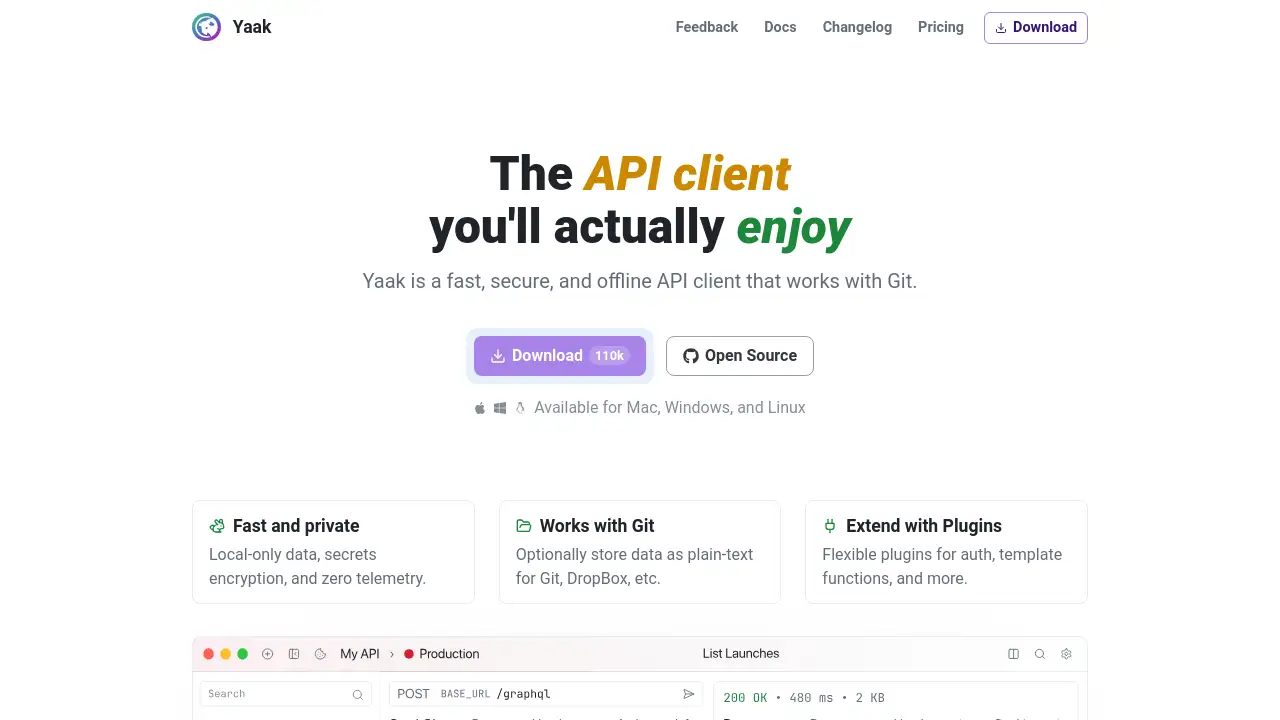
Yaak is a fast, secure, and offline API client designed for modern developers.
What is Yaak?
Yaak is a desktop application for building, testing, and managing application programming interfaces (APIs). It addresses the growing need for a developer tool that prioritizes privacy, local control, and seamless integration with existing version control workflows. Unlike many cloud-based API clients that require accounts and internet connectivity, Yaak operates offline-first, storing all data locally on a user's machine. This makes it an ideal solution for developers who work in secure environments, value data sovereignty, or simply prefer tools that don't rely on external servers. Its core philosophy revolves around being a fast API client that is secure and deeply integrated with Git, allowing teams and individuals to version-control their API collections and environments as code.
Key Features of Yaak
Local-Only Data and Security
All workspace data, including requests, environments, and collections, is stored exclusively on the local machine, ensuring offline access and enhanced privacy.
Encrypted Secrets and Zero Telemetry
Sensitive information like API keys and tokens can be encrypted within the app, and Yaak collects no usage analytics, reinforcing its commitment to being a secure API client.
Git Integration and Version Control
Yaak provides a built-in Git UI and can store data as plain text, making it effortless to commit changes, track history, and collaborate on API definitions through Git repositories.
Flexible Authentication Plugins
The tool supports a wide range of authentication methods through plugins, automatically handling complex protocols like OAuth2, AWS, and NTLM so developers don't have to.
Powerful Workflow Tools
Features like request chaining, environment variables, and batch send functionality allow for the automation and streamlining of complex API testing sequences.
Extensive Import and Export
Users can instantly migrate to Yaak by importing collections and environments from popular tools like Postman and Insomnia, or from OpenAPI specifications.
Developer-Centric Interface
A clean, uncluttered UI, a command palette, rich previews, autocomplete, and customizable themes and hotkeys create a developer friendly experience.
Constant Updates and Extensibility
A public roadmap and frequent updates based on community feedback ensure the tool is constantly improving, with a plugin system that allows for further customization.
Use Cases for Yaak
Individual Developer Working Offline
A software developer can work on API integrations during travel or in locations with poor internet, relying on Yaak's offline capabilities and local-only data storage.
Team Collaboration via Git
A development team can store their API client workspace in a Git repository, enabling code review for API changes, seamless onboarding, and consistent environments across all members.
Testing Complex Authentication Flows
API developers can use Yaak's auth inheritance and plugin system to test intricate OAuth 2.0 or AWS Signature v4 flows without writing temporary scripts.
Migrating from Other API Clients
Teams dissatisfied with bloated or cloud-mandatory tools can use Yaak's import feature to quickly move their Postman collections and begin working in a fast, secure environment.
How to Use Yaak
- Download and Install: Visit the official website and download the Yaak application for your operating system (Mac, Windows, or Linux).
- Create or Import a Workspace: Start a new workspace from scratch or immediately import an existing collection from Postman, Insomnia, or an OpenAPI file to begin.
- Configure Environments and Variables: Set up different environments (e.g., Development, Production) and define variables for URLs, tokens, and other parameters to keep requests dynamic and organized.
- Build and Chain Requests: Create HTTP requests (GET, POST, etc.), use the intuitive editor for headers and body, and utilize request chaining to pass data from one response to the next request.
- Save and Version with Git: Use the integrated Git tools to commit your workspace changes. Store the workspace as plain text in a Git repository for full history tracking and team sharing.
Target Audience for Yaak
- Software Developers and Engineers who build or consume APIs.
- QA Engineers and Testers who need a reliable tool for API testing automation.
- DevOps and Platform Teams managing internal or external API services.
- Developers working in high-security or regulated industries requiring offline tools.
- Open-Source Contributors and Teams who prioritize tools that work well with Git.
Is Yaak Free?
Based on available information, Yaak appears to be a free and open-source application. The product homepage and description do not mention any paid tiers, subscriptions, or licensing fees. It is positioned as a community-driven tool. For the most definitive and up-to-date information on pricing or future plans, users should refer to the official Yaak website.
Yaak's Pros and Cons
| Aspect | Pros | Cons |
|---|---|---|
| Data & Privacy | Local-only storage, encrypted secrets, and zero telemetry offer superior privacy and security. | Lack of cloud sync could be inconvenient for teams not using Git for everything. |
| Workflow Integration | Excellent native Git integration and plain-text storage fit perfectly into developer-centric workflows. | Teams unfamiliar with Git may face a learning curve for collaboration. |
| Performance & Usability | Often described as fast and clean, with a simple default interface that exposes advanced features when needed. | May lack some highly specialized or niche features found in larger, established platforms. |
| Cost & Accessibility | Currently free and open-source, removing financial barriers for individuals and teams. | Long-term sustainability model as a free product is not explicitly defined. |
Frequently Asked Questions about Yaak
Is Yaak really free to use?
Yes, based on all available public information, Yaak is completely free to download and use. There are no mentioned subscriptions, in-app purchases, or feature-limited tiers.
How does Yaak compare to Postman?
Yaak differentiates itself by being an offline API client with a strong focus on local-only data and Git integration. It avoids mandatory cloud accounts and telemetry, offering a simpler, more privacy-focused alternative. It also supports importing Postman collections directly.
Can Yaak handle GraphQL requests?
Yes, Yaak supports GraphQL. The changelog mentions updates like a "GraphQL Doc Explorer," indicating active development for GraphQL-specific features alongside standard REST API testing.
Where is my data stored when using Yaak?
All your data is stored locally on your computer. Yaak does not send your workspaces, collections, or environment variables to any external server unless you explicitly choose to export them or commit them to a Git remote repository.
How does the Git integration work?
Yaak can store your entire workspace—requests, folders, environments—as human-readable text files (like YAML). This allows you to point Yaak at a folder that is also a Git repository. You can then use Yaak's built-in Git UI or your terminal to commit, push, pull, and manage versions of your API work.
Does Yaak support team collaboration?
While Yaak itself does not have built-in real-time cloud collaboration features, it is designed for team use through Git. Teams can collaborate effectively by storing their Yaak workspace in a shared Git repository, using branches, pull requests, and code reviews to manage changes to their API collections.
Yaak Tags
Yaak, API client, Git, offline API tool, secure API testing, local-only data, open source API client, developer tools, API testing, Postman alternative, Insomnia alternative, fast API client, encrypted secrets