Introduction
The AI Dacen Video Generator is a free online tool that allows anyone to create dynamic dancing videos from a single photo using artificial intelligence, powered by Kling Motion Control technology.
What is AI Dacen Video Generator?
The AI Dacen Video Generator is a web-based application that transforms static images into animated dance videos. It solves the problem of needing complex video editing skills or motion capture equipment to create engaging, personalized dance content. By simply uploading a photo and a reference dance video, users can generate a new clip where the subject from the photo mimics the dance moves. This product is suitable for social media enthusiasts, content creators, marketers, and anyone looking to add a fun, creative twist to their photos. It matters because it democratizes video animation, making a once-complex creative process accessible and straightforward for general users.
Key Features of AI Dacen Video Generator
Photo to Dance Video Conversion
After uploading a single character photo, the system analyzes the body pose and structure to generate coherent dance motion, converting a static portrait into a continuous, moving video.
Dance Motion Control via Reference Video
Users can upload a reference video containing the desired dance moves, and the AI will apply that specific choreography to the person in the uploaded photo, enabling precise motion control.
Customizable Dance Style with Text Prompts
Beyond reference videos, users can guide the dance generation by entering text prompts that describe the desired style, tempo, or mood, such as "lively," "relaxed," or "performative."
Character Movement Continuity
The generator focuses on maintaining the character's appearance and ensuring smooth, natural transitions between movements, minimizing unnatural limb changes for a more polished final video.
Optimized Output Settings
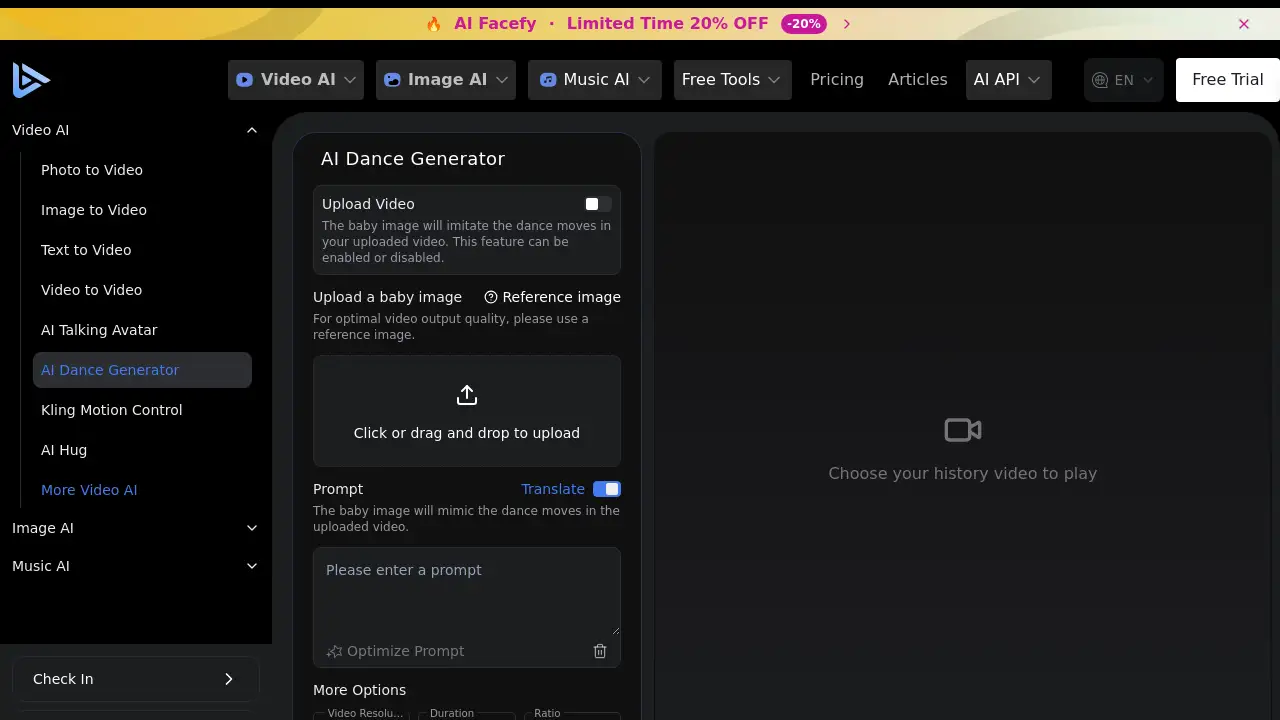
Users have control over key video parameters like resolution (e.g., 720p), duration (e.g., 5 seconds), and aspect ratio (e.g., 16:9) to tailor the output for different platforms.
Simple and Intuitive Workflow
The tool is designed with a clear, step-by-step interface that empowers users with no prior video editing or AI experience to create content quickly and easily.
Use Cases for AI Dacen Video Generator
Social Media Content Creation
Transform personal or branded photos into entertaining dance videos for platforms like TikTok, Instagram Reels, or YouTube Shorts to boost engagement and follower interaction.
Dance Concept Visualization
Choreographers and dancers can use the tool to quickly visualize and present dance concepts or experiment with different styles without needing to film a full rehearsal.
Personalized Entertainment and Gifts
Create unique, fun dance videos featuring friends, family, or even pets as a memorable gift or a lighthearted piece of entertainment for personal enjoyment.
Marketing and Promotional Campaigns
Brands can generate eye-catching, personalized dance video ads or social media posts featuring their mascot or customer avatars to create viral-worthy content.
How to Use AI Dacen Video Generator
- Upload Your Media: Start by uploading a clear, front-facing photo of the person or character you want to animate. Then, upload a reference video that contains the dance moves you want them to perform.
- Configure Settings: Use the provided options to set your preferred video resolution, duration, and aspect ratio. You can also add an optional text prompt to further describe the dance style.
- Generate the Video: Click the "Generate" button. The AI, powered by Kling Motion Control, will process your inputs and create a new video where the subject from your photo dances according to the reference.
- Preview and Download: Once processing is complete, preview the generated AI dance video. If satisfied, you can download it directly to your device for sharing.
Target Audience for AI Dacen Video Generator
- Social media influencers and content creators
- Digital marketers and branding professionals
- Hobbyists and individuals looking for fun photo editing tools
- Dancers, choreographers, and performing artists
- Parents and families wanting to create personalized videos
Is AI Dacen Video Generator Free?
The product homepage prominently promotes a free AI dance video generator. While a detailed pricing table is not provided on the specific tool page, the site header mentions a "Free Trial" and links to a general pricing page. It is common for such tools to offer a limited number of free generations, with subscription plans for higher-volume usage. For the most accurate and current pricing details, users should visit the official AI Facefy pricing page.
AI Dacen Video Generator's Pros and Cons
| Aspect | Pros | Cons |
|---|---|---|
| Ease of Use | Extremely simple, three-step workflow requiring no technical skills. | Limited advanced editing controls for fine-tuning the output. |
| Accessibility | Free tier available, making it accessible for anyone to try. | Output length may be limited in free version (e.g., 5 seconds). |
| Technology | Leverages powerful Kling Motion Control AI for realistic movement. | Results depend heavily on the quality of the input photo and reference video. |
| Output Quality | Focuses on natural movement continuity for watchable videos. | May not perfectly replicate complex or fast-paced choreography. |
| Use Case | Perfect for quick, engaging social media content. | Less suitable for professional-grade, high-fidelity video production. |
Frequently Asked Questions about AI Dacen Video Generator
What kind of photo works best for the AI Dance Video Generator?
A clear, well-lit photo where the subject's face and body are fully visible and in a relatively neutral pose yields the best results. Front-facing or half-body shots are recommended.
Do I need to provide my own dance video?
Yes, the tool requires you to upload a reference video. The AI analyzes the motion from this video and applies it to the person in your photo. You can use any dance video you have the rights to.
Can I choose a specific dance style without a reference video?
Yes, you can use the text prompt feature. By describing a dance style (e.g., "hip hop," "ballet," "silly dancing"), you can guide the AI's generation, though using a reference video typically provides more precise control.
Is there a limit to how many videos I can generate for free?
The product description states it is "Free to create dancing video." However, most freemium AI tools have usage limits. The specific limit for this generator is not stated on the page, so users may need to check during the generation process or on the pricing page.
What video formats and resolutions does it support?
The tool interface shows options for standard resolutions like 720p and common aspect ratios like 16:9. The final video is likely delivered in a widely compatible format like MP4.
Can I use this to animate pictures of cartoons or pets?
The tool is optimized for human characters. While it might work with stylized human cartoons, results for non-human subjects like pets or abstract characters may be unpredictable and are not its primary design purpose.
AI Dacen Video Generator Tags
AI dance video generator, free dance video maker, photo to dance video, Kling Motion Control, AI video generator, create dancing video, AI character animation, social media video maker, dance video editor online, AI photo animation, make photo dance, video from image