Introduction
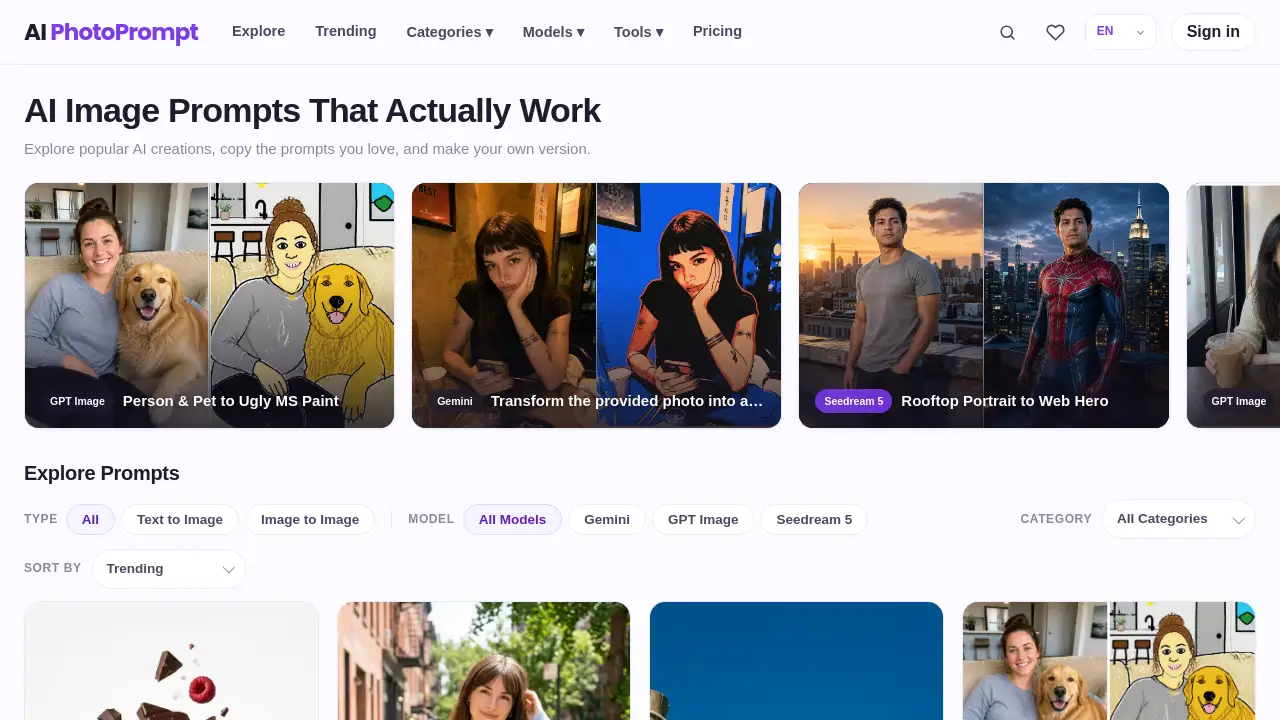
AI Photoprompt is a ready-to-use prompt gallery for AI image generators. It helps users find tested prompts for realistic photo edits and creative graphics. Users can browse 300+ prompts, compare the original idea with real examples, and copy the exact wording. AI Photoprompt supports Gemini, GPT Image and Seedream, so users can generate strong visuals without guessing.
What is AI Photoprompt?
AI Photoprompt is an online image prompt library designed for people who want reliable, repeatable results with modern AI image tools. Instead of typing vague descriptions and hoping for the best, users can explore tested AI image prompts that already include real visual examples. The prompts are organized by style and purpose, making it easier to find a useful starting point.
This product matters because prompt quality directly affects output quality. Many users struggle to describe editing styles, lighting, composition, or illustration formats in clear AI-friendly language. AI Photoprompt solves that problem by providing structured prompts that retain important details like identity, pose, clothing, and composition. It is suitable for beginners, content creators, designers, photographers, and small business owners who need practical visual results without a long trial-and-error process.
Key Features of AI Photoprompt
Large Collection of Tested Prompts
AI Photoprompt contains more than 300 tested AI image prompts. Users can browse the library and choose prompts based on different styles, including portrait photography, poster design, photo restoration, product advertising, and more.
Real Visual Examples for Every Prompt
Each prompt in AI Photoprompt is paired with a real output example. This makes the prompt library feel transparent and practical because users can see the expected style before copying the prompt. It also helps users understand how the prompt wording affects the final image.
Multi-Platform Image Prompt Support
AI Photoprompt offers prompts for Gemini, GPT Image, and Seedream. Users can select a prompt that matches the image model they are using, which increases the chance of reproducing the same look with one click.
Organized Creative Categories
The prompt collection is grouped into useful categories like Portraits & People, Photo Editing, Illustration & Art, Posters & Graphic Design, and Products & Ads. Users can quickly move from a casual idea to a specific visual style.
Simple Copy-and-Paste Workflow
AI Photoprompt removes unnecessary complexity. Once a user finds an interesting prompt, they can copy any prompt free and paste it into their preferred image tool. This simple workflow makes the entire platform easy to use.
Use Cases for AI Photoprompt
Professional Headshot Creation
Users can upload a casual selfie and apply a prompt that turns it into a LinkedIn-ready professional headshot. The prompt preserves natural identity while improving framing, clothing, lighting, and background.
Vintage Portrait Restoration
AI Photoprompt includes prompts for restoring and colorizing faded archival portraits. Users can keep the original subject’s facial structure and period details while removing stains, yellowing, and uneven fading.
Product Advertising Campaigns
Small business owners and marketers can use product-focused prompts to transform ordinary product photos into campaign-style visuals. For example, a simple headphone photo can become a dramatic Black Friday technology banner.
Creative Pet and Character Art
Pet owners and illustrators can turn photos into meme sticker packs, miniature dioramas, or hand-drawn artbook pages. These tested AI image prompts keep the pet’s markings and facial expressions recognizable while changing the artistic style.
Cinematic Color Grading
Photographers can apply prompts that enhance mood and lighting without redesigning the original scene. A typical use case is changing a normal photo into a cinematic golden-hour image with richer shadows and warmer highlights.
How to Use AI Photoprompt
Using AI Photoprompt takes only a few simple steps:
- Visit the official AI Photoprompt website.
- Choose the image model you plan to use, such as Gemini, GPT Image, or Seedream.
- Browse the prompt library or select a category like Photo Editing or Illustration & Art.
- Review the visual examples and choose a prompt that matches your goal.
- Copy the prompt, upload your photo if needed, and paste the prompt into your favorite AI image generator.
This simple workflow makes AI Photoprompt a practical place to discover useful AI image prompts and apply them quickly.
Target Audience for AI Photoprompt
- Social media managers who need eye-catching visual posts.
- Small business owners creating product ads and brand images.
- Photographers who want faster editing workflows.
- Graphic designers looking for poster and illustration inspiration.
- Content creators who produce consistent photo-based content.
- AI art hobbyists exploring tested image prompt examples.
Is AI Photoprompt Free?
According to the product homepage, users can browse the full library and copy any prompt free. There is no obvious paywall mentioned on the landing page for viewing prompts or copying examples. The platform may offer paid plans for additional features in the future, but the available reference information does not list clear paid options.
| Plan | Price | Features |
|---|---|---|
| Free Prompt Library | $0 | Browse 300+ tested prompts, view visual examples, and copy prompts |
| Paid Plans | Not listed | Check the official website for updated pricing and extra features |
AI Photoprompt's Pros and Cons
| Aspect | Pros | Cons |
|---|---|---|
| Pricing | Free prompt library with no sign-up barrier mentioned | Paid plan details are not clear |
| Usability | Simple interface, clear categories, and real examples | Users must switch to an external AI generator |
| Prompt Content | 300+ tested AI image prompts with practical styles | Support is limited to Gemini, GPT Image, and Seedream |
| Output Reliability | Prompts are designed to preserve identity and composition | Final results may still vary with each image model |
Frequently Asked Questions about AI Photoprompt
Does AI Photoprompt support all AI image generators?
AI Photoprompt focuses on tested prompts for Gemini, GPT Image, and Seedream. Some prompts might work in other tools, but the library is designed around these three supported generators.
Are the prompts in AI Photoprompt actually tested?
Yes. The product description states that the collection includes 300+ tested AI image prompts with real visual examples. Users can look at the sample image before deciding whether to copy the prompt.
Do I need experience in prompt engineering to use AI Photoprompt?
No. The platform provides ready-to-use wording. Users can simply copy any prompt free and paste it into their chosen image generator. This makes the prompt library suitable for beginners.
Can I use these prompts for product photos?
Yes. AI Photoprompt includes product-related prompts under categories such as Products & Ads. For instance, there is a sample prompt that turns a plain headphone photo into a high-energy Black Friday campaign visual.
What kinds of photo edits are covered in the prompt library?
The library covers several practical editing workflows, including selfie-to-headshot conversion, vintage photo colorization, miniature diorama scenes, cinematic lighting, and retro poster design. Each prompt includes a real image example to guide users.
Will the image look exactly like the sample prompt result?
The result can vary because AI tools interpret prompts differently. However, AI Photoprompt aims to reduce uncertainty by providing tested images and detailed prompt text. Original photos, lighting, and composition will still influence the final output.
AI Photoprompt Tags
AI Photoprompt, AI image prompts, Gemini prompts, GPT Image prompts, Seedream prompts, tested AI prompts, image prompt library, photo editing prompts, portrait photo prompts, product ad prompts, free AI prompt examples, AI photography tools