Introduction
Effortlessly transform video content into professional slide decks with a YouTube to PPT Converter.
What is YouTube to PPT Converter?
A YouTube to PPT Converter is an online tool designed to automatically transform the content from any YouTube video into a structured PowerPoint presentation. This innovative product addresses the common challenge of manually creating slides from video-based information, a time-consuming task for many professionals and students. By simply pasting a YouTube link, the tool processes the video's audio and visual content, summarizing key points and organizing them into a coherent slide deck. This is particularly valuable for anyone who needs to quickly repurpose video material for meetings, lectures, or projects, making information sharing more efficient and accessible.
Key Features of YouTube to PPT Converter
Automated Content Summarization
The converter intelligently analyzes YouTube video content to identify and extract the most important points, automatically generating concise summaries for each slide.
Instant Slide Generation
With just a YouTube link, the tool structures and generates a complete set of PowerPoint slides within seconds, drastically reducing the time required to create a presentation from scratch.
Professional Template Integration
The generated presentations are formatted with clean, professional designs, ensuring the final output is visually appealing and ready for immediate use in any formal setting.
Editable Output
Users receive a fully editable PowerPoint file, allowing for easy customization of text, layout, and design to perfectly suit their specific needs and preferences.
Use Cases for YouTube to PPT Converter
Academic Presentation Preparation
Students can efficiently convert educational YouTube lectures or tutorials into study guides or presentation materials, saving hours on manual note-taking and slide creation.
Business Report Generation
Professionals can quickly transform industry-related YouTube videos, such as market analysis reports or expert podcasts, into structured business presentations for internal meetings or client reviews.
Training Material Development
Educators and corporate trainers can repurpose instructional YouTube videos into organized training modules and lesson plans, enhancing the learning experience with visual aids.
Marketing Content Repurposing
Marketing teams can easily convert existing product demo videos or promotional content from YouTube into slide decks for sales pitches, investor meetings, or conference presentations.
How to Use YouTube to PPT Converter
Using the YouTube to PPT Converter is a straightforward process designed for user convenience.
- Copy the URL of the YouTube video you want to convert.
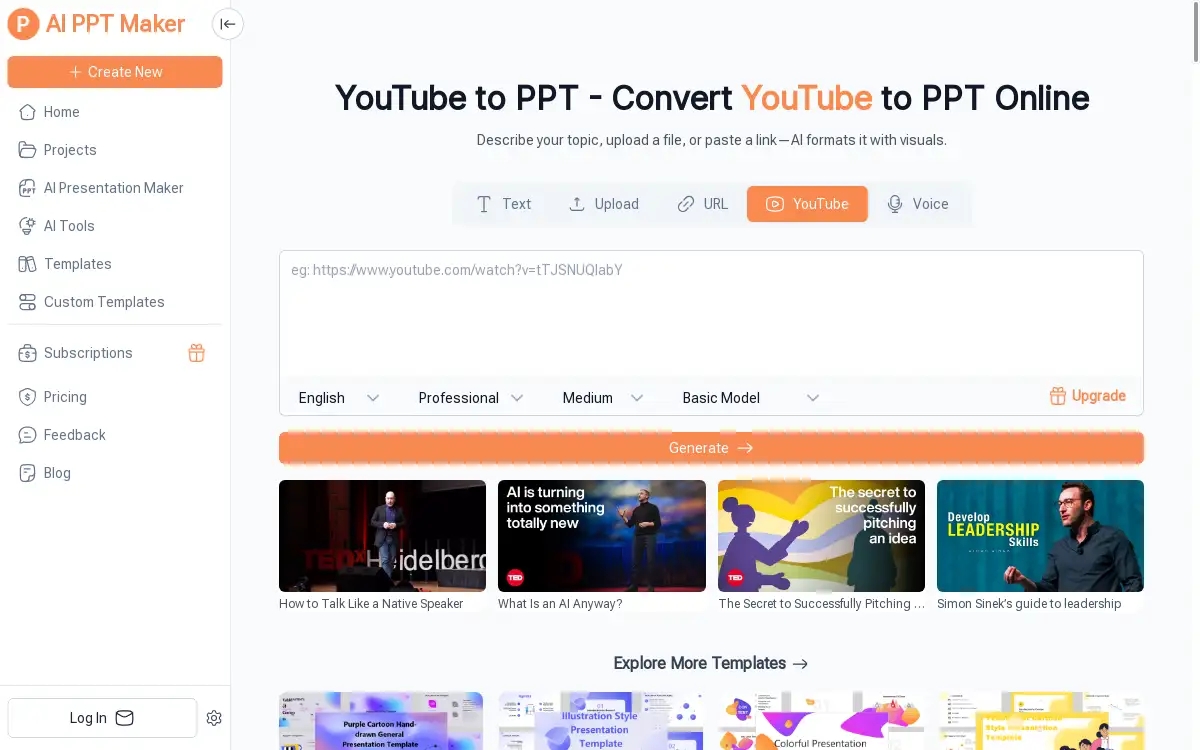
- Paste the link into the designated field on the AI PPT Maker website.
- The AI will then automatically process the video, summarizing the content and structuring it into slides.
- Within moments, you can download a professionally formatted, editable PowerPoint presentation.
Target Audience for YouTube to PPT Converter
- Students and Academics
- Business Professionals and Executives
- Content Creators and Influencers
- Educators and Trainers
- Marketing and Sales Teams
- Entrepreneurs and Freelancers
Is YouTube to PPT Converter Free?
The YouTube to PPT Converter offers a generous free plan that allows users to experience its core functionality of converting videos into presentations. This provides significant value for individuals with occasional needs. For users with higher volume requirements or those seeking advanced features, affordable premium options are available, offering enhanced capabilities for creating professional presentations efficiently.
Frequently Asked Questions about YouTube to PPT Converter
What types of YouTube videos work best with the converter?
The tool is highly effective with content-rich videos such as lectures, tutorials, presentations, and informational podcasts where the speaker clearly outlines key points. Videos with minimal dialogue or highly complex visual narratives may require more manual editing afterward.
Is the generated PowerPoint presentation editable?
Yes, absolutely. The output is a standard .pptx file that can be opened and fully customized in Microsoft PowerPoint, Google Slides, or any other compatible presentation software, allowing you to adjust text, images, and design.
How long does it take to convert a YouTube video into a PPT?
The conversion process typically takes just seconds. The speed depends on the length of the video and internet connectivity, but the tool is designed for rapid generation of presentation slides.
Can I use this tool for commercial purposes?
Yes, the presentations you create can be used for commercial purposes, including client work, internal business reports, and training materials. It is always recommended to ensure you have the right to use the source YouTube video's content.
Does the converter support languages other than English?
The primary language for analysis and slide generation is English. Performance with videos in other languages may vary and is subject to the tool's ongoing development and language model training.
Is there a limit to the length of the YouTube video I can convert?
The free plan may have limitations on video length or the number of conversions. Premium plans generally offer higher limits, allowing for the processing of longer videos like webinars or detailed lectures.
YouTube to PPT Converter Tags
YouTube to PPT, YouTube to PowerPoint, convert YouTube to PPT, video to presentation, AI presentation maker, online PPT converter, create slides from video, automatic slide generation, presentation tool, summarize video content, free PowerPoint maker, professional presentations