Introduction
AI product photography for ecommerce sellers turns one product upload into a complete set of marketplace-ready images, including white main images, lifestyle scenes, model photos, infographics, and ad crops. This tool is built specifically to help online sellers create professional visuals without hiring a photographer or using complex editing software.
What is AI Product Photography for Ecommerce Sellers?
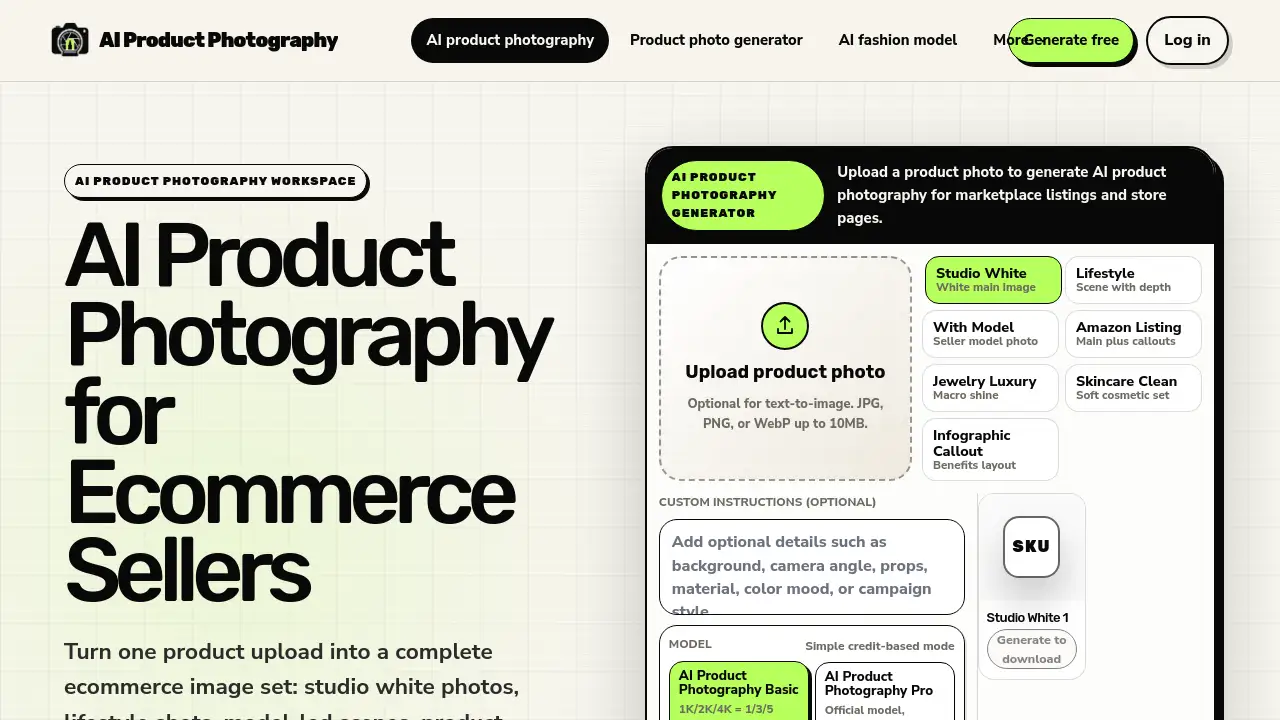
AI Product Photography for Ecommerce Sellers is a web-based generator that produces high-quality ecommerce product images from a single photo. Instead of spending hours on background removal or designing lifestyle shots manually, sellers upload a product image, choose a workflow template, and let the AI produce multiple image variants. The platform focuses on seller workflows—such as Amazon infographics, Shopify product visuals, and social media ad crops—while ensuring product fidelity through a built-in review step. It matters because consistent, professional images directly influence click-through rates and conversions on marketplaces, and this tool lowers the barrier to achieving that.
Key Features of AI Product Photography for Ecommerce Sellers
Studio White Template
Produces clean white background photos that meet marketplace requirements for Amazon, eBay, and other platforms. The template maintains product shape and detail while removing distracting backgrounds.
Lifestyle Shelf Scene
Generates lifestyle product photos that place items in realistic settings—like a kitchen counter or retail shelf—without requiring a physical set or props.
Model Product Photo
Creates model-led seller photos where the product is shown in use on a human model, ideal for apparel, accessories, and skincare.
Amazon Infographic
Builds callout graphics with text overlays and size visuals, commonly used for Amazon listing images that highlight features and benefits.
Ad Creative Crop
Produces square or vertical ad-ready crops optimized for paid social campaigns on Facebook, Instagram, and TikTok.
Jewelry Macro Shot
Specializes in close-up images of jewelry, reflective surfaces, and small details, with a focus on product fidelity for logos, labels, and packaging shape.
Use Cases for AI Product Photography for Ecommerce Sellers
Amazon Listing Optimization
Generate white main images and infographics that match Amazon’s image guidelines, improving search placement and buyer trust.
Social Media Ad Campaigns
Create lifestyle scenes and ad creative crops quickly for A/B testing different visuals on Meta platforms.
Shopify Product Pages
Produce consistent store styles across SKUs, using reusable lighting and framing to keep brand identity intact.
Seasonal Promotions
Turn one product photo into multiple themed lifestyle scenes for holiday or event campaigns without reshooting.
Product Catalogs
Batch-generate images for entire product lines using the batch-ready catalog workflow, starting from single-image previews.
How to Use AI Product Photography for Ecommerce Sellers
- Upload a product photo – Start with a real SKU image (JPG, PNG, or WebP up to 10MB) so the AI has a reference for shape and detail.
- Choose a workflow – Select from Studio White, lifestyle, model, infographic, ad crop, or macro shot templates.
- Review and download – Check product fidelity (logos, labels, reflections) using the fidelity check tool, then download previews. Use credits for HD versions and batch scaling.
Target Audience for AI Product Photography for Ecommerce Sellers
- Ecommerce sellers on Amazon, eBay, and Shopify
- Small to medium online businesses with limited photography budgets
- Marketers running paid social ads who need frequent creative updates
- DTC brands selling apparel, jewelry, skincare, home goods, and packaged products
- Catalog managers handling large SKU volumes
Is AI Product Photography for Ecommerce Sellers Free?
The platform offers a free mode that allows one image per workflow. For high-resolution outputs and batch processing, credits are purchased. Detailed pricing is available on the official pricing page.
| Plan | Price | Features |
|---|---|---|
| Free | $0 | 1 image per workflow, standard resolution, single workflow use |
| Credit-based | From $X | HD images, batch-ready catalog, reusable store styles, priority fidelity checks |
Note: Exact credit costs vary by resolution and workflow complexity. Visit the pricing page for current rates.
AI Product Photography for Ecommerce Sellers's Pros and Cons
| Aspect | Pros | Cons |
|---|---|---|
| Pricing | Free trial available; pay-as-you-go credits suit occasional users | Can become expensive for high-volume batch production |
| Features | Wide variety of templates (white, lifestyle, model, infographic, ad) | Limited to preset workflows; no custom scene builder |
| Ease of Use | Simple upload-and-generate process; no design skills needed | Product fidelity check requires careful review for regulated items |
| Product Accuracy | Built-in fidelity check for logos, labels, and reflective surfaces | Results may still need manual adjustments for complex packaging |
Frequently Asked Questions about AI Product Photography for Ecommerce Sellers
What is AI product photography?
AI product photography uses generative AI to create ecommerce product images from a product photo or text prompt. Sellers use it for studio shots, lifestyle scenes, marketplace images, and ad creatives.
Can AI product photography replace a studio shoot?
It can replace many routine ecommerce images, especially white background photos, lifestyle scenes, and ad crops. For regulated products, labels, jewelry, and reflective packaging, always review fidelity before publishing.
What product images can I create?
You can create white main images, lifestyle product photos, model-led seller photos, Amazon-style infographics, Shopify product visuals, and paid social ad crops. The macro shot workflow also handles jewelry and small details.
Do I need design skills?
No. Start with one product upload, choose a workflow, and let the AI product photography generator produce image candidates you can review and download. No special software or editing knowledge required.
How does batch processing work?
The batch-ready catalog workflow allows you to start with single-image previews, then scale into repeatable SKU sets for larger ecommerce catalogs. Credits are used per image, and you can apply consistent styles across multiple products.
Is there a fidelity check before publishing images?
Yes. Before downloading any generated image, the product fidelity check lets you review logos, labels, small text, jewelry details, reflective surfaces, and packaging shape. This step helps ensure accuracy before using the image on listings or ads.
AI Product Photography for Ecommerce Sellers Tags
AI product photography, ecommerce product images, white background photos, lifestyle scenes, model product photos, Amazon infographic, ad creative crop, product fidelity check, batch image generation, Shopify product visuals, jewelry macro shot, marketplace image pack