Introduction
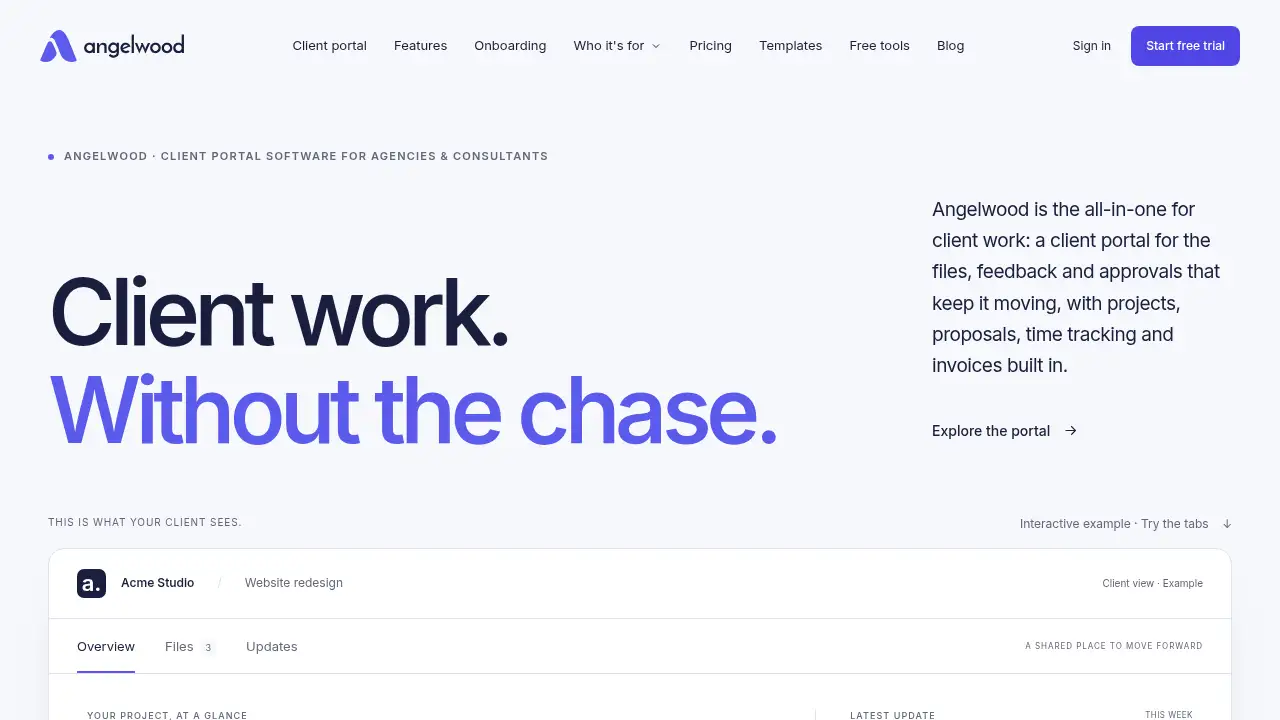
Angelwood: client portal software for agencies.
What is Angelwood?
Angelwood is client portal software for agencies and consultants that brings client onboarding, document requests, reviewed project updates, feedback, approvals, proposals, time tracking, and invoices into one workspace. Instead of chasing files across email, chat, and spreadsheets, teams can give clients a branded place to see what is happening and what comes next. This client portal software is designed for professional-services firms that need a clear agency client portal or consultant client portal without adding another fragmented tool. Angelwood matters because client work often slows down when requests, updates, and approvals live in different threads. By using one client portal software system, teams can collect the brief, track missing assets, share weekly updates, and keep decisions next to the work. It also supports proposals, agreements, time tracking, and invoices, so the client experience and the back office can stay connected.
Key Features of Angelwood
Client Onboarding and Document Requests
Collect briefs, brand assets, and answers through a structured onboarding flow. Angelwood shows what has arrived and what is still missing, reducing manual follow-up for client onboarding software workflows.
Reviewed Project Updates and Client Approvals
Turn delivery notes into clear project updates that clients can review in the portal. Teams can keep client approvals and feedback attached to the work, so next steps stay visible.
AI-Assisted Update Drafts
Use AI to draft weekly client updates from delivery notes, with sources that can be checked. Team members can edit the draft before sharing, keeping human judgment in the loop for sensitive project updates.
Proposals, Agreements, and E-Signature
Create proposals and agreements with e-signature, plus estimates, so new work starts with clear expectations. This helps agencies connect sales documents with the same client portal software workspace.
Time Tracking, Expenses, and Invoices
Track time with timesheet approval, record project expenses, and send invoices clients can pay online through Stripe. These built-in billing tools reduce the need to stitch together separate admin systems.
Branded Workspace and Project Tool Integrations
Give clients a branded portal where they can find files, feedback, approvals, and next steps. Run projects inside Angelwood or connect Asana, ClickUp, or another supported project tool and keep delivery work in the existing stack.
Use Cases for Angelwood
Agency Client Portals
Use Angelwood as an agency client portal to centralize briefs, files, feedback, and approvals for recurring client work. This is useful when account teams need a consistent client experience across multiple projects.
Consultant Client Portals
Independent consultants can use a consultant client portal to share updates, request documents, and keep proposals and invoices in one place. It helps small teams look organized without assembling a custom portal.
New Client Onboarding
Send a clear onboarding request, collect brand assets and content, and see exactly what is missing. This reduces back-and-forth during the first week of a project.
Recurring Project Updates
Prepare weekly or milestone updates, add a human voice or transcript, and give clients a clear next step. The update review flow keeps teams in control before anything is shared.
Billing and Project Administration
Manage proposals, time tracking, expenses, and online invoices alongside client communication. This is helpful for firms that want client portal software to cover more than file sharing.
How to Use Angelwood
- Set up a branded workspace and add the client project, brief, and team details.
- Send an onboarding request for documents, brand assets, and answers, then check what is still missing.
- Share reviewed project updates and collect feedback or approvals in the portal.
- Use built-in proposals, time tracking, expenses, and invoices as the project moves forward.
- Connect an existing project tool if the team prefers to keep delivery work in Asana or ClickUp.
Angelwood works best when the team treats the portal as the client-facing source of truth. For a busy agency, client portal software can reduce manual status emails while keeping decisions and next steps easy to find.
Target Audience for Angelwood
- Agencies with recurring client communication and approvals
- Consultants and professional-services firms
- Small teams that are still hands-on with delivery
- Studios and creative teams that request files and feedback
- Service businesses that want proposals, time tracking, and invoices near client work
Is Angelwood Free?
The reference information does not list public plan prices or confirm a free trial. Angelwood states that every plan includes proposals and agreements with e-signature, estimates, time tracking with timesheet approval, project expenses, and invoices clients can pay online through Stripe. For current pricing, plan limits, and trial availability, check the official Angelwood website.
Angelwood's Pros and Cons
| Aspect | Pros | Cons |
|---|---|---|
| Client experience | Branded client portal keeps files, feedback, and approvals in one place | Requires clients to adopt a portal rather than email |
| Features | Onboarding, document requests, project updates, proposals, time tracking, and invoices are built in | Full feature set may be more than a solo consultant needs |
| AI support | AI-assisted update drafts can save time, with team review before sharing | Drafts still need human checking for accuracy and tone |
| Integrations | Can connect with Asana, ClickUp, or other supported project tools | Integration details depend on the tools a team already uses |
| Pricing clarity | Every plan includes core billing and agreement features | Public pricing is not shown in the provided reference content |
Frequently Asked Questions about Angelwood
What is Angelwood client portal software used for?
Angelwood is used to give agencies and consultants a single workspace for client onboarding, document requests, project updates, feedback, approvals, proposals, time tracking, and invoices. It reduces the need to chase information across email and chat.
Can Angelwood replace project management tools?
Not always. Teams can run projects and tasks inside Angelwood, or connect Asana, ClickUp, or another supported project tool and keep delivery there. The client portal still gives clients a clear view of the work.
Does Angelwood support client onboarding and document requests?
Yes. Angelwood includes onboarding flows that collect briefs, brand assets, and answers in one place. The portal shows what has arrived and what is still missing, which helps teams follow up less.
Are AI-generated client updates safe to send?
The AI feature creates a draft from delivery notes, and teams can check and edit it before sharing. Angelwood keeps client decisions recorded alongside the work, so the team stays in control of what clients see.
Can agencies bill clients through Angelwood?
Yes. Every plan includes proposals and agreements with e-signature, estimates, time tracking with timesheet approval, project expenses, and invoices clients can pay online through Stripe.
Who is Angelwood best for?
Angelwood is best for agencies, consultants, and professional-services firms with recurring client communication. It is especially useful for small teams that need a branded client portal software experience without building a custom portal.
Angelwood Tags
client portal software, agency client portal, consultant client portal, client onboarding software, document requests, project updates, client approvals, proposals and invoices, time tracking software, AI client updates, branded client portal, agency project management