Introduction
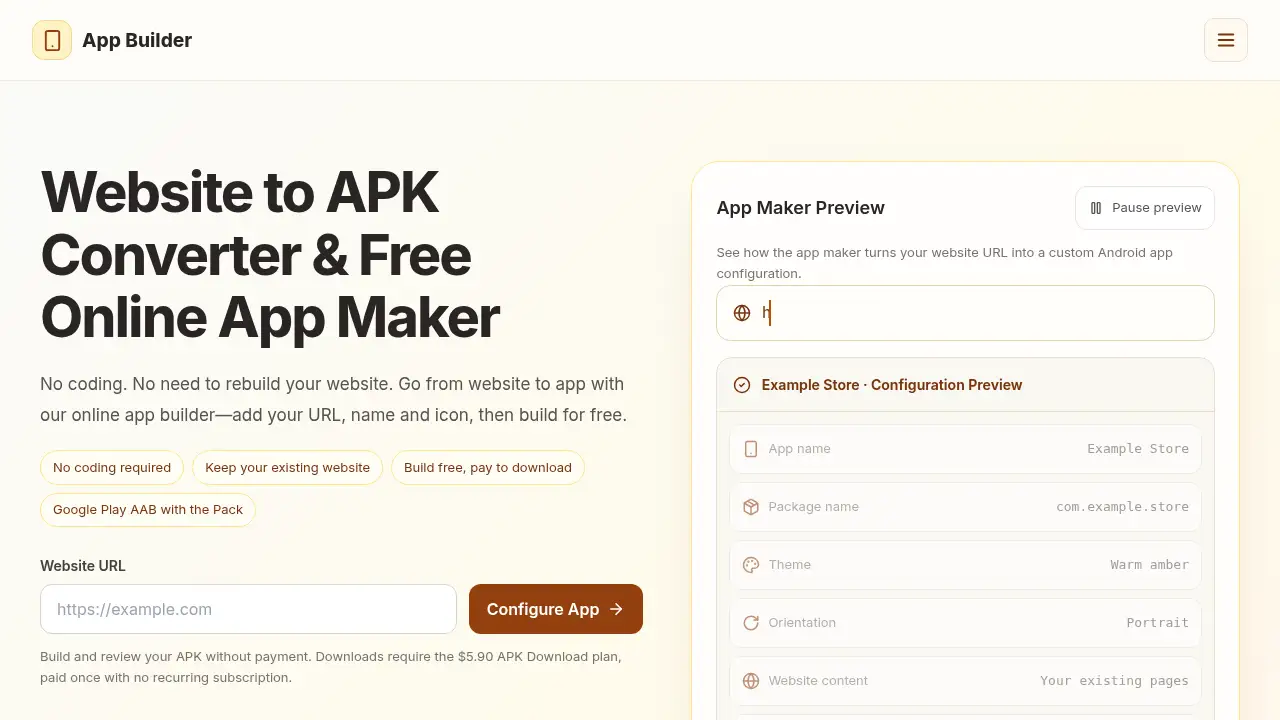
Web to APK turns a website URL into a signed Android app.
What is web to apk?
Web to APK is an online service that converts a published website URL into an Android app package. It is aimed at people who want a website to app option without rebuilding the site or writing native code. The web to APK converter uses the live website as the app’s content source, so new articles, products, and page updates can appear when users open the app. Users can set an app name, package name, icon, theme color, and screen orientation in the online app builder. The service suits small businesses, bloggers, course creators, community organizers, and developers who want a simple Android app builder for an existing website. It matters because it lowers the technical barrier to creating a signed APK for testing or direct sharing, while also offering a Google Play AAB option through the Play Store Pack. The main trade-off is that building is free, but downloading the APK requires a one-time payment. This makes web to apk a practical entry point for testing a website to APK workflow before committing to a native app project.
Key Features of web to apk
Build from a Website URL Without Coding
Turn a public website URL into an Android app in a browser. This no coding workflow keeps the existing website instead of asking users to upload HTML or install Android Studio.
Customize App Name, Icon, and Brand Colors
Set the app name, package name, PNG or JPEG icon, and theme color in the online app builder. These settings help the website to APK output carry a recognizable brand on the home screen.
Choose Screen Orientation
Select portrait, landscape, or automatic rotation for the app shell. This gives the website to app experience a more app-like feel for menus, galleries, articles, or guides.
Keep Website Content in Sync
The app loads the live website, so content updates generally do not require rebuilding the APK for every new page. New products, posts, and announcements can appear as the website changes.
Handle Website and External Links
Keep internal website links inside the app, open external websites in a browser, and use Android’s back button to revisit pages. This supports smoother browsing in a website to APK app.
Support File Uploads from a Phone
Let users choose files from their device through existing website upload forms using Android’s file picker. This is useful for forms, applications, and account-related workflows.
Download a Signed APK
Build and review the APK without payment, then unlock a signed APK for installation and testing on Android devices. The APK Download plan is a one-time purchase with no recurring subscription.
Prepare a Google Play AAB with Play Store Pack
The Play Store Pack adds an AAB, upload key, store graphics, and a submission checklist for Google Play. Publishing is still completed through the user’s own Google Play developer account.
Use Cases for web to apk
E-Commerce
Bring products and collections to Android with a website to APK app. Test product browsing, login, and checkout flows on a real phone before sharing.
Restaurants
Keep menus and booking pages within reach in a simple Android app. A restaurant can use the web to APK converter without rebuilding its existing site.
News and Blogs
Give readers quick access to the latest stories through a website to app build. Because the app loads the live site, new posts can appear without a separate publishing workflow.
Education
Make courses, lessons, and learning resources easy to browse from a home-screen app. Teachers and course creators can convert website to APK and test the student experience on Android.
Fitness and Wellness
Share workout guides, health articles, and wellness tips in one Android app. The online app builder keeps the existing website content and adds app settings such as name, icon, and theme color.
Travel and Tourism
Put destinations, travel guides, and booking links in a mobile app. A web to APK build can help travelers reach the same website content from an Android device.
Real Estate
Let buyers explore listings and galleries through an Android app. The website to APK converter keeps listing pages on the existing website while adding a branded app entry point.
How to Use web to apk
- Open the web to APK converter and enter the public website URL. The online app builder loads the live site, so no HTML upload is required.
- Set the app name, package name, optional PNG or JPEG icon, theme color, and screen orientation.
- Apply the settings and use Generate APK to build the Android app. The service allows users to build and review the APK before payment.
- Unlock the signed APK with the $5.90 APK Download plan, or choose the $69 Play Store Pack for an AAB and submission resources.
- Install and test the APK on an Android device, check login and payment flows, then decide whether to share it directly or prepare a Google Play submission.
Target Audience for web to apk
- Small business owners who want an Android app for an existing website
- Bloggers and content creators who publish on WordPress or another CMS
- Teachers and course creators who want lessons on a home screen
- Community organizers who share events and resources online
- Founders and indie developers testing a web tool or MVP on Android
- Freelancers and agencies creating app demos from client websites
- Restaurant owners, real estate agents, and travel publishers with mobile-friendly sites
Is web to apk Free?
The service offers a free build and review step, but APK downloads require payment. The APK Download plan costs $5.90 once and has no monthly fee or automatic renewal. The Play Store Pack costs $69 once for one app build and includes a signed APK, AAB, upload key, store graphics, and a submission checklist. Publishing through Google Play still requires the user’s own developer account and Google’s review process.
| Plan | Price | Features |
|---|---|---|
| Free build | $0 | Configure and build the app within service limits; review the APK before payment |
| APK Download | $5.90 once | Download the signed Android APK; keep the chosen app name and icon; no recurring subscription |
| Play Store Pack | $69 once | Signed APK, AAB, upload key, store graphics, and submission checklist for one app build |
web to apk's Pros and Cons
| Aspect | Pros | Cons |
|---|---|---|
| Pricing | Low one-time APK download fee; no subscription for the APK plan | Play Store Pack is an additional one-time cost; Google Play developer fees are separate |
| Features | No coding, live website sync, custom name/icon/colors, signed APK, optional AAB | Native permissions, remote icon URLs, and automatic Play Store publishing are not included |
| Ease of use | Browser-based online app builder; no Android Studio setup | Requires a public website URL and account sign-in to build and download |
| Content | Keeps existing website content and navigation | App behavior still needs testing on a real Android device |
| Publishing | AAB and submission resources are available with the Pack | User must submit through their own Google Play account and meet testing and policy requirements |
Frequently Asked Questions about web to apk
Is web to apk really no coding?
Yes. The web to APK converter is designed for users who do not want to write native Android code. It takes a public website URL and applies app settings such as name, icon, theme color, and screen orientation.
Do I need to rebuild my website?
No. The website to app approach uses the published website URL, so the existing site remains the content source. Users should still test login, forms, uploads, and payment flows on a real phone.
What do I get with the $5.90 APK Download plan?
The one-time plan unlocks a signed Android APK for download. It is not a monthly subscription and has no automatic renewal. The app keeps the chosen name and icon, and download access is linked to the account.
Can I publish the app on Google Play?
Yes, with the Play Store Pack. It provides a Google Play AAB, upload key, store graphics, and a submission checklist. The user submits through their own Google Play developer account; approval depends on Google’s testing and policy review.
Does the app update when my website changes?
Because the app loads the live website, new articles, products, and page updates can appear without rebuilding the APK for each content change. The app shell settings, such as icon and name, are part of the build.
Can I use my own app icon and name?
Yes. The online app builder lets users set an app name and upload a PNG or JPEG icon up to 2 MB. If no icon is selected, a default icon is used.
web to apk Tags
web to apk, website to APK, web to APK converter, convert website to APK, website to app, Android app builder, online app builder, no coding app builder, signed APK download, Google Play AAB, Play Store Pack, website URL to app