Introduction
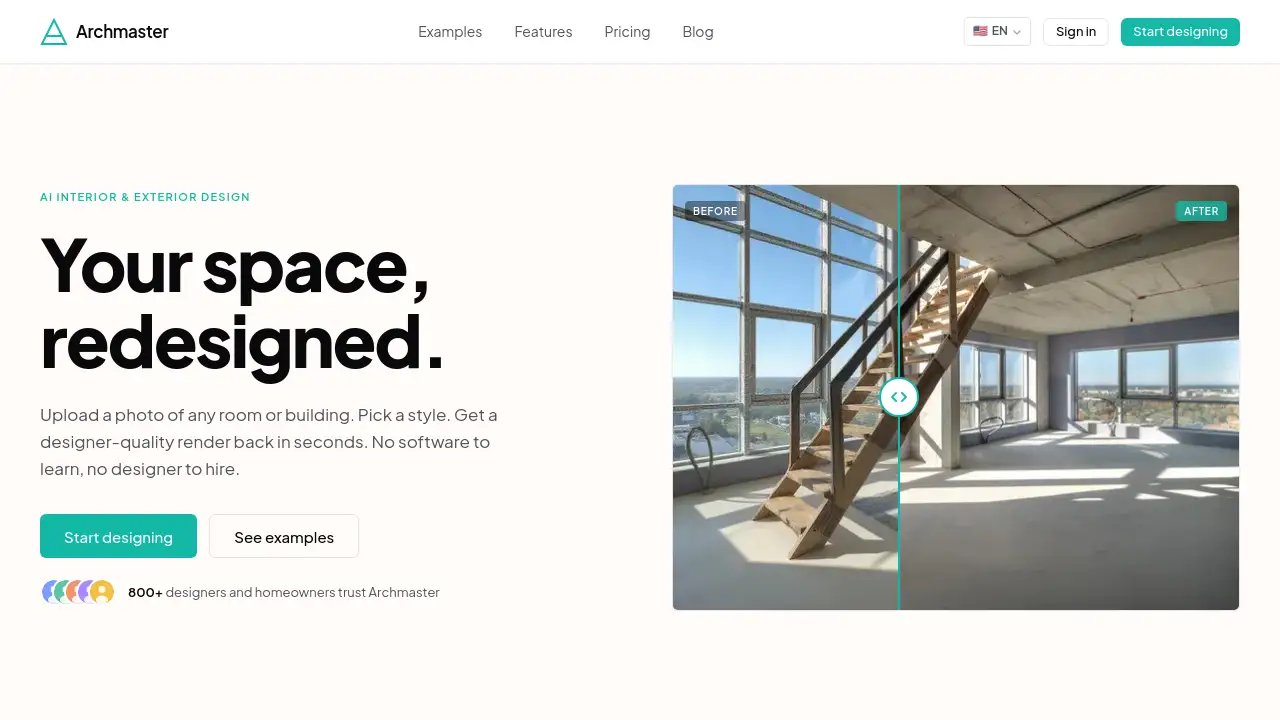
Archmaster is an AI interior and exterior design tool that transforms photos of rooms or facades into photorealistic renders in seconds. With over 20 style presets, no software or designer needed.
What is archmaster?
Archmaster is an AI-powered design platform that lets users upload a photo of any room or building facade and receive a designer-quality render in under 60 seconds. It solves the problem of visualizing changes without expensive software or hiring a professional. The tool is built for homeowners planning renovations, renters exploring non-permanent updates, real estate agents creating virtual staging, and interior designers generating early client concepts. By using an AI design tool like archmaster, anyone can experiment with styles ranging from Scandinavian minimalist to Cyberpunk without touching CAD or 3D modeling software. The service also includes free tools such as a room size calculator, paint calculator, renovation cost estimator, and color palette generator. With a simple upload-and-click workflow, archmaster makes photorealistic redesign accessible to everyone.
Key Features of archmaster
Interior Redesign
Upload a photo of any indoor space and choose from 20+ style presets. Archmaster instantly generates a photorealistic redesign of the room, allowing users to visualize different layouts, colors, and furniture arrangements.
Exterior Redesign
Transform building facades with the same ease. Whether it’s a house, apartment block, or commercial property, the AI applies chosen styles to the exterior – ideal for curb appeal planning or real estate listings.
Sketch-to-Image Conversion
Convert hand-drawn sketches or rough floor plans into detailed, realistic renders. This feature helps architects and designers quickly communicate ideas without manual drafting.
AI Render Enhancement
Improve the quality of existing renders or low-resolution images. Archmaster upscales and refines details, making outputs suitable for presentations or portfolios.
Architecture Video Generation
Create short video walkthroughs of redesigned spaces. This feature adds a dynamic layer for showcasing projects on websites or social media.
Targeted AI Inpainting
Edit specific areas of an image – replace a piece of furniture, change wall colors, or remove an object. This precision tool gives users granular control over the final look.
Free Tools Suite
Archmaster offers free calculators (room size, paint, renovation cost) and a color palette generator. These help users plan projects before generating renders.
Use Cases for archmaster
Home Renovation Planning
Homeowners can test different floor plans, color schemes, and furniture layouts before committing to changes. An AI design tool like archmaster eliminates guesswork and costly mistakes.
Real Estate Virtual Staging
Agents can virtually stage empty rooms or improve curb appeal of building facades. This speeds up listings and attracts more buyers without physical staging.
Interior Design Concepting
Designers generate multiple style options for clients quickly. The photorealistic redesign helps clients visualize final results, making approvals faster and reducing revisions.
How to Use archmaster
- Upload a photo – Take a picture of the room or building facade you want to redesign. Ensure good lighting and a clear view.
- Choose a style – Browse over 20 presets (e.g., Scandinavian, Modern, Industrial, Cyberpunk). Click one to apply.
- Generate the render – Tap the button and wait up to 60 seconds. The AI processes the image and returns a photorealistic redesign.
- Refine or edit – Use inpainting to modify specific areas, or upscale the render for higher resolution.
- Download or share – Save the final image for personal use, client presentation, or social media.
Target Audience for archmaster
- Homeowners planning interior or exterior renovations
- Renters exploring temporary design changes
- Real estate agents needing virtual staging
- Interior designers seeking quick client concepts
- Architects and builders visualizing facade updates
- DIY enthusiasts wanting to experiment with styles
- Property investors assessing renovation potential
Is archmaster Free?
Archmaster offers a weekly subscription plan at $9.99/week, which provides 30 credits. One credit covers a single generation, upscale, or edit. Multi-view generation costs 3 credits, and architecture video costs 5 credits. There is no free tier with credits, but users can start by uploading a photo to see examples of the tool’s output. For full pricing details, visit the official pricing page.
| Plan | Price | Features |
|---|---|---|
| Weekly | $9.99/week | 30 credits per week, access to all styles and tools |
archmaster's Pros and Cons
| Aspect | Pros | Cons |
|---|---|---|
| Ease of Use | No software or design skills required; upload and click | Limited control over fine details compared to manual design software |
| Speed | Renders in under 60 seconds | High-resolution outputs may require credit upscaling |
| Style Variety | 20+ presets covering a wide range of aesthetics | No custom style import; only preset styles available |
| Pricing | Affordable weekly plan with 30 credits | No free trial with credits; only free tools available without subscription |
| Output Quality | Photorealistic results suitable for client presentation | Some complex architectural details may not be perfectly rendered |
| Use Cases | Covers interior, exterior, sketch conversion, video, and editing | Video generation consumes more credits (5 per video) |
Frequently Asked Questions about archmaster
Can archmaster redesign both interiors and building facades?
Yes. Archmaster’s AI interior and exterior design tool handles both indoor spaces and outdoor building facades. Users can upload a photo of any room or house exterior and apply styles.
What photo formats are supported?
Archmaster accepts standard image formats like JPEG and PNG. For best results, use well-lit, clear photos with minimal obstructions.
Are my uploaded photos used to train AI?
According to the privacy policy, uploaded photos are not used to train AI models unless explicitly stated. Users retain ownership of their images.
Can I cancel my subscription anytime?
Yes. The weekly plan auto-renews but can be canceled at any time through your account settings. Credits remain valid until the end of the billing period.
How many credits do I need for a basic redesign?
One credit covers a single generation, upscale, or edit. Multi-view generation costs 3 credits, and architecture video costs 5 credits. A typical single room redesign costs 1 credit.
Does archmaster offer a free trial?
There is no free trial with credits, but users can test the tool by uploading a photo and viewing output examples on the website. The free calculators and color palette generator are available without subscription.
archmaster Tags
AI interior and exterior design, AI design tool, photorealistic redesign, virtual staging, room redesign, building facade transformation, AI architecture render, interior design AI, exterior design AI, home renovation visualization, sketch to image AI, architecture video generator