Introduction
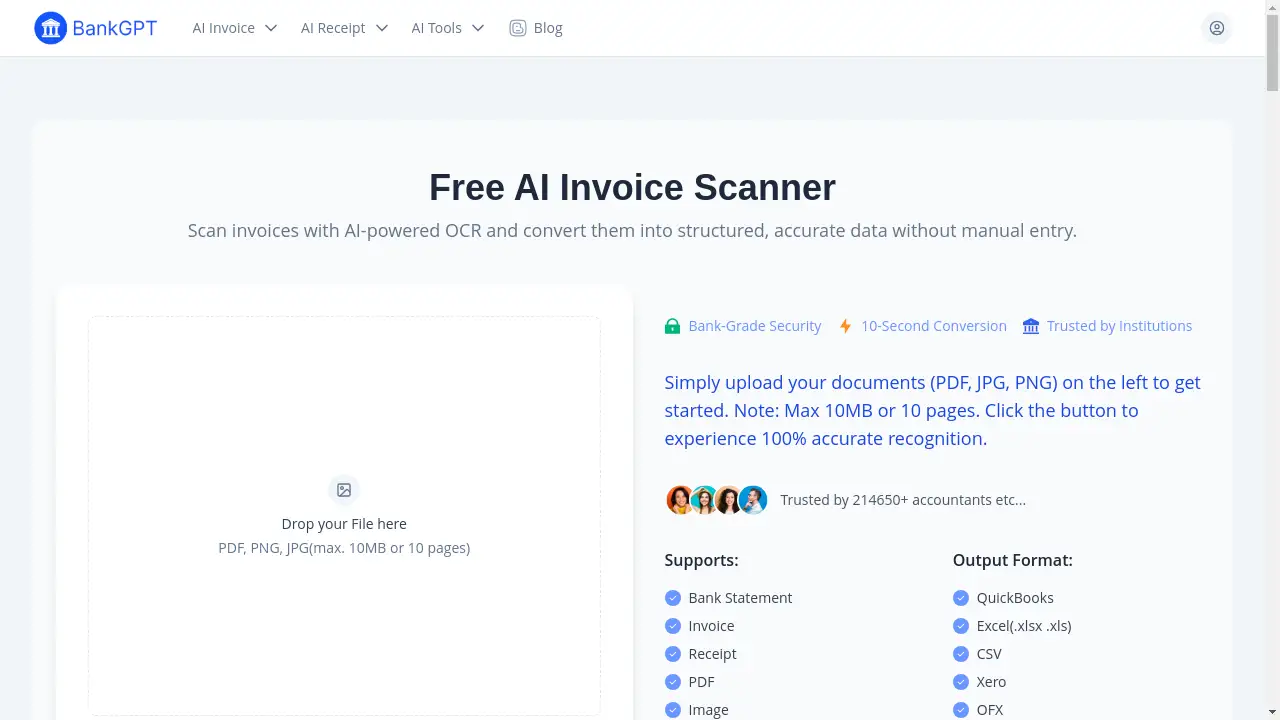
AI Invoice Scanner is a free online tool that uses artificial intelligence to automatically extract data from invoices in seconds.
What is AI Invoice Scanner?
An AI Invoice Scanner is a digital tool designed to automate the tedious task of manual data entry from invoices. By leveraging advanced Optical Character Recognition (OCR) and AI technology, it can instantly read and extract critical information such as totals, dates, vendor names, and line items from uploaded documents. This tool solves the problem of time-consuming and error-prone manual processing, making it an essential asset for anyone who handles invoices regularly. It is particularly suitable for accountants, business owners, and freelancers who need to streamline their financial workflows and maintain accurate records efficiently.
Key Features of AI Invoice Scanner
AI-Powered OCR Technology
The core of the AI Invoice Scanner uses sophisticated AI and OCR to accurately recognize text and numbers from various invoice formats, ensuring reliable data extraction without manual typing.
10-Second Data Conversion
Users can upload an invoice and receive structured, extracted data in mere seconds, dramatically speeding up the invoice processing workflow compared to traditional methods.
Bank-Grade Security
The platform processes documents with high-level security protocols, ensuring that sensitive financial data is handled safely and is not stored long-term, providing peace of mind for users.
No Installation or Sign-Up Required
This online invoice scanner requires no software downloads or account creation, allowing for instant access and use directly from a web browser, which enhances convenience.
Multi-Format Support
The tool accepts a wide range of file types, including PDF, JPG, and PNG images, making it versatile for digitizing both electronic documents and photos of paper invoices.
Export to Accounting Software
Extracted invoice data can be easily downloaded in formats like Excel, CSV, or directly exported to popular accounting platforms such as QuickBooks and Xero for seamless integration.
Use Cases for AI Invoice Scanner
Automated Bookkeeping for Accountants
Accountants can use the AI Invoice Scanner to automatically feed invoice data into bookkeeping systems, reducing manual entry and minimizing errors during reconciliation.
Expense Management for Business Owners
Business owners can quickly scan and organize vendor invoices, track payments, and manage cash flow more efficiently without getting bogged down in administrative tasks.
Financial Analysis Preparation
Financial analysts can rapidly digitize and structure invoice data from various sources, enabling quicker aggregation and analysis for reports and insights.
Loan Application Processing
Loan officers can streamline the collection and verification of financial documents from applicants by quickly extracting key data from submitted invoices and statements.
Freelancer Invoice Tracking
Freelancers and independent consultants can effortlessly digitize client invoices, maintain organized records for tax purposes, and expedite their own billing processes.
Audit and Compliance Documentation
Auditors and compliance teams can use the scanner to efficiently gather and organize invoice evidence, ensuring accurate and readily accessible documentation for reviews.
How to Use AI Invoice Scanner
Using the AI Invoice Scanner is a straightforward, three-step process that requires no technical expertise.
- Upload Your Document: Navigate to the tool's webpage and drag & drop your invoice file (PDF, JPG, or PNG) into the upload area. You can also select a file from your device. The system supports documents up to 10MB or 10 pages.
- Automatic AI Scanning: Once uploaded, the AI-powered engine immediately goes to work. It scans the document, identifies key fields like invoice number, date, vendor, totals, and line items, and extracts this data.
- Review and Export: The extracted data is presented in a structured format. You can review it for accuracy. Finally, you can download the data as an Excel spreadsheet, CSV file, or export it directly to your accounting software.
Target Audience for AI Invoice Scanner
- Accountants and Bookkeepers
- Small to Medium Business Owners
- Financial Analysts and Controllers
- Loan Officers and Credit Analysts
- Freelancers, Contractors, and Consultants
- Auditors and Compliance Officers
Is AI Invoice Scanner Free?
Yes, the AI Invoice Scanner offered on this platform is completely free to use. It provides a generous free plan that includes core features like AI-powered data extraction from invoices, support for multiple file formats, and secure online processing without requiring a subscription or hidden fees. Users can start scanning invoices instantly without any cost, making it an accessible tool for individuals and businesses of all sizes.
Frequently Asked Questions about AI Invoice Scanner
Is the AI Invoice Scanner secure for my financial documents?
Yes, the platform employs bank-grade security measures to process your invoices. Your documents are handled securely, and sensitive data is not stored long-term, ensuring privacy and security.
What file formats does the invoice scanner support?
The AI Invoice Scanner supports common file formats including PDF documents, as well as JPG and PNG image files. This allows you to upload digital invoices or photos of paper invoices.
Do I need to create an account to use the scanner?
No, you do not need to create an account or provide any personal information to use the basic scanning functionality. You can start using the AI Invoice Scanner immediately upon visiting the website.
How accurate is the AI at extracting invoice data?
The tool uses advanced AI and OCR technology designed for high accuracy in recognizing text, dates, and numbers from invoices. While highly reliable, it is always recommended to review the extracted data before finalizing.
Can I export the scanned data to QuickBooks or Excel?
Yes, a key feature of this AI Invoice Scanner is the ability to export the extracted data. You can download it in Excel (.xlsx/.xls) or CSV format, and it also supports direct export to accounting software like QuickBooks and Xero.
Is there a limit to how many invoices I can scan?
The free tool typically has a per-document limit (e.g., 10 pages or 10MB per file). For details on volume limits for batch processing, you should check the website's current terms of use.
AI Invoice Scanner Tags
AI invoice scanner, online invoice scanner, free OCR invoice, extract invoice data, PDF invoice scanner, automated accounting, invoice data extraction, AI receipt scanner, bookkeeping tool, financial document processing, QuickBooks export, Xero integration