Introduction
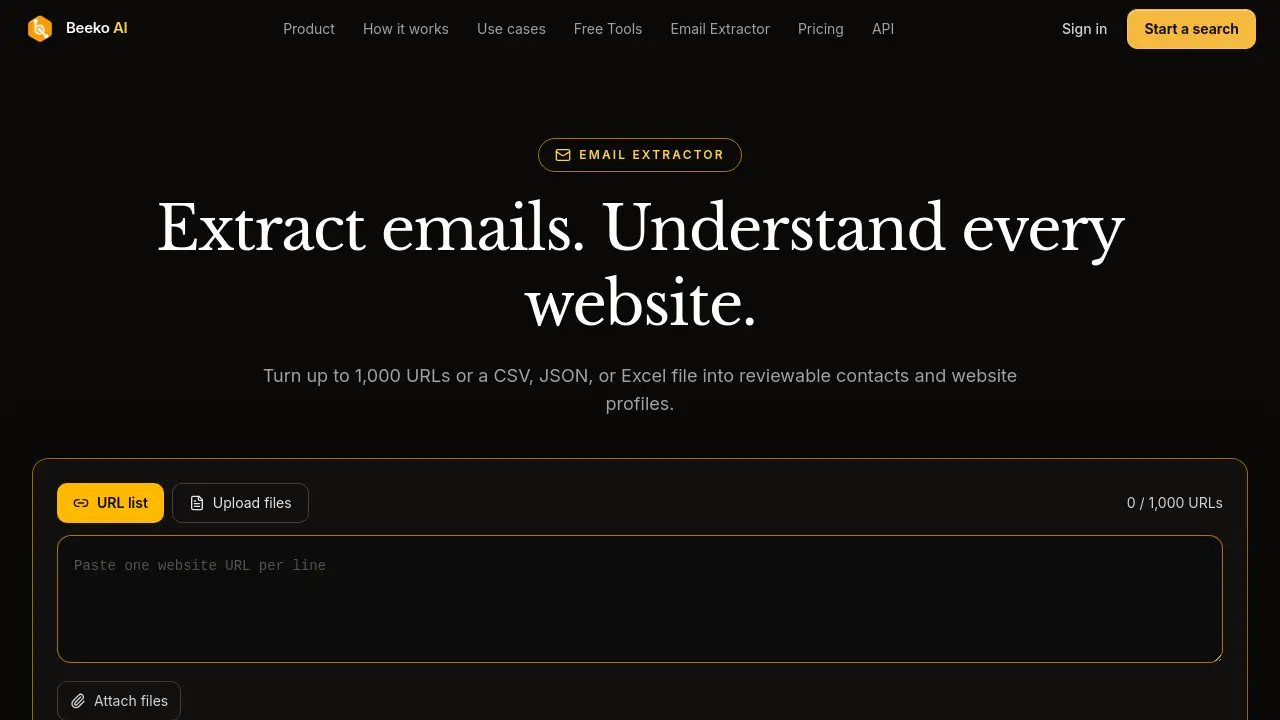
Beeko AI Email Extractor helps teams turn website URLs or files into reviewable public contact emails and website profiles. It supports up to 1,000 URLs and exports one row per input URL for easier follow-up.
What is Beeko AI Email Extractor?
Beeko AI Email Extractor is an online tool that extracts public contact emails and evidence-backed website profiles from a list of URLs or uploaded CSV, JSON, and Excel files. It is built for people who need to research many websites without opening each page by hand. Instead of guessing, users can review the source page, available excerpt, and scan status behind each result.
The product works as a bulk email extractor and website research helper. It scans public pages on supplied websites, finds published email addresses, and collects context such as company name, what they do, audience, products, industry, value proposition, pricing, location, main CTA, and recent update. It also adds an email match column to show whether a found address matches the website domain.
Beeko AI Email Extractor does not confirm mailbox ownership or deliverability. A found email is a lead for review, not a guaranteed contact. This makes it most useful for early research, list building, and follow-up planning, where a person still reviews the evidence before outreach. The tool keeps one row per input URL, including empty and failed results, so original lists are easier to manage.
Key Features of Beeko AI Email Extractor
Bulk URL and File Processing
Paste up to 1,000 website URLs or upload CSV, JSON, and XLSX files. Choose the URL column in each file to start a single extraction job.
Public Contact Email Extraction
Scan publicly accessible pages to find published contact emails. The email extractor shows source details so users can check where an address appeared.
Evidence-Backed Website Profiles
Collect company context such as what they do, audience, products, industry, value proposition, pricing, location, main CTA, and recent update. Each profile fact can be reviewed against public website evidence.
Source Review and Email Match
Click a result cell to see full text and source. The email match field flags domain matching separately, helping users judge relevance before outreach.
One Row per Input URL
Keep results aligned with the original list. Empty, failed, and invalid rows remain visible, so users can filter or retry failures without losing the source list.
Export and Workflow Handoff
Export one row per input URL with new contact and website fields beside original columns. This supports follow-up in a CRM, spreadsheet, or other workflow tools.
Use Cases for Beeko AI Email Extractor
Cold Start Prospect Research
Start with a list of websites and find published contact candidates plus enough company context to decide whom to research first. This saves early research time for sales and growth teams.
Trial-to-Paid Follow-Up
Bring website URLs from a trial-account list into the AI email extractor. Add public company context while preserving original fields, then choose a more relevant follow-up angle.
Agency and Lead Research
Agencies can review many client or prospect websites in a batch. The website email scraper produces one row per input URL, making it easier to compare companies and prepare outreach.
Market and Website Review
Researchers can scan public pages for company positioning, audience, products, and pricing details. The evidence-backed website profiles help turn raw URLs into reviewable research notes.
How to Use Beeko AI Email Extractor
- Sign in and open Beeko AI Email Extractor from the official page.
- Paste up to 1,000 website URLs or upload a CSV, JSON, or XLSX file.
- Select the URL column if a file is uploaded.
- Start extraction and review results as one row per input URL.
- Check email addresses, website profile fields, source details, email match, and scan status, then export the results.
Target Audience for Beeko AI Email Extractor
- Sales teams doing prospect research and cold outreach preparation
- Growth and marketing teams building reviewable contact lists
- Recruiters and talent researchers looking for public company context
- Agencies managing lead research for multiple clients
- Founders and small teams that need a bulk email extractor without manual browsing
- Operations teams that want website profiles and contact data in a spreadsheet-ready format
Is Beeko AI Email Extractor Free?
Pricing details are not included in the provided reference content. The homepage shows a sign-in option to start extraction and a “Try the extractor” link, but it does not list public plans, free limits, or subscription prices. Users should check the official Beeko AI Email Extractor page for current pricing, trial availability, and usage limits before starting a large job.
Beeko AI Email Extractor's Pros and Cons
| Aspect | Pros | Cons |
|---|---|---|
| Input handling | Supports up to 1,000 URLs and CSV, JSON, XLSX files | Large jobs may still need review for accuracy |
| Contact discovery | Extracts public contact emails from supplied websites | Does not verify mailbox ownership or deliverability |
| Website context | Adds evidence-backed website profiles with source details | Relies only on publicly accessible pages |
| Workflow | Exports one row per input URL and keeps failed rows visible | Users must still review results before outreach |
| Pricing | Pricing is not stated in the reference content | No public plan details are available to compare |
Frequently Asked Questions about Beeko AI Email Extractor
What is Beeko AI Email Extractor?
Beeko AI Email Extractor is a tool that scans public website pages to find published contact emails and build website profiles. It accepts URLs or CSV, JSON, and Excel files and returns one row per input URL.
Which files can I upload?
Users can paste website URLs or upload CSV, JSON, and XLSX files. They need to choose the URL column in each uploaded file. A job can contain up to 1,000 URL rows in total.
Where do the email addresses come from?
The email extractor looks at publicly accessible pages on the supplied websites. Result details show the source URL and available excerpt so users can check where an address or profile fact appeared.
Does a found email mean it is verified or deliverable?
No. A published address is a lead for review. Beeko AI Email Extractor flags domain matching separately, but it does not confirm mailbox ownership or deliverability.
What happens when a site has no email or cannot be scanned?
Its input row remains in the results. No email, fetch failure, and invalid URL are separate statuses. Users can filter or retry failures without losing the original list.
Can I export the results?
Yes. Results can be exported with one row per input URL. The export includes new contact and website fields, and original spreadsheet columns can remain beside them for follow-up.
Beeko AI Email Extractor Tags
Beeko AI Email Extractor, AI email extractor, email extractor, extract emails from websites, bulk email extractor, website email scraper, extract contact emails, website profiles, email extraction tool, CSV JSON Excel, 1000 URLs, public contact emails.