Introduction
A free, AI-powered tool for generating images and videos from text descriptions.
What is Bing Image Creator?
Bing Image Creator is an online tool developed by Microsoft that leverages advanced artificial intelligence to transform text prompts into visual content. It addresses the common need for quick, accessible, and cost-effective visual assets. Users can generate everything from simple illustrations to complex, photorealistic scenes simply by describing them in words. The platform is suitable for a wide range of users, from content creators and marketers to educators and hobbyists. Its core significance lies in democratizing image and video creation, making professional-grade visual generation available to anyone with an idea. The tool is powered by cutting-edge models like DALL-E 3 for images and Sora for video creation, ensuring high-quality and detailed outputs.
Key Features of Bing Image Creator
Free AI Image Generator
The platform offers a core, free tier for generating AI images, allowing users to create visuals without any upfront cost. This makes it an accessible entry point for experimenting with AI art.
Powered by DALL-E 3 and Sora
Image generation is powered by OpenAI's DALL-E 3 model, known for its ability to understand nuanced prompts and create detailed, stylized art. For video content, it utilizes the Sora model to turn text descriptions into engaging, short video clips.
Fast and Standard Creation Modes
Users can choose between "Fast" mode for quicker generation, which uses a quota of "fast creations," and "Standard" mode, which is free but may take several hours per video. This flexibility caters to both urgent and non-urgent creative needs.
Multiple Aspect Ratio Options
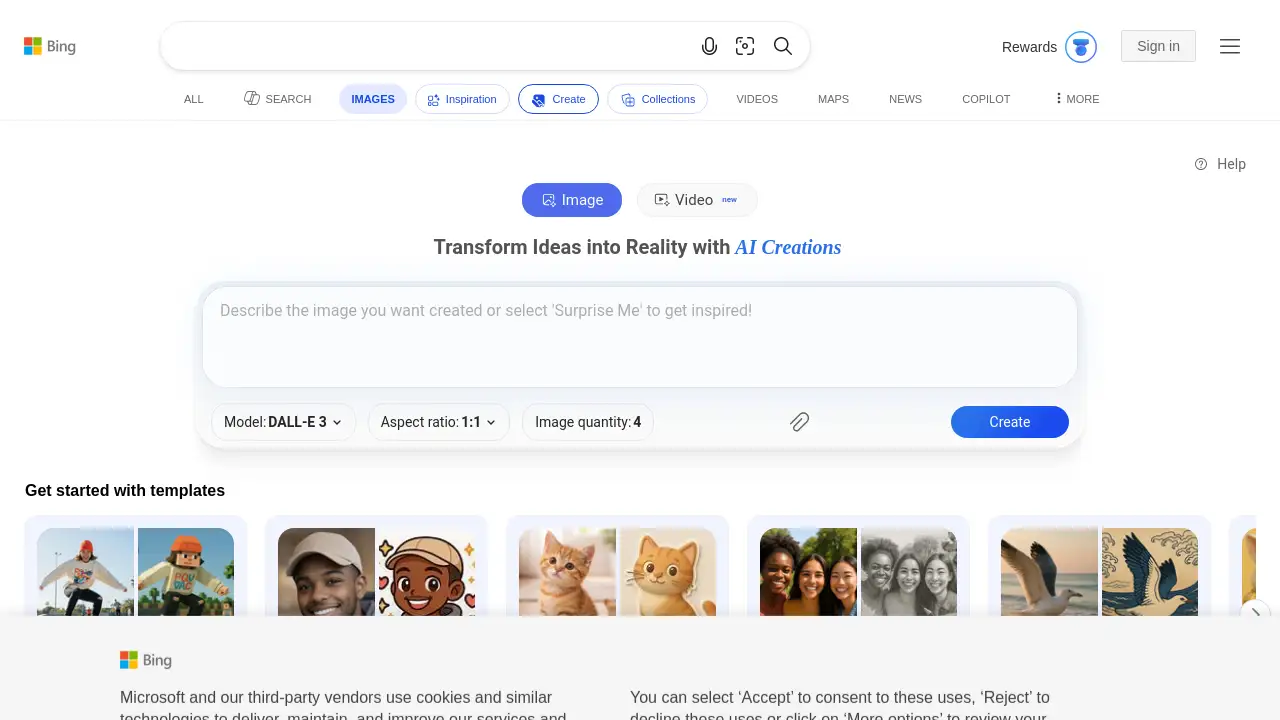
The tool provides various aspect ratios for output, including square (1:1), vertical (9:16, 4:7, 2:3), and horizontal (16:9, 7:4, 3:2). This ensures the generated content is optimized for different platforms like social media stories, blog headers, or presentations.
Image Remix and Enhancement
Beyond generating from scratch, Bing Image Creator allows users to upload an existing image to "enhance, remix, or reimagine" it with AI. This feature is useful for editing photos or creating variations of a concept.
Template-Based Prompt Starters
To help users begin, the interface offers a gallery of prompt templates across various themes (e.g., romantic scenes, cinematic shots, product showcases). These serve as inspiration and a starting point for crafting effective prompts.
Use Cases for Bing Image Creator
Social Media Content Creation
Ideal for generating unique, eye-catching graphics and short videos for posts, stories, and ads on platforms like Instagram, Facebook, and TikTok.
Blog and Website Illustration
Content creators and bloggers can quickly produce custom featured images, diagrams, or concept art to complement their written articles without needing graphic design skills.
Marketing and Advertising Material
Small businesses and marketers can prototype ad visuals, create product mockups, or develop campaign imagery cost-effectively and at scale.
Educational and Presentation Aids
Teachers and students can create visual aids, diagrams, or historical recreations to enhance learning materials and presentations.
Personal Art and Concept Exploration
Artists, writers, and hobbyists can use it to brainstorm character designs, visualize story scenes, or simply explore creative ideas and artistic styles.
How to Use Bing Image Creator
Using Bing Image Creator is a straightforward process. Follow these simple steps to turn your ideas into visuals.
- Access the Tool: Navigate to the Bing Image Creator website using a web browser.
- Craft Your Prompt: In the main text input box, type a detailed description of the image or video you want to generate. The more descriptive you are, the better the result.
- Configure Settings (Optional): Select your desired aspect ratio (e.g., square, vertical, horizontal) and choose between "Fast" or "Standard" priority for generation speed.
- Generate: Click the "Create" button. The AI will process your prompt and display the generated results, typically offering multiple variations to choose from.
- Download or Remix: Once satisfied, you can download the generated image or video. Alternatively, you can upload an image to use as a base for further AI-powered editing and remixing.
Target Audience for Bing Image Creator
- Social Media Managers and Content Creators
- Bloggers and Website Owners
- Digital Marketers and Small Business Owners
- Educators and Students
- Hobbyist Artists and Creative Writers
- Anyone needing quick visual assets without design software
Is Bing Image Creator Free?
Yes, Bing Image Creator offers a free tier for generating images and videos. The free plan includes a daily allotment of "fast creations" (which regenerate over time) for quicker generation, alongside unlimited standard creations that may take longer. For detailed information on any potential premium tiers or boost purchases, users should refer to the official Bing Image Creator website and its associated Rewards program.
| Plan | Price | Key Features |
|---|---|---|
| Free Tier | $0 | Access to AI image and video generation, daily fast creation boosts, standard priority creations, multiple aspect ratios, image upload for remixing. |
Bing Image Creator's Pros and Cons
| Aspect | Pros | Cons |
|---|---|---|
| Cost & Accessibility | Completely free to use with a generous allowance; lowers the barrier to AI art creation. | "Fast" generations are limited by a daily quota; standard generations can take several hours for videos. |
| Ease of Use | Intuitive, web-based interface with template prompts; no technical expertise required. | Output quality is highly dependent on the user's skill in crafting effective text prompts. |
| Features & Quality | Powered by advanced models (DALL-E 3, Sora); offers multiple aspect ratios and image remix functionality. | Currently lacks advanced editing controls found in dedicated design software (e.g., layering, precise color correction). |
| Reliability | Integrated with the reputable Microsoft Bing ecosystem. | Service can experience downtime or slowed generation during periods of high user demand. |
Frequently Asked Questions about Bing Image Creator
Is Bing Image Creator really free to use?
Yes, the core service of generating AI images and videos is free. Users receive a number of "fast creations" daily, with unlimited "standard" creations available, though the latter may have longer wait times.
What AI models power Bing Image Creator?
Bing Image Creator uses OpenAI's DALL-E 3 model for generating images. For creating videos from text, it utilizes the Sora model.
Can I use the images I create for commercial purposes?
The terms of use should be consulted for specific licensing details. Generally, images created with the tool can be used for personal and commercial purposes, but it's important to review the official Terms of Use on the website for the latest policies and any restrictions.
How can I get better results from my text prompts?
For better results, be as descriptive as possible. Include details about style (e.g., "cinematic," "watercolor"), subject, composition, lighting, and mood. Using the provided prompt templates as a starting point can also be helpful.
Can I upload my own images to edit with AI?
Yes, Bing Image Creator includes a feature that allows you to upload an image to "enhance, remix, or reimagine" it using AI. This lets you build upon existing visuals.
Why is my video generation taking so long?
Video generation is computationally intensive. If you are using the free "Standard" priority mode, it can take several hours to complete. Selecting the "Fast" priority mode, if you have boosts available, will significantly reduce the generation time.
Bing Image Creator Tags
AI image generator, free AI art, Bing Image Creator, DALL-E 3, text to image, AI video generator, Sora, create images from text, online image creator, digital art tool, content creation, social media graphics, marketing visuals, AI-powered design