Introduction
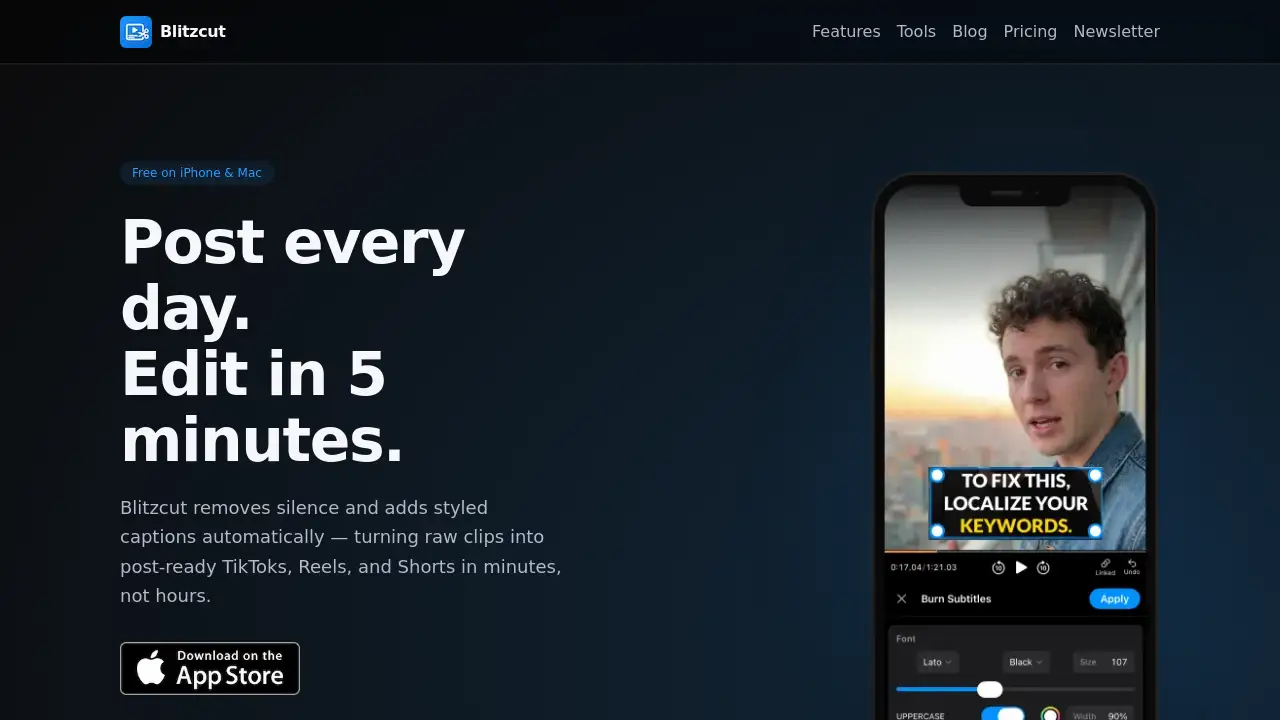
Blitzcut AI is an AI-powered video editor that creates captions and removes silence automatically.
What is Blitzcut AI?
Blitzcut AI is a mobile and desktop application designed to simplify and accelerate video editing, particularly for social media content. The core problem it addresses is the time-consuming process of editing raw footage, adding captions, and removing silent pauses—common tasks for creators posting to platforms like TikTok, Instagram Reels, and YouTube Shorts. Blitzcut AI automates these steps with on-device AI, meaning processing happens locally without needing to upload videos to the cloud, which significantly speeds up workflow. It is suitable for anyone, from beginners to seasoned creators, who wants to produce polished, captioned videos quickly without learning complex editing software. Its focus on auto-captions, silence removal, and direct export makes it a valuable tool for consistent daily content creation.
Key Features of Blitzcut AI
Unlimited Speech Transcription
The AI automatically transcribes all speech in a video with high accuracy, providing the foundation for generating captions without any manual typing.
Automatic Caption Generation
From the transcription, the tool instantly creates styled captions that can be placed directly onto the video, saving creators from the tedious task of manually adding and timing text.
AI-Powered Silence Removal
With a single tap, the AI video editor analyzes the audio waveform and intelligently cuts out all silent gaps and pauses, dramatically shortening video runtime and improving pacing.
Full Quality HDR Export
Edited videos can be exported in high dynamic range (HDR) quality, ensuring the final product looks sharp and professional when posted directly to social media platforms.
On-Device Processing
All AI processing for transcription and silence detection occurs directly on the user's iPhone or Mac, eliminating upload waits and enhancing privacy and speed.
One-Tap Social Media Export
The app allows users to export their finished videos directly to apps like TikTok, Instagram, or YouTube, streamlining the final step of the content creation process.
Use Cases for Blitzcut AI
Creating Daily TikTok or Instagram Reels
Content creators who need to post engaging short-form videos daily can use Blitzcut AI to turn raw clips into polished, captioned content in just a few minutes.
Editing Talking-Head Videos
For vloggers, educators, or business professionals who record monologues, the app efficiently removes awkward pauses and adds clear captions to improve viewer retention.
Repurposing Long-Form Content into Shorts
Users can quickly cut down longer videos, such as podcasts or webinars, into shareable clips for YouTube Shorts or other platforms by leveraging the automatic silence removal.
Enhancing Accessibility with Captions
By automatically generating accurate captions, creators can make their content more accessible to viewers who are deaf or hard of hearing, as well as those who watch videos without sound.
How to Use Blitzcut AI
- Import Your Video: Open the Blitzcut AI app and select a raw talking-head video from your camera roll. The app supports videos of any length and common formats.
- Process with One Tap: Tap the process button. The on-device AI will automatically transcribe the speech, remove all silent sections, and generate styled captions for your video.
- Review and Adjust: Quickly review the edited video and the automatically placed captions. Some apps allow for minor text edits or caption style adjustments at this stage.
- Export and Share: Export the final video in full HDR quality. Use the built-in sharing function to post it directly to your chosen social media platform like TikTok, Instagram, or YouTube.
Target Audience for Blitzcut AI
- Social media creators and influencers focused on TikTok, Reels, and Shorts.
- Small business owners and marketers creating promotional video content.
- Educators and coaches producing instructional or explainer videos.
- Vloggers and podcasters looking to repurpose content into short clips.
- Anyone seeking a fast, simple tool to add professional captions to videos without complex editing.
Is Blitzcut AI Free?
Blitzcut AI offers a free version to get started, with more advanced features likely available through a paid subscription. Users are encouraged to check the official pricing page for the most current details on plan tiers and features.
| Plan | Price | Key Features |
|---|---|---|
| Free | $0 | Core AI silence removal, auto-caption generation, basic export. |
| Pro (Info from Pricing Page) | Variable | Likely includes unlimited exports, advanced caption styles, priority support, and more tools. |
Blitzcut AI's Pros and Cons
| Aspect | Pros | Cons |
|---|---|---|
| Speed & Workflow | Dramatically reduces editing time from hours to minutes with one-tap processing. | Advanced manual editing controls may be limited compared to full desktop suites. |
| Accessibility & Ease | Extremely easy to use, no account needed to start, free to download. | As a focused tool, it may not replace full-featured video editors for complex projects. |
| Technology | On-device AI ensures fast processing and enhanced user privacy. | AI transcription accuracy, while high, may not be perfect for all accents or audio quality. |
| Output Quality | Exports full-quality HDR video suitable for professional social media posting. | The range of creative caption animations or effects might be more limited than some competitors. |
Frequently Asked Questions about Blitzcut AI
Is Blitzcut AI really free?
Yes, Blitzcut AI can be downloaded for free on iPhone and Mac, and users can access core features like AI silence removal and auto-caption generation without an initial cost. A paid Pro plan is available for access to additional features and capabilities.
How accurate are the auto-captions?
Blitzcut AI boasts over 95% caption accuracy for clear speech. The accuracy can be influenced by audio quality, background noise, and strong accents, but it is generally highly reliable for most talking-head videos.
Does it work without an internet connection?
Yes, because Blitzcut AI uses on-device AI processing, the core features like transcription and silence removal work completely offline once the app is installed, with no need to upload videos to the cloud.
What video formats does Blitzcut AI support?
The app supports common video formats from your camera roll. It is designed to handle videos "any length, any format" typically produced by smartphones, making it highly versatile for most user-generated content.
Can I customize the style of the captions?
While the reference information highlights "styled captions" are added automatically, most auto-caption tools, including Blitzcut AI, typically offer a selection of fonts, colors, and backgrounds to customize the look of your captions.
Which social media platforms can I export to directly?
Blitzcut AI facilitates direct export to major short-form video platforms, specifically TikTok, Instagram (for Reels), and YouTube (for Shorts), streamlining the publishing workflow.
Blitzcut AI Tags
AI video editor, auto-captions, video transcription, silence removal, TikTok editor, Instagram Reels editor, YouTube Shorts editor, on-device AI, caption generator, video editing app, social media video tool, fast video editing