Introduction
BulkIMG Flow is a bulk AI image generator for batches.
What is BulkIMG Flow?
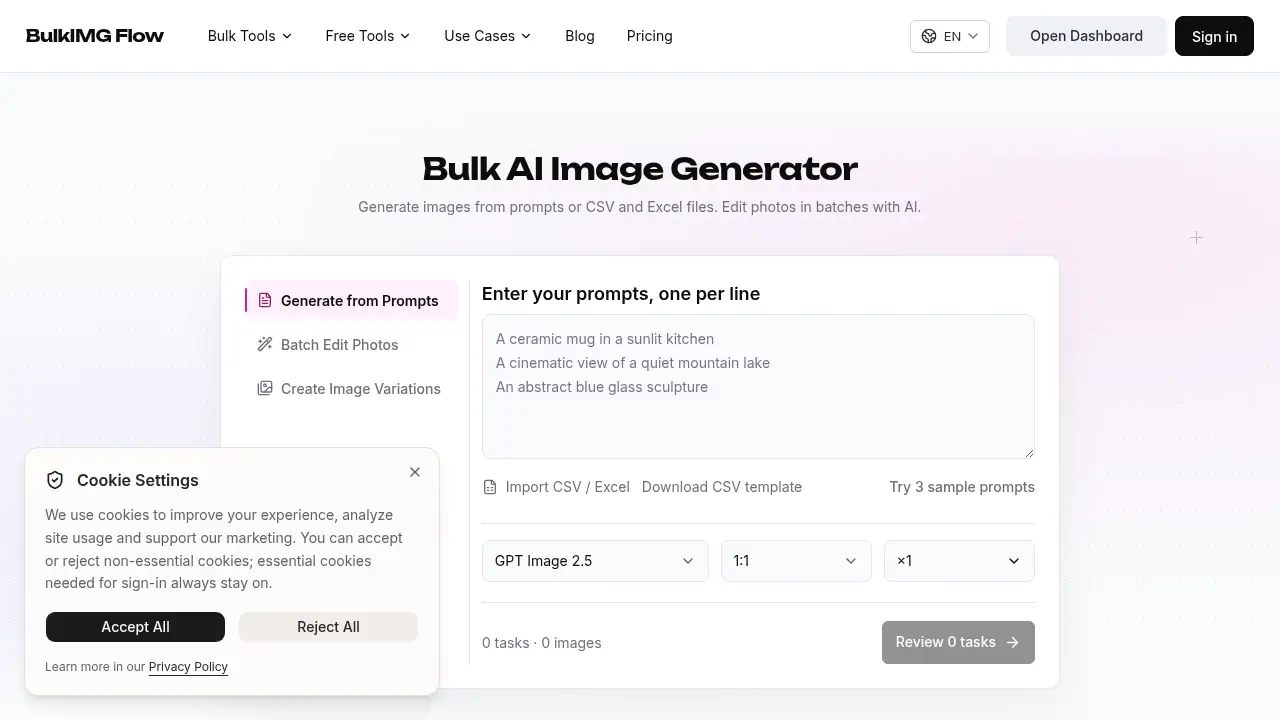
BulkIMG Flow is a web-based bulk AI image generator for creating and editing many images in one workflow. Instead of running one prompt at a time, users can paste multiple prompts, import a CSV or Excel file, or upload reference photos. The tool turns each row or prompt into a separate task, then lets users review results, retry individual tasks, and download finished images with their prompts in a ZIP file. It is built for teams and solo creators who need batch AI image generation for catalogs, ads, blog covers, storyboards, icons, and social posts. For anyone comparing a bulk AI image generator with a standard single-image tool, the main value is speed, organization, and repeatable output across dozens or hundreds of images.
Key Features of BulkIMG Flow
Multiple Prompt and Spreadsheet Input
Paste one prompt per line or import a CSV or Excel file to create many tasks at once. This bulk AI image generator also works as a practical CSV image generator for structured projects where each row needs its own image.
Batch AI Image Generation with Review
Run batch AI image generation with options for model, aspect ratio, and images per row. Users can review tasks and credit use before generating, then retry individual tasks when a result needs another attempt.
Image Variations from a Reference
Use one reference image with multiple prompts to create AI image variations. This is useful for product angles, ad concepts, and matching visual styles across a set.
Batch Photo Editing
Upload several photos and apply the same editing instruction to the set. This batch photo editing feature supports bulk image editing workflows such as background changes and product photo clean-up.
ZIP Download with Prompts
Download generated images and their prompt files together in a ZIP. This keeps large projects organized and makes it easier to hand off or archive completed batches.
Use Cases for BulkIMG Flow
Product Photos
Prepare catalog images, lifestyle scenes, and apparel visuals. An AI product photo generator workflow can help create sets of product photos from prompts or reference images.
Ads and Social Media
Create ad variations and coordinated visuals for social channels, using AI image variations to test different scenes and messages.
Blog and Editorial Covers
Generate a series of blog covers from article topics or briefs. A batch AI image generation workflow can keep a content calendar visually consistent.
Storyboards and Game Assets
Turn a shot list into ordered frames, or create sets of icons and game assets with a shared visual style.
How to Use BulkIMG Flow
- Open the dashboard and choose a mode such as generate from prompts, image variations, or batch photo editing.
- Add prompts, import a CSV or Excel file, or upload photos and a reference image.
- Select a supported model, aspect ratio, and images per row, then review tasks and credits.
- Generate the batch and review each result; retry individual tasks if needed.
- Download the finished images and prompt files as a ZIP. Using this bulk AI image generator, users can keep a large set of images organized in one flow.
Target Audience for BulkIMG Flow
- E-commerce and product photography teams
- Marketing and social media teams
- Bloggers, editors, and content teams
- Game artists, illustrators, and asset creators
- Agencies and freelancers managing client batches
- Storyboard and creative planning teams
Is BulkIMG Flow Free?
No free plan is shown for the bulk AI image generator. The site lists one-time credit packs and also mentions monthly and annual plans. The one-time packs below include credits that are listed as never expiring, access to all currently supported image models, CSV import, multiple prompts, and up to 200 tasks per batch.
| Plan | Price | Features |
|---|---|---|
| Basic | $29.90 one-time pack | 3,000 credits; all supported models; up to 200 tasks per batch; CSV import and multiple prompts |
| Standard | $69.90 one-time pack | 8,000 credits; all supported models; up to 200 tasks per batch; CSV import and multiple prompts |
| Premium | $159.90 one-time pack | 21,000 credits; all supported models; up to 200 tasks per batch; CSV import and multiple prompts |
| Enterprise | $399.90 one-time pack | 57,000 credits; all supported models; up to 200 tasks per batch; CSV import and multiple prompts |
A free bulk image resizer is also listed on the site, but bulk AI generation appears to use credits. Users should check the official pricing page for current monthly or annual options and credit estimates.
BulkIMG Flow's Pros and Cons
| Aspect | Pros | Cons |
|---|---|---|
| Batch workflow | Supports up to 200 tasks per batch; prompt, CSV, and Excel input | Large projects may need credit planning |
| Editing | Includes batch photo editing and individual task retries | Results depend on clear prompts and suitable references |
| Output | ZIP download includes images and prompt files | No free plan is shown for bulk AI generation |
| Pricing | One-time credit packs; credits are listed as never expiring | Costs scale with image volume |
Frequently Asked Questions about BulkIMG Flow
What is BulkIMG Flow?
BulkIMG Flow is a bulk AI image generator and batch photo editor. It creates or edits many images from prompts, CSV or Excel files, or uploaded photos, then lets users download results in a ZIP.
Can I generate images from multiple prompts or a CSV/Excel file?
Yes. Paste one prompt per line or import a CSV or Excel (.xlsx) file. Each prompt becomes a separate task, with up to 200 tasks per batch. This makes it a useful CSV image generator for structured projects.
Can I edit multiple photos at once?
Yes. Upload multiple images and enter the change to apply. The batch photo editing workflow is designed for sets of photos, and individual tasks can be retried if a result needs another attempt.
Does BulkIMG Flow support AI image variations?
Yes. Use one reference image with multiple prompts to create AI image variations. This is useful for product angles, ad concepts, and matching visual styles.
How many tasks can one batch handle?
Each batch supports up to 200 tasks, according to the reference information. Users can review tasks and credits before generating.
Is there a free plan?
No free plan is shown for the bulk AI image generator. One-time credit packs start at $29.90. Check the official pricing page for current monthly or annual options and credit estimates.
BulkIMG Flow Tags
bulk AI image generator, batch AI image generation, bulk image generator, batch photo editing, AI image variations, CSV image generator, bulk image editing, AI product photo generator, batch image generator, AI image generator from prompts, bulk AI photo editor, AI batch image generator