Introduction
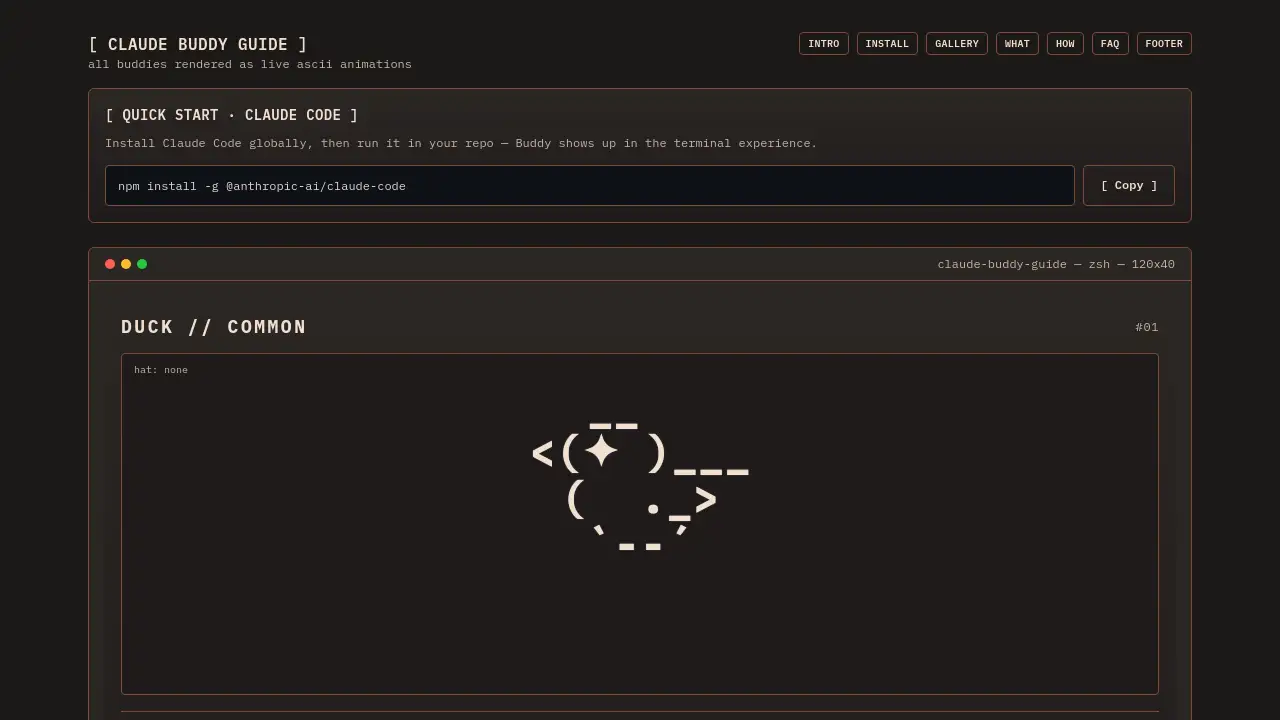
Claude Buddy is Claude Code's lightweight pet mode for a fun terminal companion.
What is Claude Buddy?
Claude Buddy is a playful feature within the Claude Code command-line interface (CLI) tool. It introduces animated ASCII pet companions, or "buddies," that appear alongside your coding workflow in the terminal. This pet mode addresses the potential monotony of command-line work by adding a layer of visual charm and lighthearted personality. It is suitable for developers and engineers who already use or are interested in using AI-powered coding assistants like Claude Code and appreciate subtle, non-intrusive enhancements to their development environment. The feature matters because it humanizes the coding experience, offering moments of delight and a unique, personalized touch to an otherwise text-heavy interface.
Key Features of Claude Buddy
Diverse Buddy Gallery
The feature offers a collection of different companions, such as a Duck, Goose, Cat, Dragon, and Ghost, each rendered as a live ASCII animation with distinct visual characteristics.
Unique Personalities and Stats
Every Buddy has a defined personality and a set of quantified stats—like Debugging, Patience, Chaos, Wisdom, and Snark—that humorously reflect its behavior and the type of support it might metaphorically provide.
Customization with Hats and Eyes
Users can customize their Buddy's appearance by changing its eye style and hat, including options like a crown, tophat, propeller, halo, wizard hat, or beanie, allowing for personal expression.
Rarity and Shiny Variants
Buddies come in different rarities (Common, Uncommon, Rare, Epic, Legendary) and some have special shiny variants, adding a collectible and gamified element to the terminal experience.
Lightweight and Integrated
As a lightweight pet mode, it runs seamlessly within the existing Claude Code terminal session without requiring significant additional resources or a complex setup.
Interactive Elements
The interface allows users to "Touch Buddy" for interaction and "Reroll" to randomly generate a new companion, encouraging engagement with the feature.
Use Cases for Claude Buddy
Enhancing Daily Coding Sessions
Developers can use a Claude Buddy as a cheerful visual companion during long programming or debugging tasks, making the terminal experience more enjoyable.
Adding Personality to Pair Programming
When sharing a screen during remote pair programming or collaborative sessions, a unique Buddy can serve as a fun icebreaker and a shared point of interest.
Lightening the Mood During Complex Debugging
Choosing a Buddy with high "Debugging" or "Patience" stats can be a humorous way to set an intention for tackling tricky bugs or refactoring complex code.
Customizing a Developer's Workspace
The feature allows developers to personalize their CLI environment with a chosen companion, hat, and eyes, making their tools feel more uniquely their own.
How to Use Claude Buddy
Using Claude Buddy is a straightforward process integrated into the Claude Code workflow.
- Install Claude Code: First, ensure the main Claude Code CLI tool is installed globally on your system using npm:
npm install -g @anthropic-ai/claude-code. - Run Claude Code: Navigate to your project repository in the terminal and start the Claude Code application as you normally would.
- Activate Buddy Mode: The Buddy should automatically appear within the terminal interface once Claude Code is running. You can interact with it directly there.
- Interact and Customize: Use the on-screen options to "Touch" your Buddy, "Reroll" for a new one, or change its hat and eye style to customize your pet mode companion.
Target Audience for Claude Buddy
- Developers using Claude Code: The primary audience is software engineers and programmers who actively use the Claude Code AI assistant for their work.
- Terminal Enthusiasts: Individuals who spend significant time in the command line and appreciate tools that enhance or personalize their terminal environment.
- Users Seeking Engaging Workflows: Professionals who enjoy subtle gamification or visual elements that make routine tasks more pleasant without disrupting productivity.
Is Claude Buddy Free?
Based on the available reference information, Claude Buddy is a feature within Claude Code. The provided installation command does not indicate a separate cost for the Buddy feature itself. Users should consult the official Claude Code documentation or website for detailed and up-to-date pricing information regarding the core Claude Code service.
| Aspect | Details |
|---|---|
| Feature Access | Claude Buddy appears to be an integrated feature of the Claude Code CLI tool. |
| Pricing Info | No separate pricing for Buddy is mentioned. Check the official Claude Code site for service plans. |
Claude Buddy's Pros and Cons
| Aspect | Pros | Cons |
|---|---|---|
| User Experience | Adds a unique, charming, and personalized element to the terminal. Makes coding sessions more visually engaging. | The ASCII art style may not appeal to all users preferring a minimalist or purely functional interface. |
| Performance | Described as a lightweight pet mode, suggesting minimal impact on system resources. | Any additional process, however small, uses some memory and CPU cycles. |
| Functionality | Offers fun customization and a collectible aspect with rarities. | The feature is purely cosmetic and does not add functional coding capabilities to the underlying AI tool. |
| Audience Fit | Perfect for developers who enjoy personalizing their tools and appreciate whimsical touches. | May be perceived as unnecessary or distracting by developers who prefer a completely professional, streamlined CLI. |
Frequently Asked Questions about Claude Buddy
What is Claude Buddy?
Claude Buddy is a lightweight pet mode feature for the Claude Code AI coding assistant. It places an animated ASCII character, or companion, in your terminal window to provide a visually engaging and personalized coding experience.
How do I get a Claude Buddy?
To get a Claude Buddy, you first need to install the Claude Code CLI tool globally via npm. Once installed and running in your project directory, the Buddy feature will be active and a companion will appear in your terminal experience.
Can I choose my Buddy?
You cannot directly select a specific Buddy. Instead, you are given a randomly generated companion. However, you can use the "Reroll" function to randomly generate a new one until you find a Buddy you like, and you can customize its hat and eyes.
Is Claude Buddy free to use?
The Buddy feature itself does not have a separate cost mentioned. It is part of the Claude Code ecosystem. Users should verify the current pricing and subscription models for the core Claude Code service on its official website.
Does Claude Buddy help with coding?
Claude Buddy is primarily a cosmetic and experiential feature. While each Buddy has humorous stats like "Debugging" and "Wisdom," these are for fun and do not directly enhance the AI's coding assistance capabilities. The core coding help comes from Claude Code itself.
What are Buddy rarities and shiny variants?
Rarities (Common, Uncommon, Rare, Epic, Legendary) and shiny variants are collectible traits that make some Buddies more visually unique or rare to encounter, adding a light gamification layer to finding your perfect companion.
Claude Buddy Tags
Claude Buddy, Claude Code, pet mode, terminal companion, ASCII pet, coding companion, developer tools, terminal experience, how to use Buddy, lightweight CLI tool, programming buddy, terminal customization