Introduction
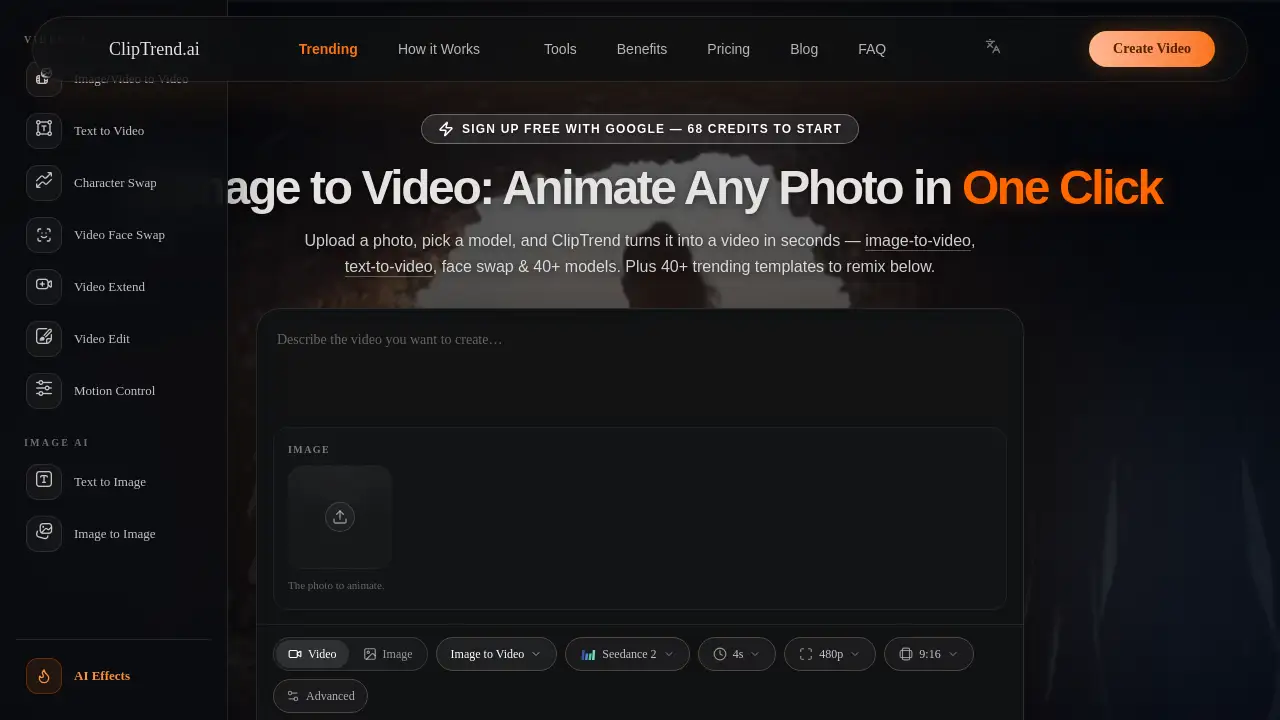
ClipTrend.ai is a trend-driven AI image to video generator that turns photos into viral clips using top models like Seedance 2 and Kling.
What is ClipTrend.ai?
ClipTrend.ai is an all-in-one AI video workspace built for creators who want to turn a static photo into a moving, shareable clip without wrestling with complex prompts or switching between multiple platforms. It solves the problem of chasing viral trends: instead of researching, engineering prompts, and testing different models, ClipTrend aggregates the best AI image to video engines—Seedance 2, Kling 3.0, Veo 3.1, Wan 2.7, and more—and wraps them inside pre‑tuned trending templates that reflect what is actually going viral on TikTok and YouTube. The platform suits social media creators, marketers, and anyone who needs viral AI video content fast. By combining face swap capabilities, text-to-video flexibility, and a gallery of real viral clips, ClipTrend makes generating watermark‑free, commercial‑safe videos as simple as uploading a selfie and clicking generate. This matters because trend cycles move quickly; having a single tool that handles model selection, prompt engineering, and trend research saves hours of manual work.
Key Features of ClipTrend.ai
AI Image to Video
Drop a photo into the generator, type a short motion description, and ClipTrend routes the job to the best‑fit engine (Seedance 2, Kling, Veo, etc.). The result is a social‑ready MP4 in 30–60 seconds.
Trending Video Templates
Instead of a blank canvas, ClipTrend shows a gallery of trending templates—real viral clips with view counts. Pick one, upload a selfie, and remix the effect in one click. No prompt engineering required.
40+ AI Models in One Workspace
Seedance 2, Kling 3.0, Veo 3.1, Wan 2.7, Grok, Nano Banana Pro, and more are accessible from a single interface. Switch models within any workspace without leaving the page.
Face Swap with Seedance 2
Upload a real human face and keep it consistent across every frame. ClipTrend’s Seedance 2 workspace does not censor recognizable faces, making face swap videos crisp and identity‑locked.
Text‑to‑Video
Prefer typing? Switch the input mode to text‑to‑video and generate clips from a prompt alone, with the same model routing and template integration.
Pay‑as‑You‑Go Credits
Browse for free. Credits are consumed only when a generation succeeds (failed runs refund automatically). Each template shows its exact credit cost before you generate, and paid exports are watermark‑free with commercial rights.
Use Cases for ClipTrend.ai
Social Media Creators
Upload a selfie, pick a trending template from TikTok, and generate a viral AI video effect in seconds. Post directly to Shorts, Reels, or TikTok without watermark or prompt hassle.
Digital Marketers
Turn product photos into short ad clips using AI image to video. Use the built‑in face swap to place a brand ambassador into various scenarios, all with commercial license.
Content Remixers
Found a viral clip you love? Paste its TikTok URL, and ClipTrend lifts the motion for you to remix with your own photo or video. Ideal for hopping on emerging trends quickly.
Small Business Owners
Create quick promotional videos for social media without hiring a designer. Use text‑to‑video to describe a feature, then generate a branded clip with zero editing experience.
How to Use ClipTrend.ai
- Sign up with Google – No credit card needed; you receive 68 free credits to start.
- Browse the gallery – Explore the trending templates or use the search bar to find a specific viral effect.
- Upload a photo – Drop a selfie, product image, or any picture into the AI image to video generator box.
- Optional: add a prompt – Type one line describing the motion (or skip and use the pre‑tuned template settings).
- Click Generate – The system routes your job to the best‑fit AI model and returns a watermark‑free MP4 in 30–60 seconds.
Target Audience for ClipTrend.ai
- Social media influencers and content creators
- Digital marketers and brand managers
- Small business owners
- Video editors looking for quick viral effects
- AI enthusiasts exploring generative video tools
- Anyone who wants to create viral AI video content without learning prompt engineering
Is ClipTrend.ai Free?
ClipTrend.ai offers a pay‑as‑you‑go credit system with a free trial. Browsing templates and previewing viral clips costs nothing. You receive 68 free credits upon sign‑up. After that, credit packs are available starting from a small one‑time purchase, with no subscription required. For regular creators, monthly subscriptions offer a larger allowance at a lower per‑credit cost.
| Plan | Price | Features |
|---|---|---|
| Free Trial | $0 | 68 credits, browse templates, preview viral clips |
| Pay‑as‑You‑Go | Varies (credit packs) | Watermark‑free exports, commercial license, auto‑refund on failures |
| Monthly Subscription | Starts at (see pricing page) | Larger credit allowance, reduced per‑credit cost, priority support |
Exact pricing and credit amounts are available at cliptrend.ai/pricing.
ClipTrend.ai's Pros and Cons
| Aspect | Pros | Cons |
|---|---|---|
| Ease of Use | One‑click generation from templates; no prompt engineering needed. | Limited customisation for advanced users who prefer full control over parameters. |
| Model Selection | Aggregates 10+ top AI models in one workspace (Seedance 2, Kling, Veo, etc.). | The specific model for each template is auto‑selected; you cannot always force a particular engine. |
| Pricing | Pay‑as‑you‑go with no subscription lock‑in; free credits to start. | High‑volume creators may find per‑credit costs add up compared to flat‑rate subscriptions of other tools. |
| Face Swap & Censorship | Seedance 2 supports real faces without censor; consistent identity across frames. | Face swap quality depends on photo clarity; complex group scenes may not perform as well. |
| Commercial Rights | All paid exports are watermark‑free and come with a commercial license. | Free trial exports include a watermark. |
Frequently Asked Questions about ClipTrend.ai
What makes ClipTrend different from other AI image to video tools?
ClipTrend focuses on pre‑tuned trending templates based on real viral clips, so you do not have to engineer prompts or choose a model. It aggregates multiple top engines (Seedance 2, Kling, Veo, etc.) under one pay‑as‑you‑go account.
How does the credit system work?
Credits are spent only when a generation completes successfully. Each template displays its exact credit cost upfront. Failed renders are refunded automatically, and paid credits produce watermark‑free MP4s with full commercial rights.
Can I use ClipTrend for commercial projects?
Yes. All paid exports come with a commercial license, suitable for social media marketing, ads, client work, product demos, and monetised YouTube Shorts.
Does ClipTrend support text‑to‑video or only image‑to‑video?
Both. You can switch the input mode to text‑to‑video and generate clips from a written prompt, using the same model routing and template integration.
What AI models are available on ClipTrend?
Seedance 2, Kling 3.0, Veo 3.1, Wan 2.7, Grok, Nano Banana Pro, and more are all accessible within the workspace. The platform automatically routes your job to the best‑fit model for the selected template.
Is there a mobile app?
Currently ClipTrend runs in a browser on desktop and mobile. No app download is required; the interface is optimised for quick generation on any device.
ClipTrend.ai Tags
AI image to video, viral AI video, face swap, text‑to‑video, Seedance 2, Kling 3.0, Veo 3.1, trending templates, AI video generator, photo to video, ClipTrend review, pay‑as‑you‑go AI video