Introduction
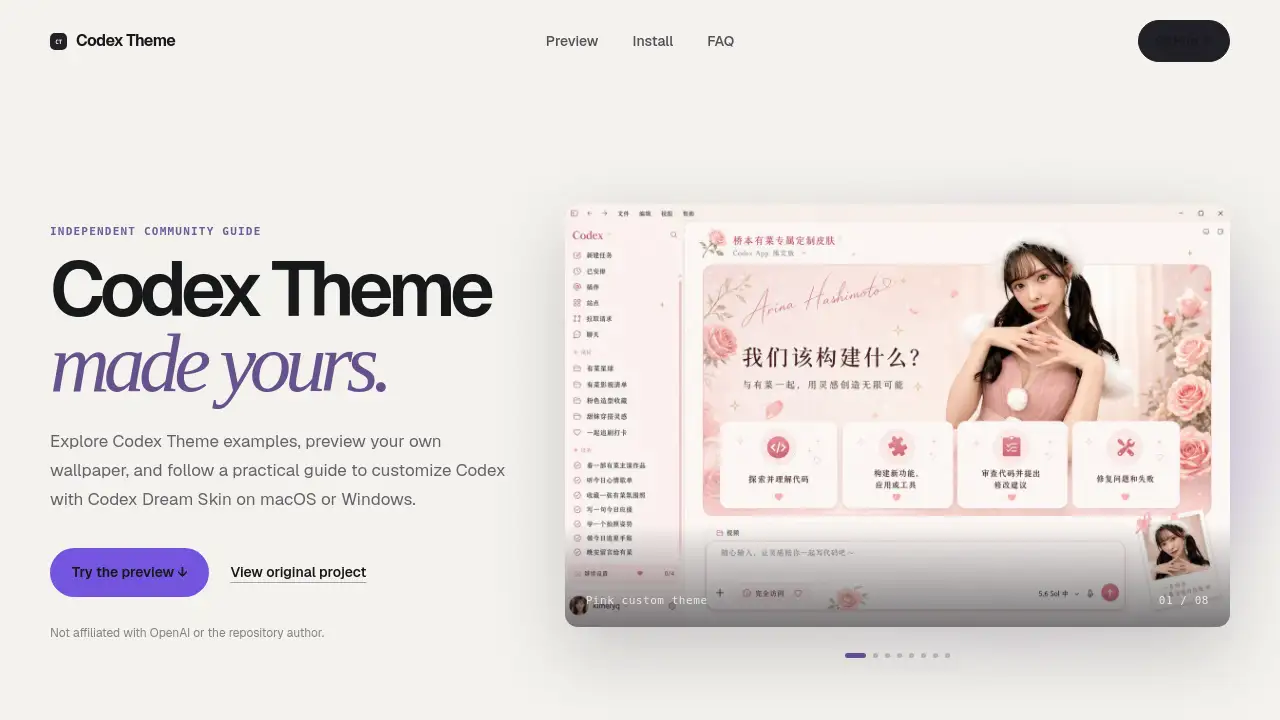
A Codex Theme lets developers personalize their coding workspace without altering the official Codex app. This visual layer adds custom wallpapers, coordinated colors, and translucent panels to the interface while keeping all core functions intact. The guide and preview tool at codetheme.org help users explore designs before installation. Whether you want a calming workspace or a branded look, a Codex Theme changes only the visual layer through a local CDP injection method, ensuring the underlying app remains untouched. This review covers what a Codex Theme is, how to use it, and its key benefits.
What is Codex Theme?
A Codex Theme is a custom visual layer for the official Codex app – OpenAI’s AI coding assistant interface. It combines a personalized background, matching color palette, and translucent panels, creating a more focused and pleasant coding environment. The theme is applied through Codex Dream Skin, an independent open-source project that uses a local CDP (Chrome DevTools Protocol) connection. This method avoids modifying the app’s core files, so projects, prompts, and conversations stay fully functional.
The concept solves a common problem: developers often want a workspace that reflects their personality or reduces visual fatigue, but the default Codex interface is fixed. A Codex Theme bridges that gap without requiring a third-party fork or risky modifications. The codetheme.org website offers a live preview playground where users can test wallpapers before committing. It also provides step-by-step guides for macOS and Windows, making the customization process accessible to non-experts. Ultimately, Codex Theme matters because it turns a utilitarian coding tool into a personal space without sacrificing stability or security.
Key secondary keywords naturally used here: Codex Dream Skin, custom Codex theme, Codex customization, coding workspace theme.
Key Features of Codex Theme
Personal Atmosphere
Turn any wallpaper and color scheme into a focused workspace. The theme applies a consistent visual style that reduces clutter and makes the interface feel yours.
Real Controls Remain
Navigation menus, conversation cards, and the prompt box stay fully interactive. The visual layer never hides or breaks essential UI elements.
Reversible Setup
A built-in restore tool returns the Codex app to its original appearance. Users can switch between a custom Codex Theme and the default look at any time.
Local Preview Playground
The website offers a browser-based preview. Upload a JPG, PNG, or WebP image to see how it works as a Codex Theme – all processing stays on your device, and nothing is uploaded or stored.
Platform-Specific Installation
Guides for macOS (Apple Silicon and Intel) and Windows use command-line scripts or PowerShell. The Codex Dream Skin repository provides the exact instructions for each operating system.
Safety Through CDP Injection
The theme applies via a local debugging port, not by replacing app files. The app.asar, WindowsApps, and official code signature remain unchanged.
Separation of API Settings
Your API key, model provider, and Base URL are not altered by applying a Codex Theme. The visual layer and backend settings stay independent.
Verified Restore Process
Each platform includes a restoration and verification step, ensuring users can always revert to the default Codex interface without leftovers.
Use Cases for Codex Theme
Personal Coding Workspace
Enhance daily productivity by choosing colors and backgrounds that reduce eye strain. A personalized Codex Theme makes extended coding sessions more enjoyable.
Streaming and Content Creation
YouTubers and live coders can brand their Codex workspace with a unique theme that matches their channel aesthetic. The custom Codex Theme becomes part of the visual identity.
Demo and Presentation Environments
When demonstrating Codex features to clients or students, a clean, distraction-free theme helps maintain focus on the AI interactions rather than the default interface.
Team Collaboration Consistency
Teams can adopt a shared Codex Theme to create a uniform look across members’ machines, reinforcing brand or project identity without altering functionality.
How to Use Codex Theme
-
Preview your wallpaper – Go to codetheme.org, drag or select an image in the playground, and see how it looks as a Codex Theme. The preview updates live and runs locally in your browser.
-
Download Codex Dream Skin – Visit the official repository (linked from the site) and grab the latest release for your operating system. Ensure you download only from the original source to avoid modified files.
-
Follow the platform-specific guide – On macOS, open the terminal and run the command installer for Apple Silicon or Intel. On Windows, run the provided PowerShell script in an administrator terminal.
-
Apply the Codex Theme – The installer will launch Codex Dream Skin, which injects your chosen wallpaper and color palette via a local CDP connection. The Codex app will open with the new visual layer.
-
Restore if needed – To go back to the default appearance, use the restore script included in the repository. Run the verification step to confirm the original view is back.
Target Audience for Codex Theme
- Developers and programmers who use the Codex AI assistant and want a personalized workspace.
- Designers who wish to align their coding environment with their overall aesthetic preferences.
- Content creators who stream or record coding sessions and need a branded or distraction-free background.
- IT managers who want to deploy a consistent theme across team machines without breaking official software.
- Early adopters interested in customizing AI tool interfaces without modifying core binaries.
Is Codex Theme Free?
Yes. The Codex Theme guide and preview tool on codetheme.org are free to use. Codex Dream Skin, the open-source project that applies the visual layer, is also free. There are no paid plans, subscriptions, or hidden costs. The only requirement is having a compatible Codex app installation on macOS or Windows.
| Plan | Price | Features |
|---|---|---|
| Codex Theme (Guide) | Free | Online wallpaper preview, platform installation guides, safety FAQ |
| Codex Dream Skin | Free | Open-source visual layer injector for macOS and Windows |
Codex Theme's Pros and Cons
| Aspect | Pros | Cons |
|---|---|---|
| Customization | Personalizes coding workspace with wallpaper and colors | Limited to Codex app only; no support for other AI tools |
| Safety | Uses non‑invasive CDP injection; does not modify app core | Requires opening a local debugging port while theme is active |
| Ease of Use | Simple preview and platform‑specific installers | Commands may be intimidating for non‑technical users |
| Reversibility | Built‑in restore tools revert to default look cleanly | Recovery process may fail if repository is not kept updated |
| Pricing | Completely free, open‑source | No official support; relies on community maintenance |
Frequently Asked Questions about Codex Theme
What is a Codex Theme exactly?
A Codex Theme is a visual customization that adds a custom background, coordinated colors, and translucent panels to the official Codex interface. It is applied via Codex Dream Skin, an independent open-source tool, and does not replace or modify the Codex app itself.
Is Codex Dream Skin an official OpenAI product?
No. Codex Dream Skin is an independent project created by Fei-Away. Codex Theme (codetheme.org) is a community guide and preview tool. Neither is affiliated with OpenAI or the repository author.
Can I restore the original Codex appearance after applying a theme?
Yes. The Codex Dream Skin repository includes platform-specific restore scripts. Simply run them, then verify that the original default look has returned.
Is installing a Codex Theme completely safe?
No third-party script is risk-free. The theme uses a local CDP port while active. Download only from the official repository, review the source, and avoid running untrusted programs during the customization. The theme does not modify the official app package.
Does the codetheme.org preview upload my wallpaper?
No. The preview runs entirely in your browser. Your image is processed locally and stored as a temporary browser URL. When you close or refresh the page, the preview disappears.
What kind of wallpaper works best for a Codex Theme?
Wide, high-resolution images with open space and moderate contrast are ideal. Avoid very busy patterns behind the prompt area. Check both light and dark details to ensure buttons and text remain readable.
Codex Theme Tags
Codex Theme, Codex Dream Skin, custom Codex theme, Codex customization, coding workspace theme, OpenAI Codex theme, macOS Codex customization, Windows Codex theme, Codex visual layer, coding environment personalization, AI coding assistant theme, Codex interface customizer