Introduction
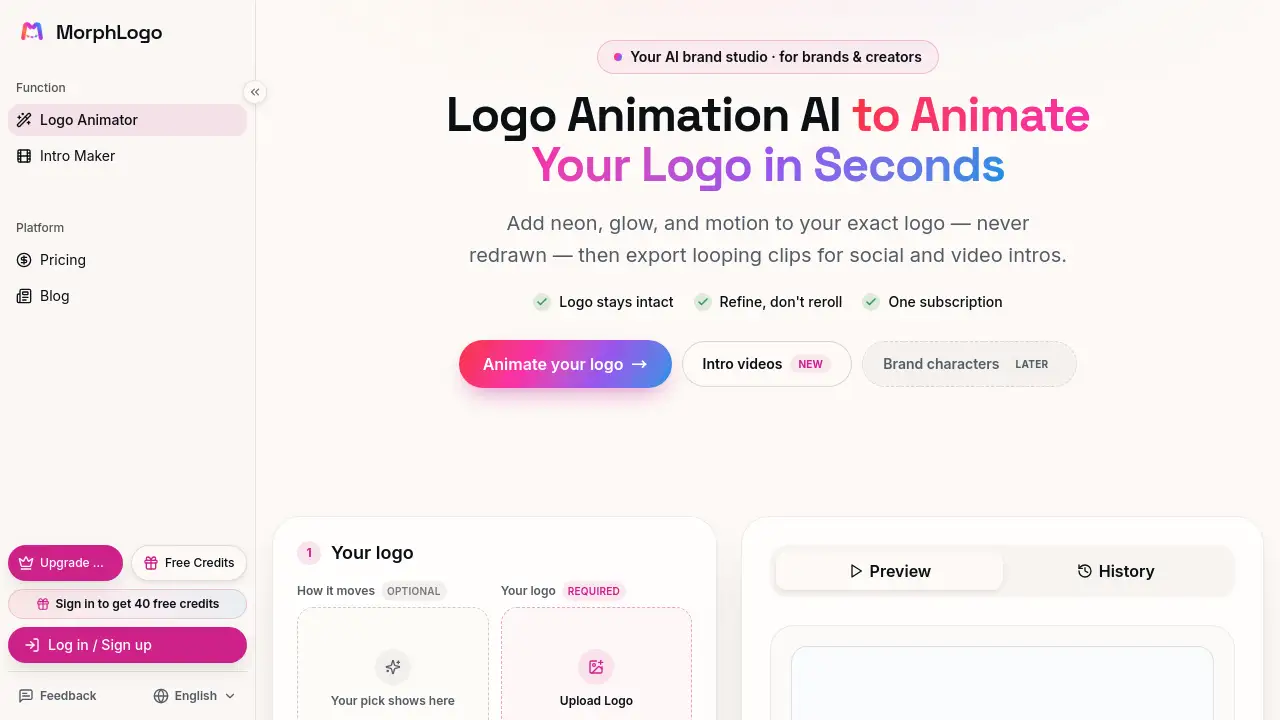
MorphLogo is a logo animation AI that turns a static logo into cinematic motion in seconds. This logo animation AI keeps your exact design intact while adding effects, and it helps creators and brands export ready-to-use animated logos without learning complex software. MorphLogo offers free sign-up credits, so anyone can test the tool immediately.
What is MorphLogo?
MorphLogo is an online logo animation AI designed for brands, creators, and small teams that need an animated logo quickly. Instead of asking users to redraw or recreate their logo in another app, MorphLogo accepts a static image file, keeps it as the real first frame, and applies motion, lighting, and camera effects around it. The result is a short looping clip that can be used for video intros, social content, or web design.
This solves a common problem: many people have a logo but not the time or budget to hire a motion designer. With MorphLogo, the process is as simple as uploading a file, choosing a style, and exporting a video. The tool supports PNG, JPG, and WebP uploads, with transparent PNGs recommended for clean motion. Because the animation starts from the actual uploaded logo, the core design stays consistent and on-brand.
For anyone searching for an AI logo animation generator, MorphLogo provides a practical, self-service alternative to After Effects and other professional tools. It matters because animated branding is now expected across social media, websites, and video content, and MorphLogo makes it accessible.
Key Features of MorphLogo
Logo-Intact AI Animation
MorphLogo uses your uploaded file as the actual first frame. This AI logo animation maker does not redraw or drift away from your mark, so shapes, colors, and proportions remain true to the original logo.
Style Library
Pick from Cinematic, Neon, 3D Orbit, Liquid, Particles, and Glitch. Each style works with a prompt to produce different reveals, lighting, and camera movements for a brand-ready animated logo.
Fast Export Options
Upload and get a render in about a minute. MorphLogo exports MP4, WebM, or GIF in 16:9, 1:1, or 9:16, making it easy to match a social or video format.
Prompt-Based Control
Write a short description of the motion and lighting you want. This logo animation generator combines that prompt with a chosen style for more predictable, refined results.
No Timeline or Keyframing
MorphLogo is not a video editor. There is no timeline to learn, so the logo animation AI handles the motion automatically and helps anyone animate a logo with AI.
Commercial-Ready Downloads
Paid exports remove the MorphLogo watermark and are ready for commercial use. This makes the tool suitable for client projects, product launches, and published brand content.
Use Cases for MorphLogo
Social Media Intros and Outros
Creators can turn a static logo into a short loop for YouTube, Instagram, or TikTok intros. The 1:1 and 9:16 aspect ratios make MorphLogo useful for social-friendly animated logo content.
Website Headers and Landing Pages
Brand teams can place a subtle animated logo at the top of a site or product page. This adds motion without replacing the primary design, thanks to the logo-intact approach.
Product Launches and Ads
Startups and marketers can generate a cinematic reveal for launch videos, ad spots, and demo reels. MorphLogo’s logo animation AI gives a professional finish in minutes.
App Splash Screens
App developers can use the tool to create a brief animated logo moment for a mobile app or web application, adding polish to the first screen.
How to Use MorphLogo
Using MorphLogo is straightforward and does not require animation experience.
- Upload your logo. Drop a PNG, JPG, or WebP file. Transparent backgrounds work best for clean motion.
- Pick a style and prompt. Choose a motion style and aspect ratio, then describe the reveal, lighting, or camera move you want to guide the logo animation AI.
- Export your animation. Preview the clip, then download it as MP4, WebM, or GIF for social posts, intros, or other projects.
In about a minute, MorphLogo can turn a static file into a brand-ready animated logo. This workflow is the core promise of MorphLogo’s logo animation AI: keep the logo intact and add cinematic motion without extra tools.
Target Audience for MorphLogo
- Brand managers who need fast animated assets for campaigns.
- Content creators and YouTubers who want intro and outro motion.
- Small business owners who cannot afford a motion designer.
- Web designers who need logo animation for sites and landing pages.
- Marketing teams preparing product launches and online ads.
- App developers who want splash-screen animations.
Is MorphLogo Free?
MorphLogo offers free credits when you sign up, so new users can animate their first logo without a credit card. Most animations render in about a minute, and free previews include a small MorphLogo watermark. Paid subscription options remove the watermark and provide clean video exports for commercial use.
The homepage emphasizes a “one subscription” approach, meaning users can access multiple styles and export options without per-file fees. Exact pricing is listed on the official MorphLogo website. This makes the logo animation AI easy to test before buying.
| Plan | Price | Features |
|---|---|---|
| Free | $0 | Sign-up credits, no credit card required, watermark on previews |
| Subscription | See website | Removes watermark, commercial-ready exports, full style library |
MorphLogo's Pros and Cons
| Aspect | Pros | Cons |
|---|---|---|
| Ease of Use | No timeline or keyframing; anyone can animate a logo with AI | Limited creative control compared to manual animation software |
| Speed | Most renders finish in about a minute | Higher resolutions or longer clips may take more time |
| Logo Fidelity | Uses your original logo as the first frame, so the design stays intact | Only accepts PNG, JPG, or WebP uploads |
| Pricing | Free credits let you try the tool before paying | Free exports have a watermark; paid plan needed for clean commercial clips |
Frequently Asked Questions about MorphLogo
Can I use MorphLogo for free?
Yes. MorphLogo gives free credits when you sign up, so you can animate your first logo without paying or entering a credit card. Previews have a watermark, and paid exports remove it.
Is MorphLogo a logo animation generator or editor?
MorphLogo works as both an AI logo animation maker and generator. You upload a static logo, choose a style, and it creates motion automatically. There is no timeline or manual keyframing involved.
What file types can I upload?
MorphLogo accepts PNG, JPG, and WebP up to 24MB. Transparent PNGs produce the cleanest animation because the background does not interfere with the motion.
What formats can I export?
You can export an animated logo as MP4, WebM, or GIF. These files are useful for social media, video intros, website headers, and app screens.
Does MorphLogo keep my original logo intact?
Yes. The logo animation AI uses your uploaded file as the actual first frame, so the animation starts and ends on your real logo. Styles like Cinematic, Neon, and 3D Orbit add motion around the logo without redrawing it.
Can I create 3D logo animation with MorphLogo?
Some styles, such as Orbit Glass and Chrome Shine, add depth and dimensional motion for a 3D look. The logo animation AI creates this effect without requiring 3D modeling software.
MorphLogo Tags
MorphLogo, logo animation AI, AI logo animation maker, animated logo, logo animation generator, animate logo with AI, brand motion, logo animation maker, cinematic logo, social media logo animation, logo video intro, video marketing tools