Introduction
A comparative guide to help users find and evaluate AI coworker tools for their workflow.
What is Cowork Leaderboard?
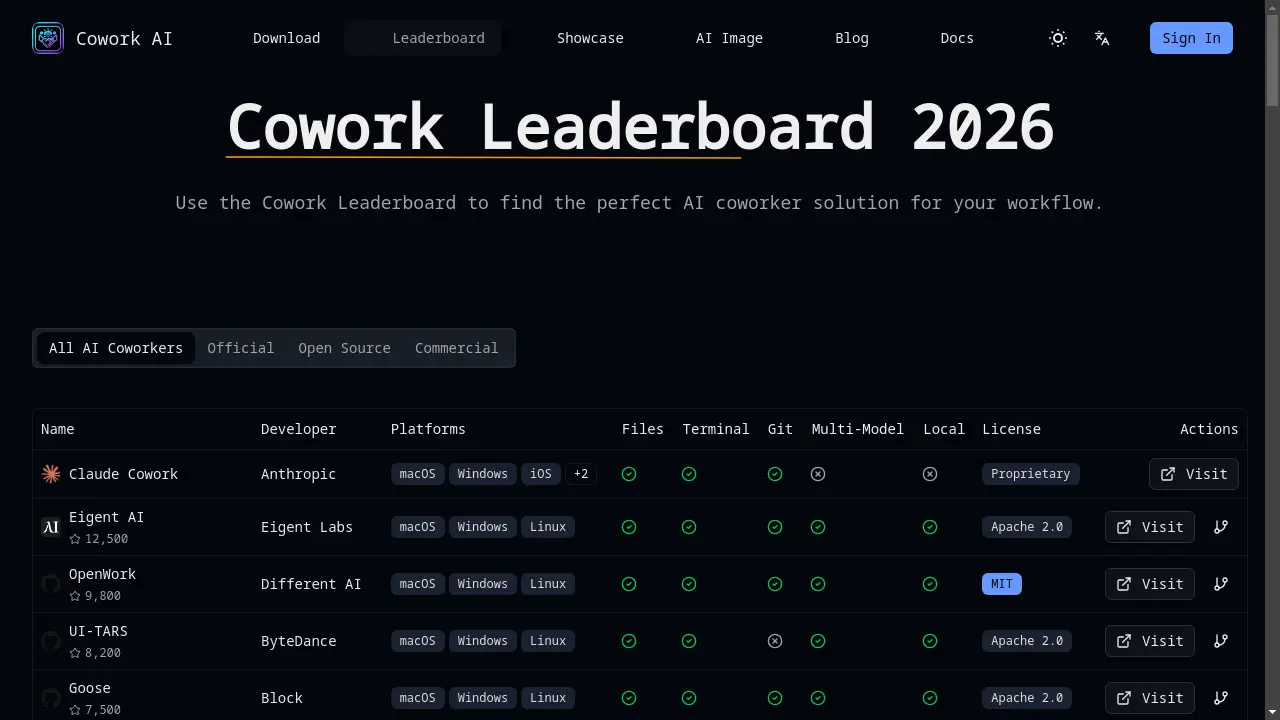
The Cowork Leaderboard is a specialized comparison platform designed to help users navigate the growing ecosystem of AI coworker solutions. It addresses the challenge of choosing between numerous tools by providing a structured, feature-based evaluation. This platform is suitable for developers, project managers, and teams looking to integrate an AI assistant into their software development or technical workflows. By comparing key factors like platform support, model flexibility, and deployment options, the Cowork Leaderboard enables users to make an informed decision that aligns with their specific technical requirements and privacy needs.
Key Features of Cowork Leaderboard
Comprehensive Feature Comparison
The leaderboard presents a detailed table comparing AI coworker solutions across essential dimensions such as supported platforms, file handling, terminal access, Git integration, and licensing.
Multi-Model Support Analysis
It highlights which AI coworkers in the Cowork Leaderboard offer multi-model support, allowing users to choose tools that can utilize different AI models like Claude, GPT-4, or local LLMs for greater flexibility.
Open Source vs. Proprietary Evaluation
The platform clearly distinguishes between open source AI coworkers, which offer transparency and customization, and proprietary solutions that may provide more polished user experiences.
Local Deployment Focus
For users with stringent privacy requirements, the Cowork Leaderboard identifies solutions capable of local deployment, ensuring sensitive data never leaves the user's own infrastructure.
Platform Compatibility Breakdown
It provides a clear overview of which operating systems and platforms (macOS, Windows, Linux, mobile) each AI coworker supports, helping users find a tool compatible with their device ecosystem.
Actionable Insights and Criteria
Beyond just listing tools, it explains the comparison criteria and why factors like terminal access or Git support are key for an effective AI coworker workflow.
Use Cases for Cowork Leaderboard
Selecting a Team Development Tool
Development teams can use the Cowork Leaderboard to evaluate and standardize on an AI coworker that fits their tech stack, collaboration style, and security policies.
Finding Privacy-First AI Solutions
Individuals or enterprises handling confidential code can use the platform to identify AI coworkers with strong local deployment capabilities from the Cowork Leaderboard listings.
Comparing Open Source Alternatives
Developers interested in customization and community-driven tools can leverage the leaderboard to compare open source AI coworkers like Eigent AI and OpenWork.
Optimizing AI Model Usage
Users who want to leverage multiple AI models for different tasks can refer to the Cowork Leaderboard to find tools with robust multi-model support.
How to Use Cowork Leaderboard
- Visit the Platform: Navigate to the Cowork Leaderboard website to view the main comparison table.
- Review the Criteria: Understand the key factors listed (Platforms, Files, Terminal, Git, Multi-Model, Local, License) to know what each column represents.
- Filter for Your Needs: Scan the table to identify AI coworker solutions that match your primary requirements, such as your operating system or need for local deployment.
- Compare Top Candidates: Shortlist 2-3 tools and compare their full feature sets side-by-side using the data provided in the Cowork Leaderboard.
- Make an Informed Choice: Use the insights to select the AI coworker that best transforms your specific workflow.
Target Audience for Cowork Leaderboard
- Software Developers and Engineers
- Tech Leads and Engineering Managers
- Data Scientists and ML Engineers
- Open Source Enthusiasts and Contributors
- Enterprise IT and Security Teams
- Freelancers and Indie Hackers
Is Cowork Leaderboard Free?
Based on the available reference information, the Cowork Leaderboard itself appears to be a free resource for comparing AI coworker tools. The platform does not sell software but provides evaluation data. Users should check the official product page for any updates on premium features or access models.
| Plan | Price | Features |
|---|---|---|
| Free Access | $0 | Full access to the comparison table, evaluation criteria, and tool listings. |
Cowork Leaderboard's Pros and Cons
| Aspect | Pros | Cons |
|---|---|---|
| Information Utility | Provides a centralized, structured comparison saving research time. | Data is only as current as the last update (e.g., 2026-01-22). |
| Decision Support | Highlights critical differentiators like local deployment and multi-model support. | May not cover every niche or newly launched AI coworker tool. |
| User Focus | Clearly explains evaluation criteria, helping users understand what features matter. | Lacks detailed user reviews or performance benchmarks for each tool. |
| Objectivity | Presents factual data on features, allowing for neutral comparison. | Does not provide a single "best" recommendation, leaving final choice to the user. |
Frequently Asked Questions about Cowork Leaderboard
How often is the Cowork Leaderboard updated?
The reference information indicates the leaderboard was last updated on January 22, 2026. For the most current data, users should check the timestamp on the official Cowork Leaderboard page.
What does "Local" mean in the comparison table?
In the Cowork Leaderboard context, "Local" refers to an AI coworker's capability to be deployed and run on a user's own hardware or private servers, ensuring data does not leave their controlled environment.
Can I trust the comparisons on the Cowork Leaderboard?
The Cowork Leaderboard provides a feature-based comparison using publicly available criteria. It is designed as a starting point for research, and users are encouraged to verify details on the official websites of the listed AI coworker tools.
Does the Cowork Leaderboard rank tools as "best" or "worst"?
No, the Cowork Leaderboard does not assign a single ranking score. Instead, it lays out objective features, empowering users to decide which tool is best for their specific workflow based on the factors that matter most to them.
Are all AI coworker tools listed on the platform?
While it aims to cover significant solutions, the Cowork Leaderboard may not include every available tool. The selection likely focuses on prominent open source and proprietary AI coworkers relevant to a technical audience.
How is "Multi-Model" support beneficial?
As noted in the Cowork Leaderboard, multi-model support allows an AI coworker to use different large language models (e.g., Claude, GPT-4). This offers flexibility to choose the best model for a task, optimize costs, and avoid vendor lock-in.
Cowork Leaderboard Tags
AI coworker comparison, AI assistant tools, developer tools, open source AI, local AI deployment, multi-model AI, Claude Cowork, Eigent AI, workflow automation, software development tools, AI coding assistant, tool evaluation platform