Introduction
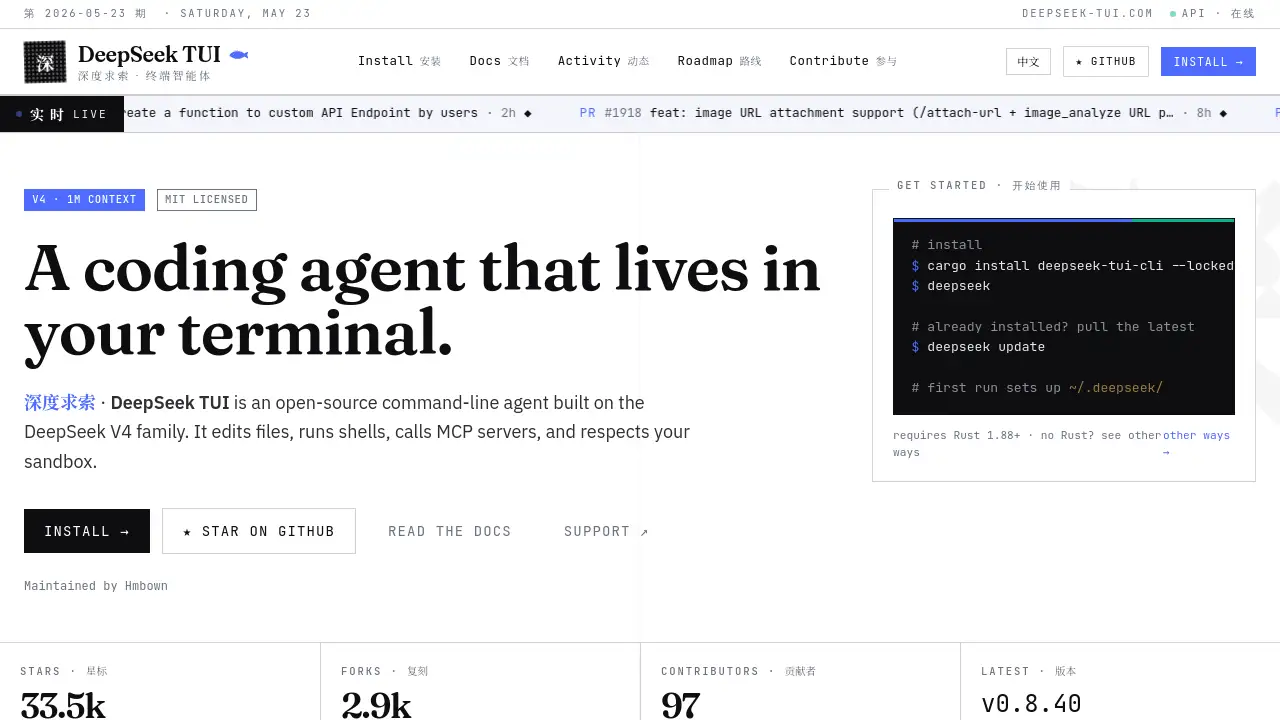
An open-source terminal-native coding agent built on DeepSeek V4, designed to assist developers directly within their command-line environment.
What is DeepSeek TUI?
DeepSeek TUI is a terminal-based coding assistant that leverages the capabilities of the DeepSeek V4 large language model. It operates as a command-line agent, moving beyond simple chat to actively read, edit, and run code within a developer's workflow. It solves the problem of context switching by integrating powerful AI assistance directly into the terminal, the primary environment for many software engineers and system administrators. This tool is particularly suitable for developers who prefer keyboard-driven workflows, work on remote servers, or manage complex, multi-step coding tasks. Its importance lies in combining the raw power of a modern LLM with a practical, sandboxed interface that respects system security and developer intent.
Key Features of DeepSeek TUI
Terminal-Native Operation
The agent runs entirely within your command-line interface, eliminating the need for a separate browser or GUI application, which streamlines the development process.
Built on DeepSeek V4
Powered by the advanced DeepSeek V4 model family, it provides intelligent code generation, analysis, and problem-solving with a substantial 1M token context window for handling large projects.
Integrated Tool Use
It can directly edit files, execute shell commands, and call MCP (Model Context Protocol) servers, acting as a true coding agent that performs tasks rather than just suggesting them.
Configurable Safety Sandbox
The tool features a three-mode approval system (Plan, Agent, YOLO) and employs OS-level sandboxing like seatbelt on macOS and landlock on Linux to safely control risky operations.
Open Source and Community-Driven
Released under the MIT license, the project is open for collaboration, with a transparent development process visible through its live activity feed and public roadmap.
Multi-Provider Support
While defaulting to deepseek-v4-pro, it supports nine different AI providers, allowing users to swap models based on preference or specific task requirements.
Use Cases for DeepSeek TUI
Automated Code Refactoring
Developers can use the terminal agent to analyze and restructure codebases, applying consistent patterns and improvements across multiple files directly from the CLI.
Interactive Script Debugging
System administrators can interactively debug shell scripts or automation pipelines by having the agent examine logs, suggest fixes, and test commands in a controlled environment.
Rapid Prototyping and Boilerplate Generation
When starting new projects, developers can prompt the DeepSeek TUI to generate initial project structures, configuration files, and sample code, accelerating the setup phase.
CI/CD Pipeline Assistance
The tool can be integrated into development workflows to review code changes, run tests, and generate reports as part of a continuous integration process, all from the terminal.
How to Use DeepSeek TUI
- Installation: The primary method is via Rust's Cargo package manager. Run
cargo install deepseek-tui-cli --lockedin your terminal. Alternative installation methods are listed on the project's website for those without Rust. - Initial Setup: Execute
deepseekin your terminal after installation. The first run will create and configure the~/.deepseek/directory for your settings and context. - Authentication: Configure your API access. You can set your preferred AI provider using a command like
deepseek auth set --provider [provider-name]. - Start a Session: Begin interacting with the agent directly in your terminal. You can give it tasks like analyzing code in a directory, writing a function, or debugging an error.
- Manage Updates: Keep the tool updated by running
deepseek updateto pull the latest features and improvements from the main repository.
Target Audience for DeepSeek TUI
- Software Developers and Engineers who work primarily in terminal environments.
- System Administrators and DevOps professionals managing infrastructure via CLI.
- Open-Source Contributors interested in transparent, community-driven AI tools.
- Researchers and students who need a programmable, scriptable AI assistant for technical tasks.
Is DeepSeek TUI Free?
The DeepSeek TUI application itself is free and open-source software (FOSS) released under the MIT license. There are no fees for downloading, using, or contributing to the tool. However, to access its core AI capabilities, users must provide their own API keys for the DeepSeek V4 model or other supported providers. Usage costs are incurred based on the pricing of the chosen AI model's API, which is billed directly by the provider (like DeepSeek AI). The tool's Pro Plan model routing feature suggests there may be specific optimizations for users on paid API plans, but the TUI client remains free.
DeepSeek TUI's Pros and Cons
| Aspect | Pros | Cons |
|---|---|---|
| Integration | Deeply integrated into the terminal workflow, reducing context switching. | Requires comfort with command-line interfaces, not suitable for GUI-only users. |
| Functionality | Acts as an active coding agent with file editing and shell execution capabilities. | Advanced features like sandboxing and tool approval have a learning curve. |
| Cost & Licensing | The client is completely free and open-source (MIT license). | Users bear the cost of the underlying AI model API calls. |
| Community & Support | Transparent, active development with a public roadmap and live activity feed. | As a community project, formal enterprise support channels are limited. |
| Security | Features a robust permission system and OS-level sandboxing for safe operation. | Configuration of security policies requires understanding to be effective. |
Frequently Asked Questions about DeepSeek TUI
What is the main difference between DeepSeek TUI and the standard DeepSeek Chat?
While both use the DeepSeek model, the standard chat is a conversational interface. DeepSeek TUI is a terminal-native coding agent designed to perform actions—like editing files and running shell commands—directly within your development environment, making it a tool for execution, not just discussion.
Do I need a DeepSeek API key to use DeepSeek TUI?
Yes, to utilize its AI-powered features, you need a valid API key from DeepSeek AI or another supported provider. The TUI client is free, but it acts as an interface to these paid AI services.
How does the safety sandbox work?
The sandbox uses a three-mode system: Plan (read-only), Agent (requests approval for risky ops), and YOLO (auto-approves). It also employs operating-system-specific containment (e.g., seatbelt on macOS) to restrict the agent's access to your system, ensuring commands are run safely.
Can I use DeepSeek TUI with models other than DeepSeek V4?
Yes, the tool supports nine built-in AI providers. You can configure your preferred model using the deepseek auth set --provider … command, allowing flexibility in your choice of underlying AI.
Is DeepSeek TUI suitable for beginners?
It is best suited for users already comfortable with the command line. Beginners may find the terminal-centric approach and configuration options challenging, though it is an excellent tool for those looking to deepen their CLI and development automation skills.
How can I contribute to the DeepSeek TUI project?
The project welcomes contributions. You can report bugs or propose features via GitHub Issues, submit code changes via Pull Requests, or join design discussions. The maintainer emphasizes a no-CLA, open process where all contributions are reviewed transparently.
DeepSeek TUI Tags
DeepSeek TUI, terminal coding agent, DeepSeek V4 CLI, open-source AI assistant, terminal-native AI, command-line coding tool, DeepSeek TUI review, coding assistant, developer tools, AI terminal, open-source terminal agent, DeepSeek AI integration