Introduction
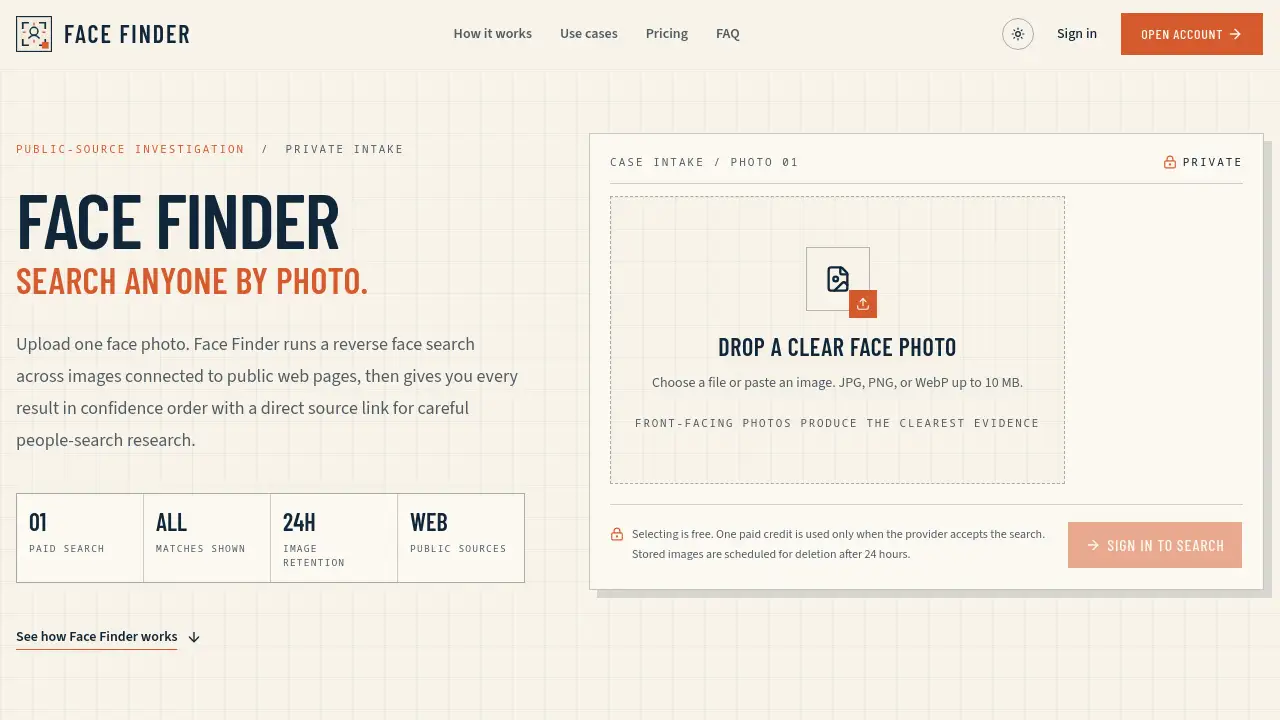
Face Finder is a web-based reverse face search tool designed to show where a face photo may appear on public web pages. Users upload one clear face photo, and Face Finder compares that face against images connected to public sources. The returned report contains source-linked visual matches in confidence order, making people-search research and identity checks easier to review. Face Finder is not a legal identity certificate or a regulated background check; it is intended to surface visual leads that need further verification. Public-source investigation and private intake workflows can use the tool before deciding whether more confirmation is necessary.
What is Face Finder?
Face Finder is a paid reverse face search service that turns one photo into a list of possible public matches. It addresses a common problem: a single profile image, dating photo, or avatar can appear in several places without a clear explanation. Instead of manually scrolling through image platforms, users let Face Finder run a face search by photo across images linked to public pages.
Each result is ranked visually by confidence and arrives with a source link, which saves time during people-search research and identity checks. The tool is suitable for individuals who want to verify a new online connection, professionals handling private intake, and anyone doing public-source investigation.
Key Features of Face Finder
Search anyone by photo
Face Finder accepts one clear face image through upload, drag-and-drop, or paste. The image can be prepared before an account is created, so the user can check quality before entering the paid search step.
Display every match in confidence order
Face Finder does not hide lower-ranked visual results. Every returned match is placed in order from strongest visual similarity to weakest, which gives a more complete base for reviewing evidence.
Provide source links for each match
Each result in a Face Finder report includes a direct public source page. Opening the source link lets users evaluate the domain, account name, caption, publication date, and other surrounding context before drawing conclusions.
Keep uploaded images private by design
The selected file normally stays in the user’s browser while authenticating or choosing a plan. Once a paid search starts, images are stored under a dedicated Cloudflare R2 retention prefix designed for automatic deletion after 24 hours.
Return credits automatically when a search fails
Face Finder works through a provider boundary, and a credit is used only when the provider accepts the search. If the provider rejects, times out, or cannot be reached, the credit is returned automatically.
Use Cases for Face Finder
Catfish Check
Users can run a reverse face search on a dating photo before trusting a new online connection. Face Finder returns public pages where the same face appears, so account names, posting dates, claimed locations, and source ages can be compared.
Impersonation Investigation
A suspicious profile photo can be searched to find other public uses. People-search research with Face Finder may reveal whether names or biographies change between accounts, although source-page context still needs careful review.
Self-Audit of Public Images
People can upload a photo they own to see where it is being reused. This kind of identity check can uncover copied profiles, outdated posts, or unexpected exposure. The public source links give a useful starting point if a user needs to contact site owners.
How to Use Face Finder
Prepare a clear photo
Crop one unobstructed face, use neutral lighting, and avoid heavy filters, extreme side angles, sunglasses, or large screenshot borders.
Preview the photo before signing in
The Face Finder homepage allows the image to be selected, dropped, or pasted before account creation. This step helps users confirm that the picture is usable without spending anything.
Sign in and start one paid search
Users need an account and one paid credit before the image is sent to the provider. Face Finder spends a credit only when the provider accepts the job.
Inspect all matches in confidence order
Compare stable facial details first, such as eye spacing, brow shape, nose profile, jawline, ears, and distinctive marks. Hair and clothing are supporting context, not proof of identity.
Open public source links and record review notes
Each source page should be reviewed separately. Saving the public URL, confidence score, date reviewed, visible profile label, and facial similarities creates a useful trail for later verification.
Target Audience for Face Finder
- People who want to check a dating profile photo before building trust
- Fraud reviewers and impersonation researchers
- Journalists doing public-source investigation
- Private intake professionals who handle initial photo checks
- Individuals conducting a self-audit of their own public images
- Researchers who need source-linked visual clues for people-search research
Is Face Finder Free?
No. Face Finder does not offer a free reverse face search after registration. A photo can be prepared and previewed for free, but every provider search requires one paid credit.
Users can choose monthly plans for regular checks or buy credit packs that never expire. If a provider rejects or times out, the search credit is returned automatically.
| Plan | Price | Features |
|---|---|---|
| Starter | $19.99/month | 20 face searches per month, confidence-ordered matches, source links, private case history |
| Pro | $39.99/month | 60 face searches per month, confidence-ordered matches, source links, private case history, priority email support |
| Quick Check | $9.99 | 5 search credits that never expire |
| Case Pack | $29.99 | 20 search credits that never expire |
| Evidence Pack | $59.99 | 50 search credits that never expire |
Face Finder's Pros and Cons
| Aspect | Pros | Cons |
|---|---|---|
| Pricing | Credit packs never expire; failed searches receive automatic refunds | No free provider search; unused monthly credits do not roll over |
| Results | Every match is shown in confidence order | Visual similarity alone does not confirm identity |
| Privacy | 24-hour deletion lifecycle; no image is sent before payment | Provider receives the image once a paid search starts |
| Workflow | Photo preview can be done without an account | An account and paid credit are needed before a provider search can run |
Frequently Asked Questions about Face Finder
What is Face Finder?
Face Finder is a web-based reverse face search service. It compares the face in an uploaded photo with images connected to public web pages and returns source-linked matches in confidence order. It does not certify a person’s legal identity; it provides visual leads for further people-search research.
Can I upload a photo without creating an account?
Yes. Users can select and preview a photo on the homepage first. Face Finder asks the user to sign in and have a paid credit only before it sends the image to the search provider.
Does Face Finder offer a free reverse face search?
No. Every provider search requires one paid credit. Users can choose a monthly plan or buy credit packs that never expire.
What happens to an uploaded photo?
Search images and cached result thumbnails are stored under a dedicated Cloudflare R2 retention prefix designed for automatic deletion after 24 hours. The provider receives nothing while the user is still preparing the photo.
How are Face Finder results ordered?
Face Finder displays every returned match without filtering out lower-ranked evidence. Results are ordered from the highest confidence score to the lowest.
Will I lose a credit if a search fails?
No. Face Finder automatically returns the credit when the provider rejects the request, cannot be reached, or does not finish before the search timeout.
Face Finder Tags
Face Finder, reverse face search, search anyone by photo, face search by photo, people-search research, identity checks, public-source investigation, source-linked matches, confidence order, photo trace, catfish check, private intake