Introduction
Send large files easily with Fileport link sharing.
What is Fileport?
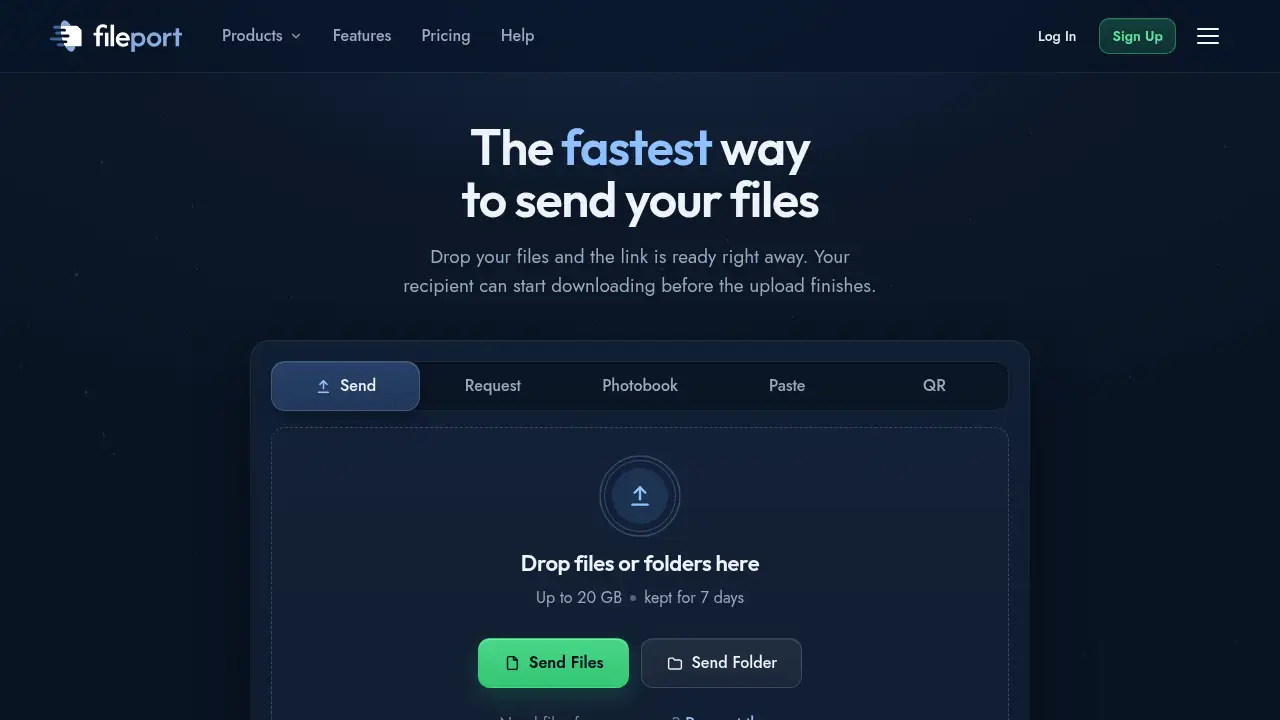
Fileport is an online file transfer tool for people who need to send large files without email attachments. It creates a shareable link as soon as files are dropped, and the recipient can start downloading before the upload finishes. The service is built for large file sharing, from video projects and photo shoots to whole folders. It matters because email inboxes often block big attachments, and many file transfer services require account setup or add tracking. Fileport offers a simple file link workflow, with 20 GB per upload on the free no-account option.
Key Features of Fileport
Instant File Links
Drop files and Fileport creates a ready-to-share link right away. This makes large file sharing faster for time-sensitive projects.
Download While Uploading
Recipients can begin downloading before the upload is complete. This upload-while-download feature speeds up large file transfer when every minute counts.
20 GB Free per Upload
Send large files up to 20 GB per upload without creating an account. A free account raises monthly capacity to 50 GB and adds photo albums.
Smart Upload Regions
Fileport selects a fast upload region based on location, or users can choose one. This supports smoother online file sharing across distances.
Private by Default
No ads and no tracking are used, and files are stored and sent with industry standard encryption. Privacy is a core part of the file transfer experience.
Extra Sharing Tools
Users can request files, create photo albums, share text and make trackable QR codes. These tools extend Fileport beyond a basic send large files service.
Use Cases for Fileport
Sending Video Projects
Video creators can send large files such as raw clips, edits and exports through one link. This avoids failed email attachments and supports fast large file transfer with clients.
Sharing Photo Shoots
Photographers can share full-resolution photo shoots as a link instead of splitting images across messages. The recipient can start downloading while the upload is still running.
Sending Whole Folders
Fileport handles folders, so teams can send large files and related assets in one organized link. This is useful for design packs, documents and campaign materials.
Working With Clients
Agencies and freelancers can share files with clients without asking them to create an account. The file link workflow keeps large file sharing simple.
Requesting Files
Users can request files from others and collect uploads through Fileport. This helps teams manage incoming large file transfer tasks in a structured way.
How to Use Fileport
- Open Fileport to send large files and choose the files or folders you want to share.
- Drop the files on the page; Fileport prepares a shareable link immediately.
- Copy the link and send it by email, chat or another message.
- The recipient opens the link and can start downloading before the upload finishes.
- Free uploads remain available for 7 days; for more capacity, review account and Pro options on the official site.
Target Audience for Fileport
- Content creators sending video and audio assets
- Photographers and videographers sharing full-resolution shoots
- Remote teams exchanging large project folders
- Agencies and freelancers working with clients
- Small businesses that need simple large file transfer
- Individuals who need to send large files without an account
Is Fileport Free?
Fileport is free for basic large file sharing, and paid Pro capacity is also listed. The free option works without an account for up to 20 GB per upload, while a free account adds monthly capacity and extra tools.
| Plan | Price | Features |
|---|---|---|
| Free (no account) | $0 | Up to 20 GB per upload, link ready instantly, 7-day expiry |
| Free account | $0 | 50 GB uploads per month, more uploads per day, photo albums |
| Pro | Not listed | Up to 1 TB per upload; check official site for current price |
Fileport's Pros and Cons
| Aspect | Pros | Cons |
|---|---|---|
| Pricing | Free option with 20 GB per upload and no account needed | Pro price is not listed in the provided information |
| Speed | Link is ready instantly and downloads can start before upload finishes | Performance may depend on internet connection and file size |
| Capacity | Up to 1 TB per upload on Pro | Free uploads expire after 7 days |
| Privacy | No ads and no tracking, with industry standard encryption | Encryption details are not fully described |
| Tools | Extra features like file requests, albums, text sharing and QR codes | Some extra tools may require a free account |
Frequently Asked Questions about Fileport
How large can files be on Fileport?
Fileport supports up to 20 GB per upload without an account, up to 50 GB a month on a free account, and up to 1 TB per upload on Pro. This makes it useful for large file transfer needs.
Do I need an account to send large files?
No account is needed for the free 20 GB per upload option. A free account adds more monthly capacity and extra tools, but basic file link sharing works without sign-up.
Can recipients download before the upload finishes?
Yes. The link works as soon as files are dropped, and downloads can start before the upload is complete. This is one of Fileport's main speed advantages for large file sharing.
How long do free uploads stay available?
Free uploads expire after 7 days. Users should share links promptly and download files within that window.
Is Fileport private?
Fileport states that it has no ads and no tracking, and files are stored and sent with industry standard encryption. Users should review the privacy policy for full details.
What extras come with a free account?
A free account offers 50 GB of uploads per month, more uploads per day and photo albums. It is aimed at people who send large files regularly.
Fileport Tags
send large files, large file transfer, large file sharing, send files online, Fileport review, free file sharing, no account file sharing, share files with link, upload large files, 20 GB file transfer, send big files, online file transfer