Introduction
The AI TikTok video generator is an online tool that turns text or images into short, vertical clips for TikTok. This review explains how the AI TikTok video generator works, who it is for, and how it supports modern short-form content. The tool focuses on creating AI TikTok videos in a 9:16 format without filming or complicated editing.
What is AI TikTok Video Generator?
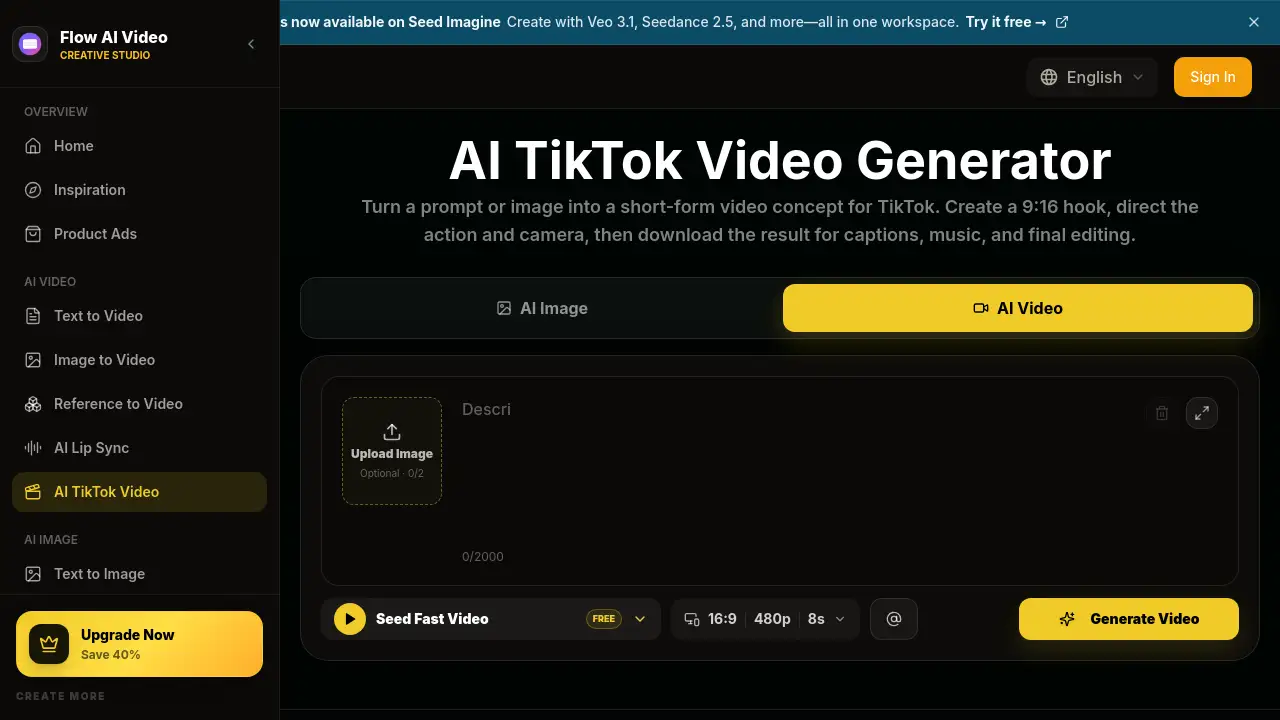
The AI TikTok video generator is a text-to-video and image-to-video solution that helps users create vertical video clips from a simple prompt or photo. Users can describe an opening hook, subject, scene, action, camera movement, pace, sound, and final shot. They can also upload an image and turn it into motion. The final clip can be downloaded for captions, music, and editing.
This TikTok video maker is built for creators and business owners who need a fast way to produce short-form video content. It matters because short-form social feeds demand a constant supply of vertical videos. The main value of the AI TikTok video generator is that it removes filming and editing barriers. It is also useful for testing hooks and comparing creative directions before committing to a full production. As an AI video generator, the platform supports several video models, so users can choose the option that fits their desired motion, resolution, and cost. This makes the AI TikTok video generator a practical starting point for TikTok posts.
Key Features of AI TikTok Video Generator
Create from Text or Image
The AI TikTok video generator accepts a text prompt or an uploaded image. This makes it easy to turn a product photo, portrait, or campaign visual into a moving TikTok video.
9:16 Vertical Format
Every clip is created in a 9:16 portrait format designed for TikTok. The AI TikTok video generator keeps faces, products, and actions visible in a vertical video layout.
Choose AI Video Models
The AI TikTok video generator includes multiple AI video models. Users can compare models to match their preferred motion, video length, resolution, and audio settings.
Preview Credit Cost
The AI TikTok video generator shows the credit cost before generation. Users can review the aspect ratio, duration, resolution, audio option, and total cost before spending credits.
Simple Prompt Workflow
The tool uses a guided prompt structure for hooks, scenes, and final shots. This TikTok video maker is beginner-friendly and helps users plan the opening, action, camera style, and ending.
Works on Mobile and Desktop
The AI TikTok video generator runs in a browser and works on phones, tablets, and computers. Users can write prompts, upload images, generate clips, and preview results from any device.
Use Cases for AI TikTok Video Generator
UGC Product Videos
Content creators can use the AI TikTok video generator to build UGC video content with a natural, direct-to-camera feel. The tool supports product close-ups, reactions, and conversational calls to action.
Product Demos and Short Ads
Marketing teams can create short video ads that show a problem, demonstrate a product, and end with a clear benefit. The 9:16 output is ready for TikTok posts and paid social campaigns.
Faceless TikTok Videos
The AI TikTok video generator can create faceless clips from generated visuals, products, places, or characters. This is useful for creators who prefer not to appear on camera.
Tutorials and Explainers
The TikTok video maker can generate short explainer videos that open with a question and end with a takeaway. This works well for educational content and tips-based pages.
How to Use AI TikTok Video Generator
- Choose a video type, such as UGC, product demo, faceless story, tutorial, or ad.
- Add content by writing a prompt or uploading an image. The prompt should describe the opening hook, subject, action, camera style, and ending.
- Set the video options to 9:16, choose a model, duration, resolution, and audio setting, then click Generate.
- Preview the generated clip and download it for captions, music, and final editing before posting to TikTok.
Using the AI TikTok video generator takes only a few minutes, and the guided workflow helps beginners stay focused on the creative direction.
Target Audience for AI TikTok Video Generator
- TikTok content creators who need regular vertical video content
- UGC creators producing product reviews and demos
- Small business owners promoting products and offers
- Social media marketers testing hooks and video ads
- Freelance video creators looking for fast concept exploration
- Faceless content creators who want to avoid being on camera
This audience can use the AI TikTok video generator as a TikTok video maker that supports text-to-video and image-to-video generation. The tool is especially useful for teams that need a fast, repeatable way to create short-form video concepts.
Is AI TikTok Video Generator Free?
The product offers free credits to start, according to the official pricing page. Users can test the AI TikTok video generator before choosing a paid plan. The Basic plan is listed at $19.9 per month and includes 800 credits per month. Pricing may vary based on annual or one-time options, and users should check the official pricing page for current details.
| Plan | Price | Features |
|---|---|---|
| Free | $0 | Free credits; basic trial access |
| Basic | $19.9/month | 800 credits/month; up to 40 videos/month; Flow Video Generator; unlimited downloads |
AI TikTok Video Generator's Pros and Cons
| Aspect | Pros | Cons |
|---|---|---|
| Ease of use | No editing skills required; guided prompts | Final captions, music, and editing are still needed |
| Video format | Native 9:16 vertical video for TikTok | Best for short-form clips; not a full editor |
| Model choice | Multiple AI video models to compare | Credit cost varies by model and resolution |
| Device access | Works on mobile and desktop | Requires an internet connection |
| Pricing | Free credits plus a simple monthly plan | Heavy users may need more credits over time |
Frequently Asked Questions about AI TikTok Video Generator
Does the AI TikTok video generator create full TikTok videos?
No. It generates the main video clip in a 9:16 format. Users still need to add captions, music, a call to action, and any required disclosure before posting.
Can I use the AI TikTok video generator with my own images?
Yes. The tool supports image-to-video generation. Users can upload a product photo, portrait, or campaign image and turn it into motion.
Is the AI TikTok video generator good for UGC content?
Yes. The workflow includes UGC-style product videos, natural direct-to-camera setups, handheld movement, and close-ups. It works well for creators who need quick product content.
Do I need editing experience to use the AI TikTok video generator?
No. The AI TikTok video generator is designed for beginners. There is no timeline to set up and no complicated editing software to learn. The output is a downloadable clip ready for final adjustments.
What output format does the AI TikTok video generator produce?
The output is a 9:16 vertical video. This makes it suitable for TikTok, Instagram Reels, and other mobile-first social feeds.
How much does the AI TikTok video generator cost?
The tool offers free credits to test it. The Basic plan costs $19.9 per month and includes 800 credits, enough for up to 40 videos per month under normal usage.
AI TikTok Video Generator Tags
AI TikTok video generator, TikTok video maker, AI video generator, text to video, image to video, 9:16 video, vertical video maker, UGC video generator, faceless TikTok videos, AI video ads, short-form video tool, TikTok video ideas