Introduction
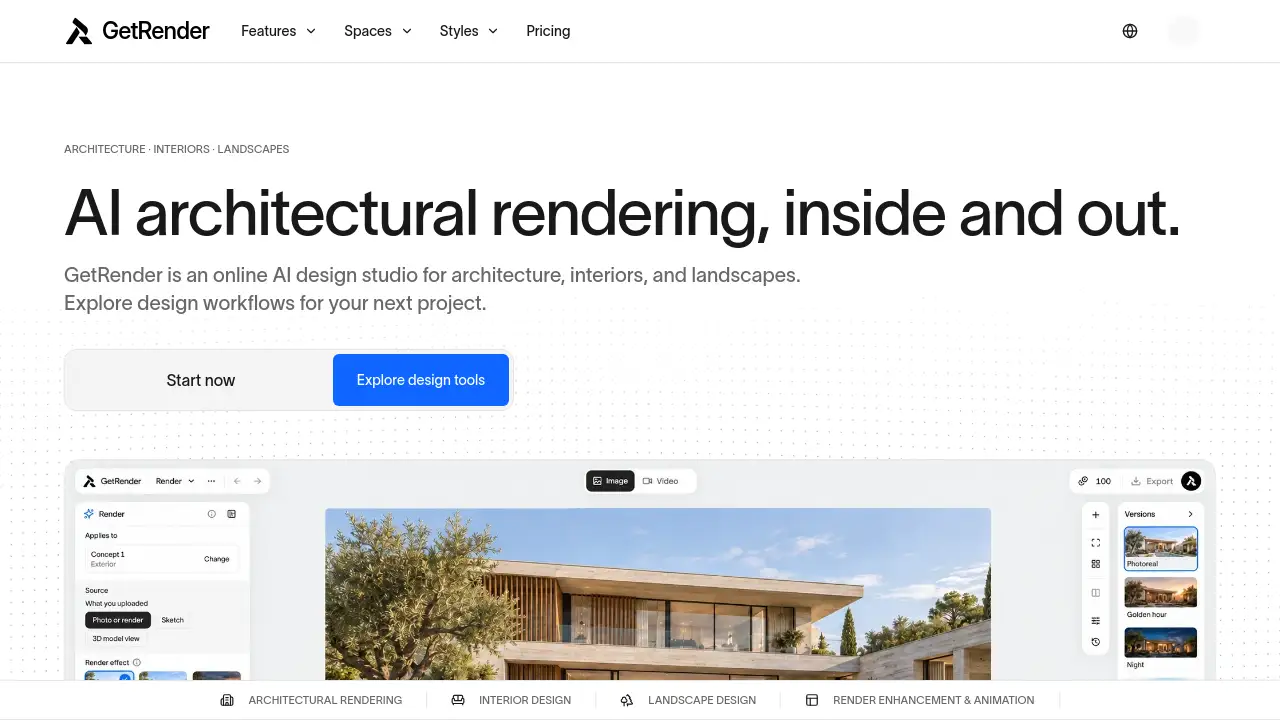
GetRender is an online AI architectural rendering studio for buildings, interiors, and landscapes. It helps architects, designers, and studios turn sketches, photos, and references into visual concepts, sketch-to-render studies, and design presentations.
What is GetRender?
GetRender is a web-based AI design studio built for architectural rendering and early-stage design exploration. It addresses a common problem: design ideas often need quick visual form before teams commit to detailed modeling or documentation. GetRender provides workflows for architecture, interiors, and landscapes, so users can explore exterior concepts, room redesigns, garden ideas, and presentation visuals in one place.
The platform is suitable for architects, interior designers, landscape designers, visualization artists, contractors, and real estate agents. Its main value is speed and accessibility. Instead of spending hours on test renders, users can generate AI architectural rendering concepts from sketches, model views, room photos, site references, and existing renders. GetRender also supports facade material exploration, virtual staging, render enhancement, and short architectural image to video studies.
Key Features of GetRender
Architecture Rendering Workflows
Explore exterior concepts, building massing, facade materials, lighting, and atmosphere from sketches or references. This workflow supports early architectural rendering studies before detailed documentation begins.
Interior Design and Virtual Staging
Redesign rooms, test furniture layouts, and explore style directions such as minimalist, warm, or contemporary palettes. Interior design workflows help users visualize finishes, cabinetry, lighting, and material combinations.
Landscape Design Concepts
Develop garden, courtyard, and outdoor space ideas that connect planting, paths, and architecture. Landscape design tools help users study how a building relates to its site and surrounding terrain.
Architectural Render Enhancer
Improve material detail, lighting, and visual clarity in an existing render. The architectural render enhancer is useful when a base image needs a more polished look for review or presentation.
Architectural Image to Video
Create short motion studies from an architectural rendering for design presentations. This feature helps clients sense light, depth, and camera movement more clearly than a static image alone.
AI Design Studio Workspace
Browse tools by space, task, and visual goal inside a single AI design studio. Users can move from reference to exploration, review, and presentation-oriented output.
Use Cases for GetRender
Early Concept Visualization
Architects can test massing, window rhythms, and facade depth within minutes. AI architectural rendering supports quick concept exploration before teams move into Revit or other detailed tools.
Client Design Reviews
Designers can compare layouts, materials, and styles during meetings. Visual options make it easier for clients to respond to direction, mood, and material choices.
Real Estate Presentation
Agents can show furnished or restyled spaces for empty properties. Virtual staging helps buyers understand furniture scale, room flow, and lighting conditions.
Construction Material Discussions
Contractors can discuss exterior finishes and material changes on-site. Clear visual comparisons help keep clients, builders, and designers aligned on scope.
Landscape and Outdoor Space Studies
Landscape designers can visualize planting character, paths, terraces, and outdoor living areas. These concepts help communicate atmosphere, though they do not verify planting suitability, drainage, or levels.
Presentation and Competition Media
Visualization artists can create motion clips from static renders. Architectural image to video outputs add impact to competition boards, client decks, and design presentations.
How to Use GetRender
- Open the GetRender website and choose a design workflow, such as architecture, interiors, landscape design, render enhancement, or image to video.
- Upload a reference, sketch, room photo, site image, or existing render.
- Describe the direction you want, including materials, lighting, atmosphere, or style.
- Review the generated AI architectural rendering concepts and compare them with the original design.
- Select useful options for discussion, then refine or enhance them for client review and presentation.
Target Audience for GetRender
- Architects exploring early building and facade concepts
- Interior designers testing room redesigns and virtual staging
- Landscape designers developing garden and courtyard ideas
- Architectural visualization artists enhancing renders and motion studies
- Construction professionals discussing materials and finishes
- Real estate agents presenting empty or dated properties
- Design studios looking for faster concept visualization workflows
Is GetRender Free?
The provided reference content does not list exact prices or plan limits. GetRender has a dedicated Pricing page at https://getrender.ai/pricing, and users can also begin through the Get started path. For current free, trial, or paid plan details, check the official pricing page directly.
GetRender's Pros and Cons
| Aspect | Pros | Cons |
|---|---|---|
| Features | Covers architecture, interiors, landscapes, render enhancement, and image to video | Some workflows are marked coming soon |
| Speed | Supports fast concept exploration and sketch-to-render studies | AI imagery can change geometry and proportions |
| Accessibility | Web-based AI design studio with task-based tools | Not a replacement for CAD, BIM, or technical documentation |
| Use Cases | Useful for client reviews, presentations, and material discussions | Visual concepts do not verify site constraints, drainage, or planting suitability |
| Pricing | Pricing page is available for review | Exact prices are not provided in the reference content |
Frequently Asked Questions about GetRender
What is AI architectural rendering?
AI architectural rendering uses reference images and design instructions to create visual concepts. GetRender applies this approach to buildings, interiors, landscapes, and presentation media.
Is GetRender suitable for architects and interior designers?
Yes. GetRender is designed for architects, interior designers, landscape designers, visualization artists, contractors, and real estate agents who need faster visual exploration.
Can GetRender turn a sketch into a render?
Yes. The architecture workflow supports sketch-to-render studies, exterior concepts, and facade material exploration from sketches or references.
Does GetRender replace Revit, CAD, or 3D modeling software?
No. GetRender is best understood as a concept visualization and AI architectural rendering tool. It supports early exploration, review, and presentation, but it does not replace technical design documentation.
Can GetRender create videos from architectural renders?
Yes. The architectural image to video workflow creates short motion studies from an architectural rendering for design presentations.
How much does GetRender cost?
The reference content does not include exact pricing. Visit https://getrender.ai/pricing for current plan details and availability.
GetRender Tags
AI architectural rendering, GetRender, AI design studio, sketch-to-render, architectural visualization, interior design AI, landscape design, virtual staging, architectural render enhancer, architectural image to video, facade material exploration, AI rendering for architects