Introduction
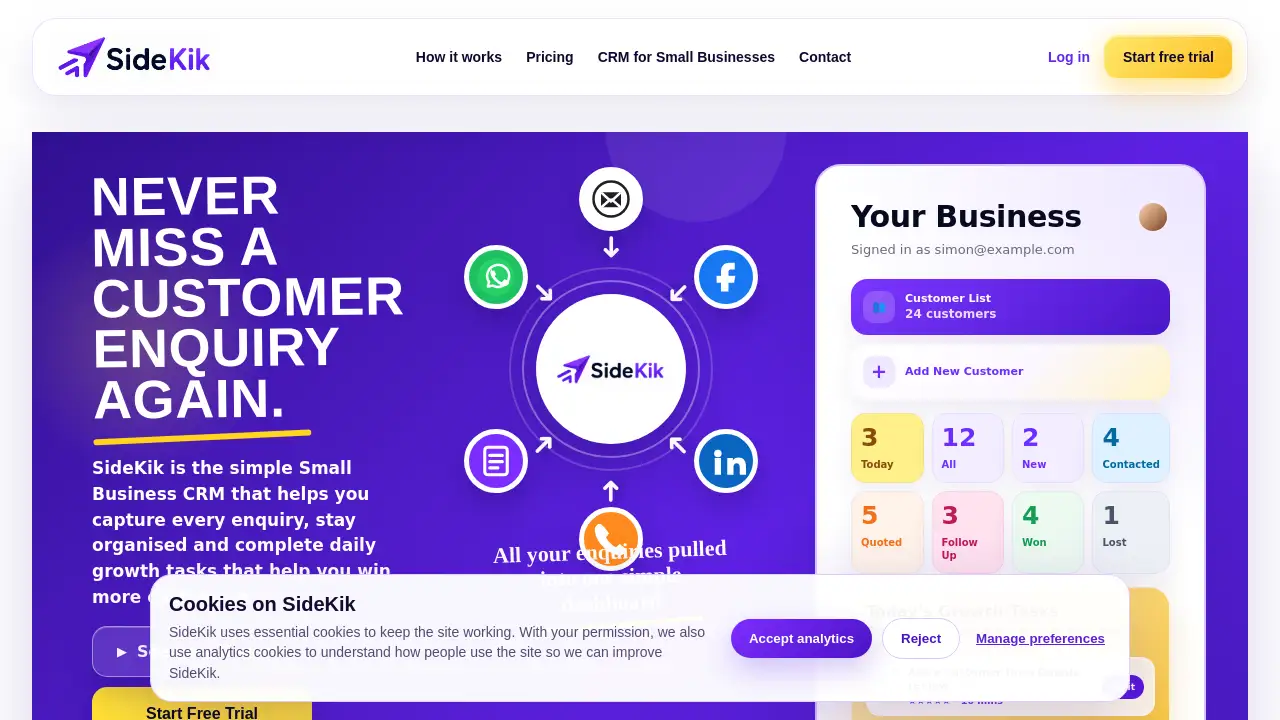
SideKik is a simple Small Business CRM designed to help sole traders and small teams capture every enquiry, stay organised, and complete daily growth tasks. It replaces scattered inboxes and spreadsheets with one clear dashboard, making it easier to follow up leads and win more customers.
What is SideKik?
SideKik is a lightweight customer relationship management tool built specifically for small businesses that want to grow without adding complexity. It solves the common problem of missing enquiries, forgetting follow-ups, and losing track of customers across multiple channels like email, WhatsApp, Facebook, and website forms. By pulling all messages into one place and offering smart reminders, SideKik acts as both an enquiry management software and a customer follow up software. The tool also includes daily growth tasks—simple actions like asking for a Google review or updating a business profile—that help business owners steadily attract new customers. Designed for sole traders, tradespeople, freelancers, and local service providers, SideKik is a small business growth tool that keeps the focus on customer conversations, not admin.
Key Features of SideKik
Centralised Enquiry Dashboard
All incoming enquiries from email, social media, website forms, and manual entries land in one simple dashboard. This feature turns SideKik into effective enquiry management software, eliminating the need to check multiple apps.
Smart Follow-Up Reminders
SideKik highlights which enquiries, quotes, and customers need attention today. Automated reminders ensure no warm lead goes cold, making it a practical customer follow up software for busy owners.
Daily Growth Tasks
Each day, SideKik suggests three small, high-impact actions such as asking for a review or updating your Google Business Profile. These tasks are part of the daily growth tasks system that helps win more customers steadily.
AI-Written Message Suggestions
The tool generates friendly replies, quote chasers, and review requests. Users can copy, edit, and send these messages, saving time on routine communication.
Enquiry Forwarding
Got an enquiry via email, WhatsApp, or DM? Forward it to a dedicated SideKik address, and it becomes a lead automatically. The AI summarises the enquiry and suggests the next action.
Customer List and Pipeline Tracking
SideKik provides a visual pipeline with stages like New, Contacted, Quoted, Follow Up, Won, and Lost. This simple lead tracker for small business helps owners see where each customer stands.
Reconnection with Past Customers
Upload existing contacts, and SideKik flags people you haven't spoken to for a while. This feature supports customer follow up software functionality by reviving old relationships.
Enquiry Form Everywhere
Create one custom enquiry form and embed it on your website, social profiles, WhatsApp Business profile, and Google Business Profile. This ensures every channel collects enquiries in the same format.
Use Cases for SideKik
Tradesperson Managing Multiple Enquiry Channels
An electrician receives quotes via Facebook, WhatsApp, and email. SideKik brings all those enquiries into one dashboard, sends follow-up reminders, and suggests daily growth tasks like asking for reviews.
Freelancer Following Up Old Leads
A freelance designer has a list of past quotes that never converted. Using SideKik’s quote follow-up software features, she reconnects with old leads and uses AI-written messages to revive conversations.
Local Service Business Improving Customer Experience
A cleaning company uses SideKik to respond faster to website form enquiries. The daily growth tasks prompt them to ask satisfied customers for Google reviews, boosting local visibility.
Sole Trader Organising Daily To-Dos
A plumber starts each day by checking SideKik’s “Things To Do” list and follow-up reminders. This replaces paper notes and ensures no customer is forgotten.
How to Use SideKik
- Sign up at getsidekik.app and create your business account.
- Connect your channels – add your SideKik enquiry form to your website, social profiles, and Google Business Profile. You can also set up a forwarding email address.
- Start capturing enquiries – as messages arrive, they will appear in your central dashboard. Forward any stray emails or DMs to your SideKik address.
- Track and follow up – use the customer pipeline to move leads through stages. SideKik will remind you which enquiries need a reply today.
- Complete daily growth tasks – each day, do one or two of the suggested actions, such as asking for a review or updating your business listing, to steadily win more customers.
Using SideKik this way turns it into a simple Small Business CRM that manages both existing customers and new leads.
Target Audience for SideKik
- Sole traders
- Tradespeople (electricians, plumbers, builders, cleaners)
- Freelancers and consultants
- Local service businesses (agencies, marketing firms)
- Small business owners who want a lightweight alternative to complex CRMs
- Any small business that struggles to keep up with enquiries and follow-ups
Is SideKik Free?
SideKik does not publicly list specific pricing on its homepage. However, the product appears to offer a free tier or trial, as users can sign up and start using the dashboard without upfront payment. For detailed pricing plans, visit the official website at getsidekik.app and look for a pricing or plan page. The tool is positioned as an affordable simple Small Business CRM for micro-businesses.
| Plan | Price | Features |
|---|---|---|
| Free / Starter | Likely free | Basic dashboard, limited customers, core enquiry management |
| Pro / Paid | To be confirmed | Advanced features like AI messages, more integrations, unlimited contacts |
Note: Pricing is based on typical freemium models. Check the official site for exact details.
SideKik's Pros and Cons
| Aspect | Pros | Cons |
|---|---|---|
| Ease of Use | Very intuitive dashboard; no training required | May lack advanced reporting for larger teams |
| Enquiry Management | Centralises all channels, including WhatsApp and social media | Limited to small business scale; not ideal for enterprise |
| Follow-Up Features | Smart reminders and AI-written messages save time | AI suggestions may need manual editing for tone |
| Daily Growth Tasks | Practical, actionable steps to attract new customers | Tasks are pre-set; users cannot customise the list |
| Pricing | Likely affordable or free for basic use | No transparent pricing on homepage |
| Integrations | Works with email, social, and forms | No native integration with popular tools like Zapier or email marketing platforms |
Frequently Asked Questions about SideKik
What makes SideKik different from other CRM tools?
SideKik focuses on simplicity and daily growth tasks. It is not a heavy enterprise CRM but a simple Small Business CRM designed for sole traders and tradespeople. It combines enquiry management software and customer follow up software with growth prompts to help win customers.
Can I forward enquiries from WhatsApp and Facebook to SideKik?
Yes. You can forward any message from WhatsApp, Facebook Messenger, LinkedIn, or email to your SideKik address. The AI will summarise the enquiry and create a lead automatically.
Does SideKik include a mobile app?
The website works as a mobile-friendly web app. There is no mention of a dedicated native app, but the dashboard is accessible from any browser on a phone or tablet.
Is SideKik suitable for a team of more than one person?
SideKik is built for small businesses, often operated by a single owner. While multiple users may share an account, the tool is best suited for sole traders or very small teams. For larger teams, a more traditional CRM might be needed.
How do the daily growth tasks work?
Each day, SideKik shows three simple tasks like “Ask a customer for a Google review” or “Follow up an old quote”. You mark them complete, and the tool tracks your progress. These tasks are designed to be completed in 10–15 minutes and help drive steady business growth.
Can I export my customer data from SideKik?
The product does not advertise export functionality, but most web-based tools allow CSV exports. Check the settings or contact support for data export options.
SideKik Tags
Simple Small Business CRM, enquiry management software, customer follow up software, small business growth tool, daily growth tasks, lead tracker for small business, CRM for sole traders, CRM for tradespeople, quote follow-up software, customer enquiry management, small business productivity, local business growth tool