Introduction
Skate AI: your AI skate coach for iPhone.
What is Skate AI?
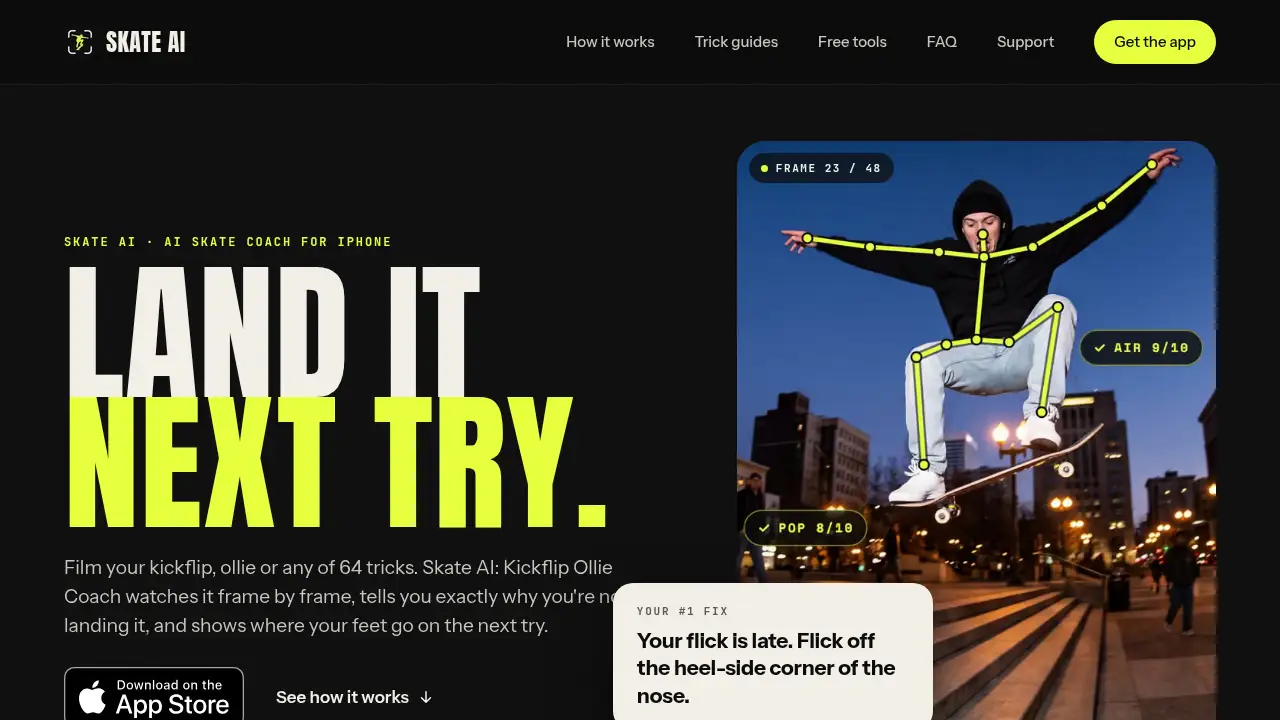
Skate AI is an iPhone app that reviews skateboard trick videos and turns them into practical feedback. It works as an AI skate coach for skaters who want more detail than “try again.” The app analyzes a clip of a kickflip, ollie, heelflip, or one of 64 supported tricks. It pulls 48 frames from the attempt, scores setup, pop, flick, catch, and landing out of 10, then gives one main fix and a drill. This skate trick analysis matters because many skaters can feel that something is wrong but cannot see whether the issue is foot placement, timing, or commitment. Skate AI aims to turn a phone clip into a clear next step. It suits beginners working on an ollie, intermediate skaters stuck on a kickflip, and anyone who already films practice tries. The app is not a replacement for a local coach, but it can be a useful skateboarding app between sessions. It also includes a chat for questions about foot placement, fear, and what to learn next.
Key Features of Skate AI
Frame-by-Frame Trick Breakdown
Skate AI pulls 48 frames from each clip and reviews setup, pop, flick, catch, and landing. This trick breakdown helps skaters see the moment that changed the attempt.
Scored Trick Analysis
The app scores every part of the trick out of 10, so users can compare pop and catch instead of only seeing the final result. This skate trick analysis gives a clear starting point for the next try.
One Main Fix and Drill
After the analysis, Skate AI names the most important correction and adds a drill with a target. A kickflip analyzer view can show whether the flick, foot position, or landing needs attention first.
Foot Placement Diagrams
For 46 tricks, the app shows a top-down diagram with where each foot sits, which way the toes point, and where the front foot flicks. This foot placement guide supports an ollie coach, kickflip coach, or heelflip session.
Ask-the-Coach Chat
Users can ask the AI skate coach questions about fear, foot placement, or what to learn next. The chat works as a simple skateboarding coach companion when a skater needs a quick answer between filming sessions.
iPhone Video and Privacy Details
Skate AI is an iPhone app that lets users upload a clip or film inside the app. The original videos stay on the phone, while still frames are sent for analysis and handled according to the stated privacy policy.
Use Cases for Skate AI
Learning a First Ollie
A new skater can film an ollie from the side and use Skate AI to check setup and landing. The ollie coach feedback can make practice more focused than repeating the same try without a clear reason.
Fixing a Kickflip
A skater stuck on kickflips can use the kickflip analyzer to see whether the board flips out in front or stays under the body. Skate AI then suggests one fix and a drill for the next session.
Practicing Flat Ground Tricks
Flat ground tricks make up 47 of the 64 supported tricks, so the app fits regular street or park practice. A skater can track a trick breakdown for shove-its, heelflips, and tre flips without extra equipment beyond an iPhone.
Preparing for Grinds and Transition
The app also lists grinds, slides, and transition tricks such as 50-50s, boardslides, and drop-ins. Skate AI can support skateboard tricks beyond flat ground when the clip clearly shows the whole body and board.
How to Use Skate AI
- Open Skate AI on an iPhone and choose a supported trick or type in the trick name.
- Film side-on or at a 45° angle with the whole body and board in frame; slow motion can help.
- Upload the clip and let Skate AI pull frames for a trick breakdown.
- Review the scores for setup, pop, flick, catch, and landing, then read the main fix and drill.
- Use the foot placement diagram and coach chat to plan the next try.
Target Audience for Skate AI
- Beginner skaters learning an ollie or first flip trick.
- Intermediate skaters stuck on a kickflip, heelflip, or shove-it.
- Skaters who already film practice clips and want skate trick analysis.
- iPhone users looking for an AI skate coach or skateboarding app.
- Self-guided learners who want drills and foot placement guidance between in-person sessions.
Is Skate AI Free?
Skate AI is not free. It is offered as a subscription in the US at $7.99 per week or $39.99 per year, billed through the Apple Account. There is no free plan listed in the reference information. Users can cancel in iPhone Settings. Because pricing can vary by region and change over time, check the App Store listing before subscribing.
| Plan | Price | Features |
|---|---|---|
| Weekly | $7.99/week (US) | Subscription access to Skate AI features |
| Annual | $39.99/year (US) | Subscription access, billed yearly |
Skate AI's Pros and Cons
| Aspect | Pros | Cons |
|---|---|---|
| Pricing | Annual plan is cheaper than weekly | No free tier; weekly plan can add up |
| Features | Scores five trick parts, gives one fix and drill, includes coach chat | Feedback depends on clear video |
| Device | Built for iPhone filming and upload | Not available on Android |
| Learning | Foot placement diagrams for 46 tricks support practice | Not a replacement for in-person coaching |
| Privacy | Originals stay on phone; frame handling is explained | Analysis requires sending frames to an AI provider |
Frequently Asked Questions about Skate AI
What is Skate AI best at?
Skate AI is best at giving structured feedback on a single filmed try. It breaks a trick into setup, pop, flick, catch, and landing, then gives one main fix and a drill.
Does Skate AI work for kickflips and ollies?
Yes. Skate AI supports kickflips, ollies, heelflips, shove-its, tre flips, and many other tricks. The kickflip analyzer and ollie coach feedback use the same scored breakdown.
How should I film a clip for Skate AI?
Film side-on or at a 45° angle with the whole body and board in frame. Slow motion can help, and the app can tell users if the camera missed the feet.
Is Skate AI a replacement for a skate coach?
No. Skate AI is a training aid, not a full replacement for an in-person coach. It can help with skate trick analysis between lessons, but it cannot watch safety, spot a skater, or replace local guidance.
Is Skate AI available on Android?
Not yet. Skate AI is iPhone only for now, so Android users need to wait or use another skateboarding app.
Does Skate AI store my videos?
The original videos stay on the phone. To analyze a try, Skate AI sends still frames to its server and AI provider, and the reference information says frames may be held for up to 30 days for abuse checks before deletion.
Skate AI Tags
Skate AI, AI skate coach, skateboarding app, AI skateboarding coach, kickflip analyzer, ollie coach, skate trick analysis, foot placement guide, trick breakdown, iPhone skate app, skateboard tricks, AI trick coach