Introduction
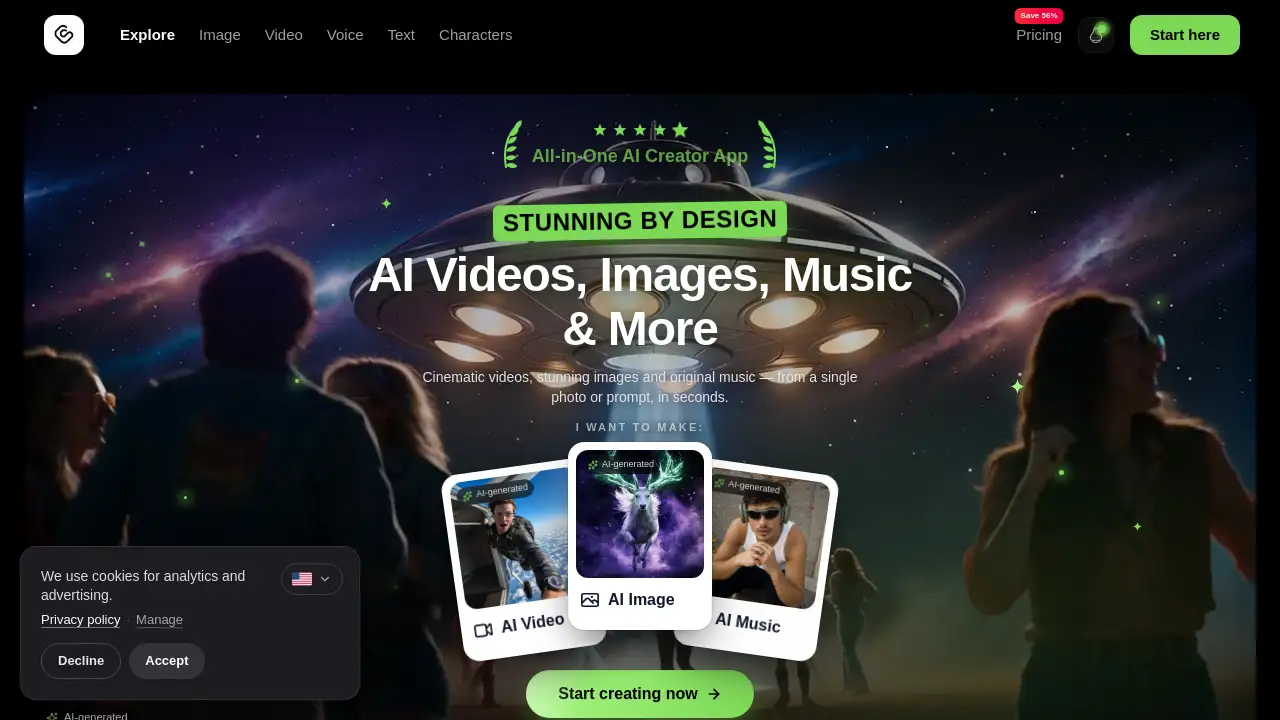
GoCrazyAI is an all-in-one AI video generator for creators. It brings video, image, music, and voice tools into one browser-based studio, so users can turn text or photos into anime clips, cinematic videos, and AI music with top models.
What is GoCrazyAI?
GoCrazyAI is an all-in-one AI creative studio for video, image, music, and voice generation. It solves the problem of juggling many separate AI tools by placing a full AI video generator, AI image studio, AI music generator, and voice toolkit behind one login and one credit balance.
The platform is designed for creators who want fast results without installing software. Users can open it in a modern browser, sign in, upload a photo or write a prompt, and generate content in minutes. GoCrazyAI supports popular models such as Veo 3.1, Sora 2, Seedance 2, Kling 2.6, and WAN 2.7, making it useful for social media clips, ads, anime art, music demos, podcasts, and more.
Key Features of GoCrazyAI
AI Video Generator
Generate cinematic AI video from a text prompt or a single photo. Choose from models like Veo 3.1, Sora 2, Seedance 2, Kling 2.6, and WAN 2.7, then export 1080p MP4 clips.
AI Image Studio
Create photorealistic images and edits with a prompt-based workflow. The AI image studio is useful for concept art, product visuals, and social media graphics.
AI Music Generator
Turn a sentence into an original song, instrumental, or sound effect. The AI music generator produces downloadable vocal and instrumental stems that are copyright-free.
Anime and Cartoon Tools
Use the AI anime generator or cartoon generator to turn text or photos into anime art, cartoon videos, and anime profile pictures. These tools support many styles, including cute, dark, cinematic, cyberpunk, and manga.
Anime PFP Generator
Create original anime avatars for Discord, TikTok, X, YouTube, or Twitch. The anime PFP generator outputs square 1024×1024 images and offers Anime Pro, Anime Super, and Pro Max options.
AI Voices and Podcast Studio
Access 2,000+ multilingual voices or design a custom voice from a description. The AI podcast studio can turn a script into a multi-voice episode with natural turn-taking.
AI Video Editor and Upscaler
Add subtitles, music, and overlays, or upscale images up to 8K resolution. Extra tools include image relighting, voice isolation, and an AI dance generator with 13 dance styles.
Use Cases for GoCrazyAI
Social Media Content
Create short-form videos, anime clips, and cartoon content for TikTok, Instagram, YouTube Shorts, and similar platforms. The AI video generator helps turn simple photos into scroll-stopping visuals.
Ads and Marketing
Generate video ads from a photo or prompt, then add voiceovers for explainers and promotions. This makes GoCrazyAI useful for small teams that need fast ad variations.
Music and Audio Production
Produce instrumentals, full songs with vocals, sound effects, and podcast episodes. The AI music generator and AI voices tools support music creators, podcasters, and audio editors.
Anime and Avatar Creation
Make anime art, anime PFPs, and cartoon videos without drawing skills. Fans and digital artists can use the AI anime generator for profile pictures and creative experiments.
Photo Enhancement and Editing
Upscale images, relight scenes, remove background noise, and isolate voices. These features help clean up media before publishing or client delivery.
How to Use GoCrazyAI
- Open GoCrazyAI in a browser and sign in.
- Pick a tool such as AI Video, AI Image Studio, or AI Music.
- Upload a photo, write a prompt, or do both.
- Choose a model and any available cinematic effect or style.
- Generate the content, wait for rendering, then download the result.
Most AI videos render in 1–5 minutes, while images and anime avatars often return faster. Users can queue multiple jobs and find past generations in the My Creations dashboard.
Target Audience for GoCrazyAI
- Content creators and influencers
- Social media managers and marketers
- Small business owners and ad creators
- Musicians, podcasters, and audio editors
- Anime fans, digital artists, and avatar makers
- Video editors who need quick AI-assisted assets
Is GoCrazyAI Free?
GoCrazyAI does not list a permanent free plan. Subscriptions start at $25/month, and every subscription includes 5 free songs. Subscribers can also buy one-time top-up packs whose credits never expire.
| Plan | Price | Features |
|---|---|---|
| Creator | $25/month | 75 credits, access to all AI models, monthly credit refresh, cancel anytime |
| Producer | $60/month | 250 credits, access to all AI models, monthly credit refresh, cancel anytime |
| Premium | $95/month | 500 credits, access to all AI models, monthly credit refresh, cancel anytime |
AI videos cost roughly 15–60 credits depending on model, resolution, and length. AI images cost 3–15 credits, and anime avatars start at 5 credits. Exact rates appear on each tool and on the official pricing page.
GoCrazyAI's Pros and Cons
| Aspect | Pros | Cons |
|---|---|---|
| Pricing | Monthly plans start at $25 and unlock every model; top-up credits never expire. | No free tier is listed; heavy video use can consume credits quickly. |
| Features | All-in-one video, image, music, voice, and editing tools. | Some commercial rights vary by content type and subscription tier. |
| Ease of use | Browser-based, no install, simple prompt and upload workflow. | Users need to learn model differences and manage credits. |
| Output | Multiple top models, 1080p MP4 video, and fast 1–5 minute renders. | Quality and speed depend on the selected model and prompt. |
| Privacy | Private by default, delete anytime, and failed generations are refunded. | An account is required, and platform policies still apply. |
Frequently Asked Questions about GoCrazyAI
What is GoCrazyAI?
GoCrazyAI is an all-in-one AI video generator and creative studio for video, image, music, and voice generation. It works in a browser and uses one credit balance across its tools.
Do I need technical skills to use GoCrazyAI?
No. GoCrazyAI is built for creators rather than engineers. Users can type a prompt, upload a photo, choose a model, and click Generate without installing software.
Which AI video models are available on GoCrazyAI?
The AI video generator includes Google Veo 3.1, OpenAI Sora 2, ByteDance Seedance 2, Kling 2.6 Turbo Pro, and WAN 2.7. Each model has different strengths for realism, motion, speed, or stylized output.
Can I create anime art, anime PFPs, or AI music?
Yes. The AI anime generator creates anime art from text, while the anime PFP generator makes square profile pictures. The AI music generator creates songs, instrumentals, and sound effects from a one-line prompt.
How much do GoCrazyAI credits cost?
GoCrazyAI uses monthly credit plans: Creator is $25/month for 75 credits, Producer is $60/month for 250 credits, and Premium is $95/month for 500 credits. Subscribers can also buy top-up packs whose credits never expire.
Can I use GoCrazyAI content commercially?
Usage rights depend on the content type. AI-generated music and lyrics can be used commercially with proper licensing. AI images vary by subscription tier, and AI videos are typically for personal use unless a higher-tier plan specifies otherwise.
GoCrazyAI Tags
GoCrazyAI, AI video generator, AI anime generator, AI music generator, AI image studio, anime PFP generator, text to video, image to video, cinematic AI video, AI voices, AI dance generator, AI video editor