Introduction
Flow AI: all-in-one AI video, image, music studio.
What is Flow AI?
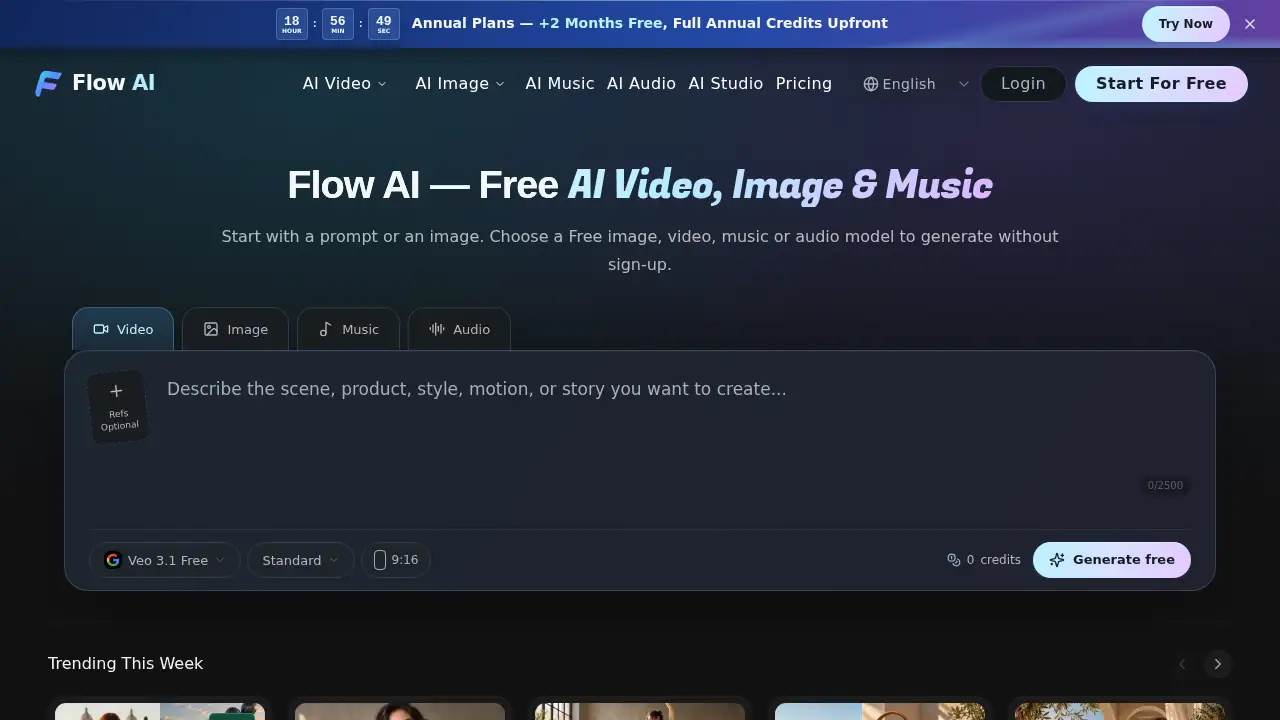
Flow AI is a browser-based online AI studio that brings video, image, music, voiceover, and sound creation into one workspace. It is designed for creators who want to test ideas quickly without installing software or switching between separate tools. The platform offers an AI video generator, an AI image generator, an AI music generator, and an AI voiceover generator in one connected interface. Flow AI also works as an independent alternative to Google Flow, with its own model selection, account system, and credit system. Users can start with free models such as Nano Banana 2 Free for images, Veo 3.1 Free for videos, Music V6 Free for songs, and Eleven v3 Free for audio without signing up. This makes Flow AI useful for beginners, solo creators, and teams that need a simple way to explore AI media production. The core value is convenience: a single Flow AI workspace keeps prompts, references, generations, and downloads organized.
Key Features of Flow AI
All-in-One Online AI Studio
Flow AI combines video, image, music, and voice tools in one browser-based studio. This online AI studio helps creators move from a prompt to a preview without opening separate apps.
Free AI Video Generator
Use the AI video generator in Flow AI to turn text or reference images into short videos. The platform includes multiple video models and shows settings before generation.
Free AI Image Generator
Create original visuals with the AI image generator in Flow AI. Start with text to image prompts, choose aspect ratios, and explore available AI image models.
AI Music and Song Generator
The AI music generator supports songs, instrumentals, and sound scenes. Flow AI also includes a voice and sound generator for voiceovers and dialogue.
No-Signup Free Tools
Flow AI offers free AI tools that work without an account. Eligible free-model results can be previewed and downloaded without a watermark, while signing in lets users save work.
Infinite Canvas Workspace
The Infinite Canvas brings ideas, assets, and AI generations into one open workspace. Creators can connect references, explore variations, and build visual workflows in Flow AI.
Clear Credit Costs
Flow AI shows credit costs before users submit credit-based tasks. Free models do not use credits, and the pricing page lists current plans and credit options.
Use Cases for Flow AI
Quick Social Video Creation
Creators can use Flow AI as an AI video maker for short social clips, product teasers, or concept videos. The AI video generator supports text prompts and reference images for fast visual tests.
Image Generation and Editing
Designers and marketers can use the AI image generator for moodboards, ad concepts, and simple edits. Flow AI also includes practical finishing tools such as background removal and upscaling, supporting basic AI image editor workflows.
Music and Voiceover Production
Podcasters and video creators can use the AI music generator and AI voiceover generator for intros, sound scenes, and dialogue. This makes Flow AI useful for projects that need both audio and visuals.
Prototyping with an Online AI Studio
Teams can test creative directions in one online AI studio before committing to a larger production. Flow AI lets users compare models, prompts, and outputs in a shared browser workflow.
How to Use Flow AI
- Open the Flow AI website and choose a tool such as the AI video generator, AI image generator, AI music generator, or voice and sound generator.
- Enter a clear prompt or upload supported reference images. Select a model, aspect ratio, or other available settings.
- Review the credit cost if the selected model is credit-based. Free models do not consume credits.
- Generate the result, preview it in the workspace, and download eligible outputs.
- Sign in if you want to save results or use credit-based models and tools in Flow AI.
Target Audience for Flow AI
- Solo content creators who need fast AI video, image, music, and voiceover tools.
- Social media managers producing short-form concepts and campaign visuals.
- Designers and marketers exploring AI image generation, editing, and text to image workflows.
- Musicians, podcasters, and video editors looking for an AI music generator or AI voiceover generator.
- Small teams testing ideas in an online AI studio without installing desktop software.
- Beginners who want to try free AI tools in Flow AI and no-signup access before choosing paid models.
Is Flow AI Free?
Flow AI has a free entry point. Free models such as Nano Banana 2 Free, Veo 3.1 Free, Music V6 Free, and Eleven v3 Free can be used without signup or credits, according to the product information. Daily free allowances refresh, but availability can change, so users should check the generator for the current offer. Credit-based models and tools require sign-in, and costs vary by model and settings. The official pricing page lists current plans and credit options. Free users may use outputs for personal and other non-commercial purposes; paid-plan users may use generated outputs commercially, subject to the Terms of Service and the selected model’s rules.
| Plan | Price | Features |
|---|---|---|
| Free | $0 | Free models for video, image, music, and audio; no signup required for eligible models; daily allowances; watermark-free downloads for eligible free results |
| Credit-Based | Varies by plan and model | Access to credit-based models and tools; sign-in required; credit cost shown before generation; paid-plan commercial use subject to terms |
Flow AI's Pros and Cons
| Aspect | Pros | Cons |
|---|---|---|
| Pricing | Free models and no-signup access lower the barrier to entry | Advanced models require credits, and costs vary by model |
| Features | All-in-one studio for AI video, image, music, and voiceover | Some tools and outputs depend on model rules and availability |
| Access | Browser-based and works on desktop or mobile | No desktop app for offline work |
| Workflow | Multiple models, clear credit costs, and a connected workspace | Generation time varies by model, task, and queue |
| Output use | Eligible free results can be downloaded without a watermark | Commercial use requires a paid plan and follows model terms |
Frequently Asked Questions about Flow AI
What is Flow AI?
Flow AI is an online AI video, image, music, and audio generator. It combines an AI video generator, AI image generator, AI music generator, and voice tools in one browser-based studio.
Is Flow AI free to use?
Yes, Flow AI offers free models that do not require credits or signup. Users can try Nano Banana 2 Free for images, Veo 3.1 Free for videos, Music V6 Free for songs, and Eleven v3 Free for audio. Daily allowances may change, and credit-based models require sign-in.
Do I need an account to use Flow AI?
No account is needed for eligible free models. Users can generate, preview, and download eligible results without signing in. An account is required to save results or use credit-based tools in Flow AI.
Can I download Flow AI outputs without a watermark?
Eligible free results, such as Nano Banana 2 Free images and Veo 3.1 Free videos, can be downloaded without a watermark according to the product information. Other models and tools follow their own output and plan rules.
How is Flow AI different from Google Flow?
Flow AI is an independent platform with its own model selection, accounts, and credit system. It is not affiliated with Google Flow and offers AI video, image, music, and voice tools in one online AI studio.
Can I use Flow AI outputs commercially?
Paid-plan users may use generated outputs commercially, subject to the Terms of Service, applicable law, and the selected model’s rules. Free users may use outputs for personal and other non-commercial purposes.
Flow AI Tags
Flow AI, AI video generator, AI image generator, AI music generator, AI voiceover generator, free AI tools, online AI studio, no signup AI, text to image, AI video maker, AI song generator, voice and sound generator.