Introduction
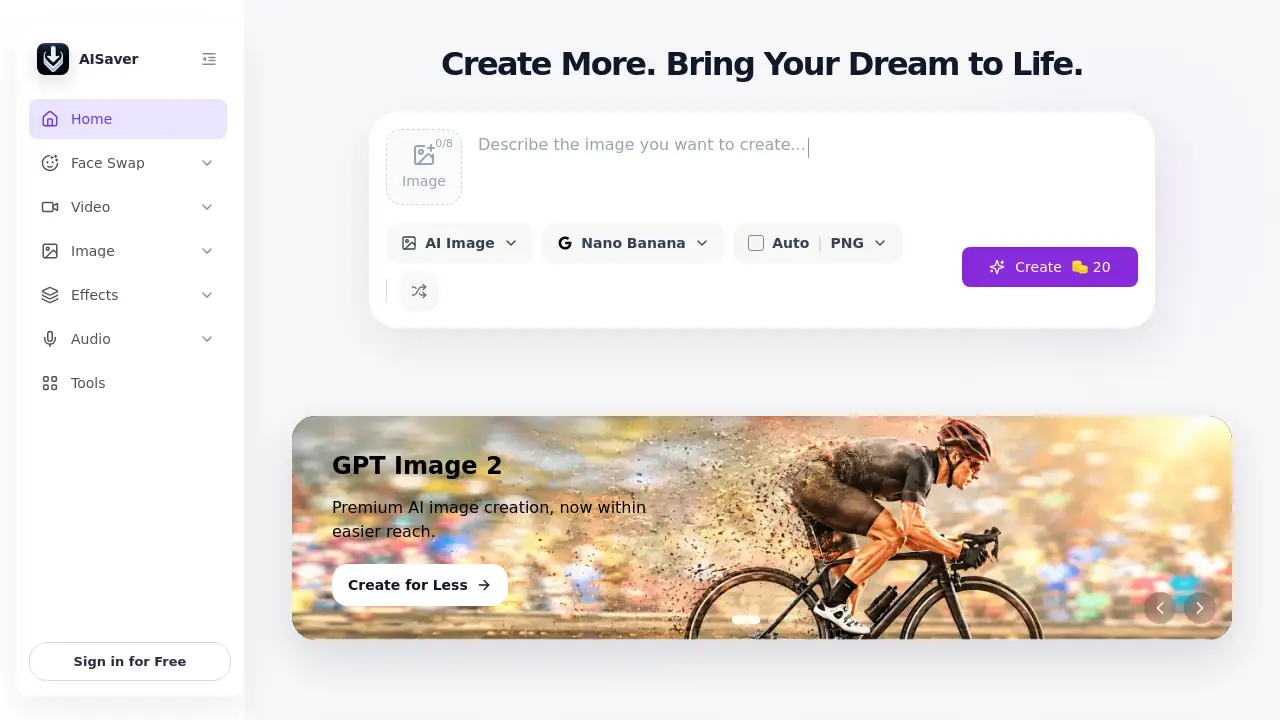
AISaver is an online AI video and image creation platform that helps creators produce face swaps, AI videos, image edits, and fun visual content quickly. Instead of jumping between separate apps, users can start with AISaver for multiple creative jobs. This AISaver review gives an overview of the product, its tools, and the audience it suits best. Anyone looking for a practical AI video generator or a flexible AI image generator will find useful information here. The platform is designed for fast, simple, browser-based creation.
What is AISaver?
AISaver is an all-in-one creative platform for AI video and image creation. It solves the problem of needing several specialized programs for different tasks. Users can swap faces, generate new videos from photos, turn text into images, improve video quality, and remove watermarks. AISaver works as both an AI video generator and an AI image generator, which makes it easy for creators to manage projects in one place. The product is suitable for social media creators, marketers, designers, and everyday users who want quick results. AISaver matters because it makes professional-looking AI tools accessible from a single online dashboard. Since it is browser-based, users do not need to install heavy software or own expensive hardware.
Key Features of AISaver
Face Swap Tools
AISaver includes video face swap, photo face swap, GIF face swap, multiple face swap, and batch face swap. These tools allow users to replace faces in media with realistic AI processing, while keeping facial expressions and motion natural.
AI Video Generator
As a powerful AI video generator, AISaver turns static images into moving clips. Users can also create kiss videos, twerk videos, bikini videos, and animated scenes. This AI video generator helps creators produce short-form content without learning complicated editing software.
AI Image Generator
AISaver also functions as a practical AI image generator. Users can write a text prompt and generate an original image, or use image-to-image conversion to change an existing photo. This AI image generator is useful for concept art, social media graphics, and personal projects.
Video Enhancer
The video enhancer improves blurry or low-quality footage by increasing clarity, sharpness, and lighting. Creators can use this tool online to give old clips a cleaner and more professional look.
Video Watermark Remover
The watermark remover deletes unwanted text, logos, and watermarks from videos. This tool is helpful for cleaning up files or personal archives while preserving overall video quality.
AI Photo Editor
The photo editor and AI clothes changer make it easy to edit portraits, change outfits, or enhance small details. These features turn the platform into a complete AI video and image creation workspace.
Advanced AI Models
AISaver integrates models such as Nano Banana Pro, Nano Banana AI, Kling AI, Seedance 2.0, and Seedance AI. These models improve generation quality, clarity, and motion consistency for better final output.
Use Cases for AISaver
Social Media Content
Creators can use AISaver to make face swap videos, AI-generated images, and animated clips for TikTok, Instagram, and YouTube. The browser-based workflow saves time and supports fast content publishing.
Marketing and Advertising
Marketers can create ad creatives, product demos, and visual variations without hiring a large production team. Using the AI video generator and AI image generator, brands can test different ideas quickly and cheaply.
Personal Entertainment
Users can swap faces in photos and GIFs, create dance-style videos, or generate fun scenes from personal photos. These tools are popular for memes, reactions, and casual sharing.
Photo and Video Restoration
The video enhancer and watermark remover can restore old clips, clean up files, and improve visual quality before sharing. This use case helps users maintain the quality of their personal media.
How to Use AISaver
Using AISaver is simple and requires no technical skills.
- Visit the AISaver website and sign in for free.
- Choose a tool, such as face swap, AI video generator, or AI image generator.
- Upload a photo or video, enter a text prompt, or select a reference file.
- Wait for the AI to process the file online.
- Preview the result and download the final output to your device.
This straightforward workflow makes AISaver attractive for both beginners and busy creators.
Target Audience for AISaver
AISaver fits many types of users, including:
- Social media creators and influencers
- Digital marketers and advertising teams
- Graphic designers and content agencies
- Small business owners
- Educators and students
- Casual users who enjoy AI photo editing
- Video editors looking for a quick online helper
Is AISaver Free?
AISaver offers a free entry point with a daily check-in system. Users can claim 20 credits each day for five days. This lets them test face swap, AI video generator, and AI image generator tools without upfront payment. There is also an upgrade option that gives 50 credits every day and unlocks extra daily rewards. For users who need more, AISaver sells additional credit packs. Exact prices may change, so users should check the official pricing page for current details.
| Plan | Price | Features |
|---|---|---|
| Free | $0 | Daily check-in credits, access to basic creation tools |
| Upgrade | Varies | 50 credits every day, more daily rewards, fewer limits |
| Paid Credits | Varies | Extra credits for additional creations |
AISaver's Pros and Cons
| Aspect | Pros | Cons |
|---|---|---|
| Pricing | Free daily credits and simple upgrade option | Paid pricing details are not shown clearly on the homepage |
| Features | Many AI tools in one platform | Some tools may be unnecessary for casual users |
| Ease of Use | Browser-based and beginner-friendly | Certain advanced functions require credit usage |
| Output Quality | Uses powerful AI models for realistic results | Final quality depends on the source files |
Frequently Asked Questions about AISaver
Is AISaver safe to use?
AISaver is an online AI platform. Users should avoid uploading private or sensitive images and should get permission before swapping someone else's face. As with any cloud service, follow standard safety practices.
Do I need to install software to use AISaver?
No. AISaver runs directly in the browser. Users can access the face swap, AI video generator, and AI image generator tools from the website without installing any programs.
What is a face swap tool?
A face swap tool replaces faces in images, videos, or GIFs with another face. AISaver uses AI to blend skin tones, match expressions, and keep motion smooth for believable results.
Can I use AISaver for free?
Yes. AISaver offers free credits through a daily check-in. Users can claim 20 credits each day for five days. After that, they can upgrade for 50 credits per day or buy additional credits.
What can I create with AISaver?
Users can create AI videos, face swap clips, AI images, enhanced photos, and cleaned-up videos. AISaver also supports image-to-video, text-to-image, video-to-video, and image-to-image workflows. This AI image generator and AI video generator cover many creative tasks.
Does AISaver work on mobile devices?
AISaver is browser-based, so it can be used on phones, tablets, and computers with an internet connection. The online interface keeps the same tools available without a native app.
AISaver Tags
AISaver, AISaver review, AI video generator, AI image generator, face swap online, video face swap, photo face swap, AI video creation, AI image editing, image to video, video enhancer, AI tools online