Introduction
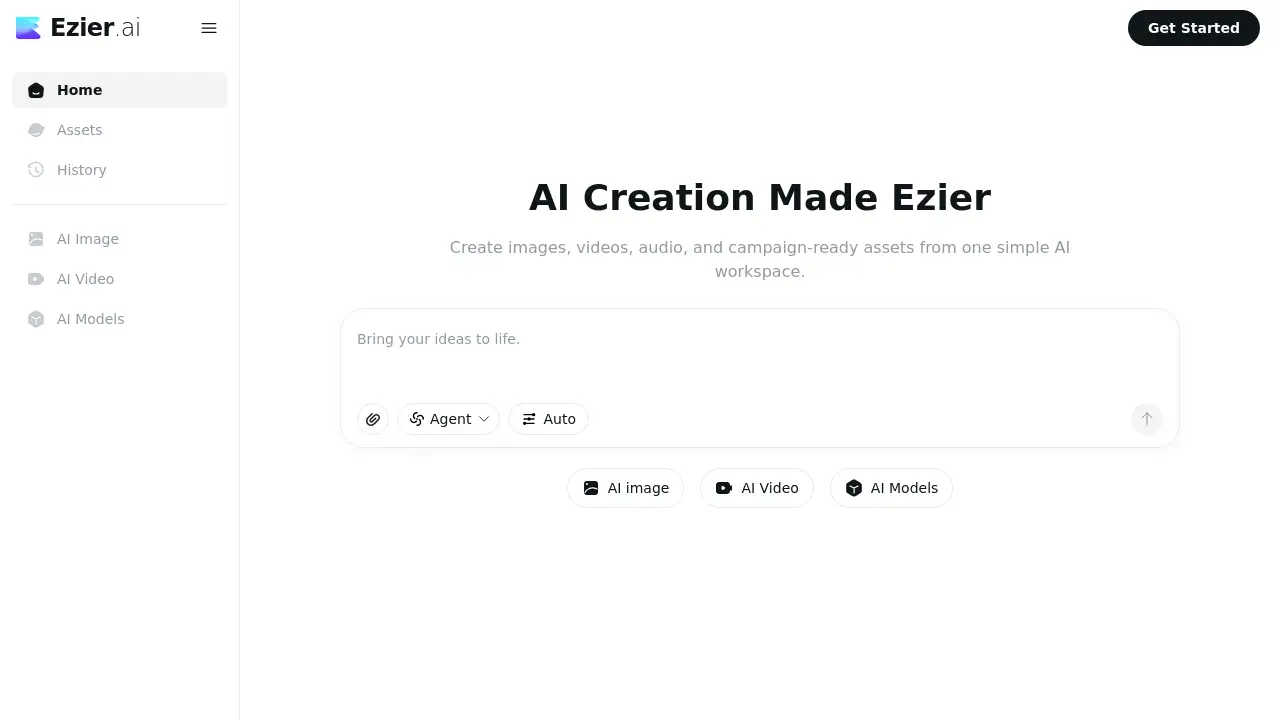
Ezier AI is a unified AI creation platform for producing images, videos, and audio in one workspace. It brings together many of the most popular AI models, so users can avoid moving between separate subscriptions. The workspace is designed for creative workflows where a single idea becomes a product image, a video clip, or an ad variation. In this Ezier AI review, the focus is on key functions, model options, typical uses, and pricing. This helps readers decide whether the product fits their specific content creation needs.
What is Ezier AI?
Ezier AI is an all-in-one creative workspace that simplifies the AI creation journey. The main problem it solves is workflow fragmentation. Without such a platform, a user might test an AI image generator on one website, switch to an AI video generator on another, and then use a third service for enhancement and upscaling. Ezier AI keeps the whole path in one place. Users can choose from 20+ image models, many advanced video models, and dozens of editing tools.
The platform is suitable for creators, marketers, e-commerce teams, and small businesses that produce visual assets regularly. It matters because moving from an idea to a usable result becomes much faster. When the task is clear, a user can choose the exact tool or model. When the task is unclear, Agent and Auto modes route the prompt to the best workflow with less manual effort. This approach lets Ezier AI serve both experts who want full control and beginners who want guided suggestions.
Key Features of Ezier AI
20+ AI Image Models
Ezier AI gives access to leading image generation models such as GPT Image 2, Nano Banana, Qwen Image, and Wan Image. Creators can generate, edit, and enhance visuals without changing platforms.
AI Video Generator and Video Models
As an AI video generator, Ezier AI includes models such as Veo, Kling, Seedance, Hailuo, and Happyhorse. These options allow different balances of speed, motion quality, and cinematic style.
13+ Image Tools
Photo cleanup stays inside the same workspace with tools such as Background Remover, Object Remover, Image Upscaler, Image Enhancer, Old Photo Restoration, and Unblur Image. This keeps the project moving forward without redoing prompts.
Video Editing Tools
Video creators can access text-to-video, image-to-video, video-to-video, Lip Sync AI, AI video editor, video extender, video enhancer, and video upscaler. The platform becomes a production suite instead of a one-step generator.
Agent and Auto Routing
Users who are unsure which model to pick can choose Agent or Auto mode. Ezier AI analyzes the text prompt and selects the appropriate workflow, giving newcomers an easier way to begin.
Credit-Based Access
Rather than buying several separate model subscriptions, users can test different tools with credits. This budget-friendly approach makes Ezier AI useful for comparing model outputs before spending more money on a final asset.
Use Cases for Ezier AI
Product Photography and E-commerce
An online store can use Ezier AI to create clean product pictures, remove distracting backgrounds, and generate several listing variations from one main photo. Product detail is preserved during editing and upscaling.
Short Video Generation
Marketers can use the AI video generator to create social media clips, ad concepts, and thumbnails within minutes. The platform supports both fast social content and cinematic multi-shot storytelling.
Brand Content Creation
Small teams can produce logo drafts, wallpapers, social media banners, avatars, and campaign variations in one place. Ezier AI keeps prompts, references, and edits close together, which helps build a consistent visual style.
Restoration and Visual Cleanup
Photographers and business owners can restore old pictures, sharpen blurred images, remove watermarks, and enhance low-quality videos. These use cases benefit from having generation and editing in the same dashboard.
Creative Experimentation
Teams can compare different AI models before committing to a paid workflow. Spending a few credits to test an AI image generator or an AI video generator helps users make better decisions.
How to Use Ezier AI
- Go to ezier.ai and create an account.
- Pick a starting point, such as text-to-image, image-to-video, or a specific model.
- If unsure, select Auto or Agent mode, and Ezier AI will recommend the most suitable workflow.
- Generate a preview asset, then refine it with tools like Image Upscaler, Object Remover, Video Enhancer, or Lip Sync AI.
- Track credit usage, save generated files, and download the final result or continue iterating.
Target Audience for Ezier AI
- Content creators and influencers
- E-commerce founders and marketers
- Freelance designers and video editors
- Social media managers and community teams
- Startups and small business owners
- Anyone who needs AI images and videos regularly
Is Ezier AI Free?
Ezier AI uses a credit-based model instead of requiring separate paid subscriptions per model. The homepage does not clearly publish full pricing, so free trial availability may depend on the current promotion or region. For accurate and up-to-date pricing, users should visit the official Ezier AI pricing page.
| Plan | Price | Features |
|---|---|---|
| Starter | Varies | Limited credits for testing image and video tools |
| Paid plans | Varies | More credits plus access to advanced models and editing features |
Ezier AI's Pros and Cons
| Aspect | Pros | Cons |
|---|---|---|
| Pricing | More practical than paying for multiple separate AI tools | Credit costs can be hard to predict before testing |
| Features | Combines image, video, audio, and editing tools in one workspace | Many options may feel overwhelming for new users |
| Model choice | Supports top models such as Veo, Kling, Seedance, and Hailuo | Users must learn model differences to avoid wasted credits |
| Workflow | Agent and Auto modes reduce the learning curve | Advanced editing still requires human review and iteration |
Frequently Asked Questions about Ezier AI
What is Ezier AI?
Ezier AI is a creative platform where users can generate, edit, enhance, and manage images, videos, and audio in one place. It is designed to replace the need for several single-purpose subscriptions.
Is Ezier AI only an AI image generator?
No. Ezier AI works as an AI image generator but also includes an AI video generator, audio features, video upscaling, photo restoration, and many creative tools. Its purpose is wider than still image creation.
Who should use Ezier AI?
Freelance designers, e-commerce teams, social media managers, startup founders, and small content teams are typical users. Anyone who regularly turns prompts into visual assets can benefit from the workflow.
Do I need technical knowledge to use Ezier AI?
No. The Agent and Auto modes make it easier because Ezier AI suggests the right model and tool for the prompt. Beginners can explore at their own pace while learning which models produce the best results.
How do Ezier AI credits work?
Credits are consumed whenever a user generates or edits an asset. More advanced models and complex edits tend to require more credits, while simple image cleanup usually costs less.
Does Ezier AI support the latest AI models?
Yes. Ezier AI regularly adds updated models and currently supports image models such as GPT Image 2, Nano Banana, Qwen Image, and Wan Image, along with video models such as Veo, Kling, Seedance, and Hailuo.
Ezier AI Tags
Ezier AI, AI creation platform, AI image generator, AI video generator, text to video, image to video, AI creative tools, content creation workspace, Ezier AI review, AI video editor, AI photo enhancer, AI upscaler