Introduction
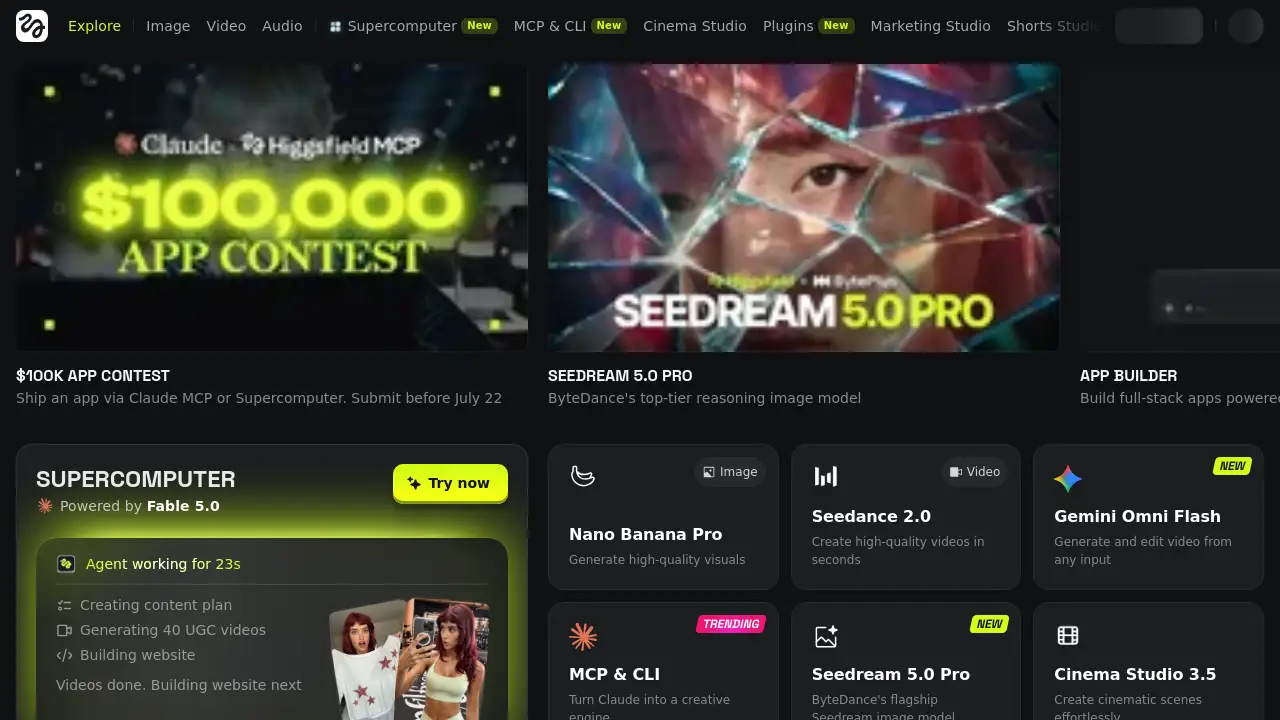
Higgsfield AI is a versatile creative platform that lets users generate images, videos, and voice content from text prompts or reference materials. It combines advanced generation tools with editing, upscaling, and workflow automation, making it a powerful option for content creators, marketers, and businesses. The platform also offers a Supercomputer for running custom AI apps and integrates with tools like Adobe Premiere Pro and DaVinci Resolve. This review explores the core features, use cases, pricing, and overall value of Higgsfield AI.
What is Higgsfield AI?
Higgsfield AI is an all-in-one generative AI platform designed to produce images, videos, and audio content quickly and efficiently. It solves the problem of fragmented creative tools by offering a unified workspace where users can generate, edit, upscale, and automate media production. Whether you need a promotional video, a series of social media images, or an AI-powered voiceover, Higgsfield AI provides the tools to do it from a single interface. The platform is suitable for marketers, social media managers, filmmakers, educators, and developers who want to streamline their content creation workflow. With features like an AI agent for automating repetitive tasks and a Supercomputer for running custom apps, Higgsfield AI matters because it reduces the time and cost typically associated with high-quality media production.
Key Features of Higgsfield AI
Multi-Modal Content Generation
Users can create images, videos, and voice content directly from text descriptions or reference images. The platform supports multiple AI models including Seedream 5.0 Pro for high-reasoning images and Seedance 2.0 for premium video generation.
AI-Powered Editing and Upscaling
Higgsfield AI includes tools to refine and enhance generated media. Images and videos can be upscaled to 4K resolution, and the platform offers features like background removal (CutItOut) and layer decomposition (LayerLab).
Creative Automation with AI Agent
An integrated AI agent enables users to build automated workflows using pre-built apps or custom scripts. The Supercomputer environment allows running apps like Video Editor, MicroDrama Studio, and Hook Studio with credit-based usage.
Pre-Built Studios for Specific Use Cases
The platform offers specialized studios: Marketing Studio for brand content, Shorts Studio for quick social videos, Explainer for creating up-to-10-minute explainer videos, and Cinema Studio for cinematic visual effects. These studios come with ready-to-use templates and presets.
Plugins for Professional Editing Tools
Higgsfield AI integrates with Adobe Premiere Pro and DaVinci Resolve Studio via plugins, enabling users to access AI generation and editing capabilities directly within their existing editing workflow.
Viral Presets and Original Series
A library of pre-made visual effects presets (e.g., “Zombie Dance,” “Drift Racing”) allows users to apply big-budget CGI transformations with a single click. The platform also hosts Original Series – the first AI-generated streaming series – for inspiration and demonstration.
Mobile and Web Accessibility
All features are available through a web browser, and the platform offers dedicated mobile apps for generating content on the go, including the Photodump feature for character consistency across scenes.
Use Cases for Higgsfield AI
Social Media Content Creation
Marketers and influencers can quickly produce eye-catching images, short videos, and audio clips for platforms like Instagram, TikTok, and YouTube. The Shorts Studio and Viral Presets make it easy to create trending content without advanced editing skills.
Marketing and Advertising Campaigns
Businesses can generate product mockups, promotional videos, and voiceovers using the Marketing Studio. The ability to upscale to 4K and automate workflows with the AI agent helps scale campaign production efficiently.
Educational and Explainer Videos
Teachers and trainers can use the Explainer studio to turn any topic into a captioned video up to 10 minutes long. This is useful for online courses, corporate training, and instructional content.
Film and Visual Effects Prototyping
Filmmakers and video editors can quickly prototype scenes, apply CGI presets, and generate background plates using Cinema Studio. The integration with Premiere Pro and DaVinci Resolve allows seamless incorporation into post‑production pipelines.
App Development and Custom Automation
Developers can build full-stack apps powered by Higgsfield image and video models using the Supercomputer and MCP/CLI interfaces. The $100K App Contest encourages community innovation.
How to Use Higgsfield AI
- Sign Up and Choose a Plan: Create a free account on the Higgsfield AI website. You can start with a free tier that includes limited credits, then upgrade to a paid plan for more features.
- Select a Tool or Studio: Navigate to the Image, Video, or Audio section, or open a specialized studio like Marketing Studio or Explainer.
- Provide a Prompt or Reference: Enter a text description or upload a reference image/audio. For video generation, you can also use camera controls and action keywords.
- Generate and Refine: Click the generate button. Once the output is ready, use editing tools to upscale, remove backgrounds, or apply visual effects. You can also run automated workflows via the AI agent.
- Export and Share: Download the final media in your preferred resolution (up to 4K), or directly share to social media platforms. For professional use, export to Premiere Pro or DaVinci Resolve via plugins.
Target Audience for Higgsfield AI
- Content Creators and Social Media Managers – Need fast, varied content for multiple channels.
- Digital Marketers and Advertising Agencies – Require scalable campaigns with consistent branding.
- Video Editors and Filmmakers – Want AI-assisted pre‑production and visual effects.
- Educators and Trainers – Seek simple tools for creating explainer videos.
- Developers and AI Enthusiasts – Interested in building custom AI apps and automating workflows.
- Small Business Owners – Need affordable, professional-quality media without hiring a full creative team.
Is Higgsfield AI Free?
Higgsfield AI offers a free tier that provides limited credits to try the platform. Paid premium plans unlock higher generation limits, faster processing, and access to advanced models and studios. Details of specific pricing are available on the official pricing page. Users can sign up to receive an extra discount on Premium plans.
| Plan | Price | Typical Features |
|---|---|---|
| Free | $0 | Limited credits, basic models, standard resolution |
| Premium | Starts at ~$X/month | More credits, 4K upscaling, all studios, AI agent access |
Note: Exact pricing should be verified on the official site, as offers and discounts may change.
Higgsfield AI's Pros and Cons
| Aspect | Pros | Cons |
|---|---|---|
| Versatility | Generates images, videos, and voice – all in one platform | Advanced features may require learning time |
| Quality | Supports top-tier models like Seedream 5.0 and Seedance 2.0 | Free tier has limited resolution and credits |
| Automation | AI agent and Supercomputer allow custom workflows | Some automated features may use credits quickly |
| Integration | Plugins for Premiere Pro and DaVinci Resolve | Plugin setup may require technical knowledge |
| Mobile Support | Dedicated apps for on‑the‑go creation | Mobile version lacks some advanced studio tools |
| Pricing | Free tier available; extra discounts for sign‑ups | Premium plans can be pricey for heavy users |
Frequently Asked Questions about Higgsfield AI
What kind of content can I create with Higgsfield AI?
Higgsfield AI can generate images, videos, and voice content from text prompts or reference materials. It also offers specialized studios for marketing videos, short social clips, explainer videos, and cinematic visual effects.
Do I need prior experience to use Higgsfield AI?
No, the interface is designed to be accessible. You can start by typing a text description and clicking generate. For advanced features like the Supercomputer or custom apps, some technical knowledge may be helpful.
Can I use Higgsfield AI for commercial projects?
Yes, commercial use is permitted. The platform is used by businesses, marketers, and agencies to create promotional materials, product imagery, and social media content. Check the terms of service for specific usage rights.
How does the credit system work?
Each generation or upscale consumes a certain number of credits, depending on the model and resolution. Free accounts receive a limited number of credits monthly. Paid plans provide more credits and the option to purchase additional ones.
Is there a mobile app for Higgsfield AI?
Yes, Higgsfield AI has mobile apps for both iOS and Android. The mobile experience includes features like Photodump for character consistency and access to certain image and video models.
What integrations does Higgsfield AI support?
It integrates with Adobe Premiere Pro and DaVinci Resolve Studio via plugins. It also offers an MCP and CLI interface for developers, and a Supercomputer environment to run custom apps.
Higgsfield AI Tags
Higgsfield AI, AI image generator, AI video creator, AI voice content, AI creative platform, AI content automation, AI marketing studio, AI explainer video, AI visual effects, AI upscale, AI video editor, AI app builder