Introduction
Image Editor is an AI-powered online photo editing tool that transforms how users enhance, edit, and create stunning visuals using simple text prompts.
What is Image Editor?
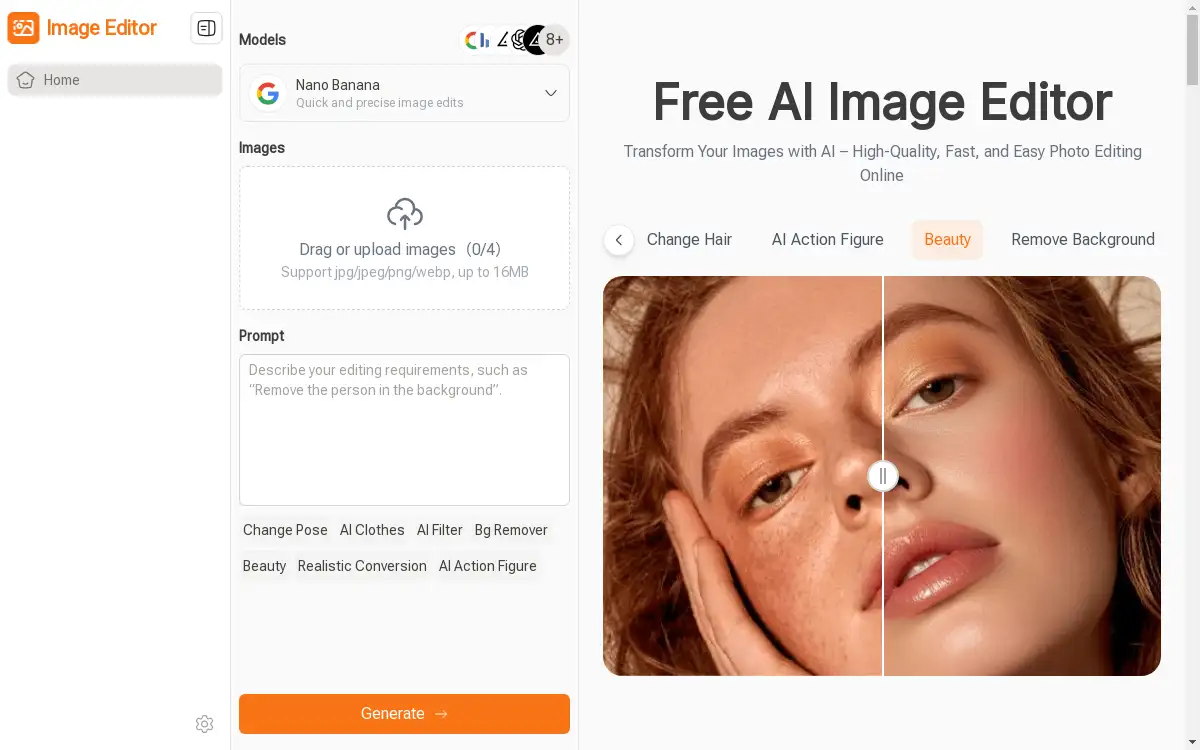
Image Editor is a revolutionary online photo editing platform that leverages artificial intelligence to make professional image editing accessible to everyone. This innovative tool solves the common problem of complex photo editing software by allowing users to enhance photos, remove backgrounds, and transform images using simple text descriptions instead of technical skills. The platform is perfect for content creators, marketers, educators, bloggers, and anyone who needs high-quality visual content without the steep learning curve of traditional editing software. Image Editor matters because it democratizes professional photo editing, enabling users to create stunning visuals in minutes rather than hours, all while maintaining exceptional quality results.
Key Features of Image Editor
AI-Powered Text Prompt Editing
Transform photos effortlessly by describing desired changes in natural language, eliminating the need for complex editing skills or expensive software.
Multiple AI Models Available
Access diverse AI models including Nano Banana, Flux Kontext, Seedram, and GPT, each optimized for different photo editing tasks and creative effects.
Hundreds of Preset Prompts and Styles
Choose from ready-made templates and prompts that inspire creativity while delivering professional results, perfect for users unsure about prompt writing.
Continuous Editing Workflow
Edit images repeatedly in one seamless workspace, allowing users to refine details and experiment with multiple styles without switching between tools.
High-Quality Free Downloads
Download edited photos in high resolution at no cost, ensuring professional-quality results for social media, marketing materials, or personal projects.
Zero Learning Curve Interface
Start editing immediately with an intuitive interface that requires no design experience or technical knowledge to produce stunning visual content.
Background Removal and Enhancement
Automatically remove backgrounds and enhance photo details with AI precision, streamlining tasks that traditionally require advanced editing expertise.
Use Cases for Image Editor
Social Media Content Creation
Create eye-catching posts, stories, and promotional graphics for platforms like Instagram, Facebook, and Twitter using AI-powered editing capabilities.
Marketing and Advertising Materials
Design professional banners, promotional graphics, and campaign visuals that capture attention and drive engagement for businesses of all sizes.
Educational Content Development
Enhance teaching materials, create engaging diagrams, and design learning visuals that help educators deliver more effective and visually appealing lessons.
E-commerce Product Photography
Improve product images by removing backgrounds, enhancing details, and creating consistent, professional-looking photos for online stores and catalogs.
Blog and Website Graphics
Produce high-quality featured images, blog graphics, and website visuals that maintain consistent branding and professional appearance across digital platforms.
Personal Photo Enhancement
Transform personal photos by adjusting colors, applying filters, and enhancing image quality for special occasions, portfolios, or social sharing.
How to Use Image Editor
Using Image Editor is remarkably straightforward with its three-step process designed for maximum efficiency and ease of use.
Step 1: Choose an AI Model - Select the AI model that best matches your editing needs. Each model offers unique strengths, whether you're optimizing photos, applying creative effects, or handling specific enhancement tasks.
Step 2: Upload Image and Apply Prompt - Upload your photo to the platform, then either select a preset prompt from the extensive library or write a custom description of your desired changes. The AI understands natural language instructions, making the process intuitive.
Step 3: Generate and Download - Wait briefly while the AI processes your image according to your specifications. Once complete, preview the enhanced result and download your high-quality edited photo instantly, ready for immediate use across any platform or medium.
Target Audience for Image Editor
- Content creators and social media influencers seeking quick, professional editing solutions
- Marketing professionals and advertising agencies needing efficient visual content production
- Small business owners requiring cost-effective marketing materials and product photography
- Educators and trainers creating engaging learning materials and presentations
- Bloggers and website owners maintaining consistent, high-quality visual content
- E-commerce entrepreneurs optimizing product images for online sales
- Students and researchers needing polished visuals for academic projects
- Freelancers and consultants creating professional presentations and proposals
Is Image Editor Free?
Image Editor offers a generous free plan that allows users to access core editing features and download high-quality results without any cost. The free version includes access to multiple AI models, preset prompts, and the ability to enhance photos using text descriptions. Users can experiment with background removal, photo enhancement, and style transformations while enjoying professional-quality downloads. This approach makes Image Editor accessible to everyone, from casual users to professionals, ensuring that high-quality photo editing doesn't require expensive software subscriptions or one-time purchases.
Frequently Asked Questions about Image Editor
What types of images can I edit with Image Editor?
Image Editor supports common image formats including JPEG, PNG, and other standard photo file types. You can edit personal photos, product images, graphics, and virtually any visual content that needs enhancement or transformation.
Do I need design experience to use Image Editor effectively?
No design experience is required. Image Editor uses natural language processing, allowing you to describe desired changes in plain English. The AI handles the technical aspects while preset prompts provide inspiration for users unsure about specific editing requests.
How long does it take to process images using AI models?
Processing time typically ranges from a few seconds to about one minute, depending on the complexity of edits and the AI model selected. Most basic enhancements and background removals complete quickly, while more complex transformations may take slightly longer.
Can I edit the same image multiple times with different effects?
Yes, Image Editor supports continuous editing workflows. You can apply multiple edits to the same image, experiment with different styles, and refine results until you achieve the desired outcome, all within the same workspace.
Are there any limitations on download quality or file size?
Image Editor provides high-resolution downloads without quality restrictions. The platform maintains professional standards for output quality, ensuring your edited photos are suitable for print, web use, social media, or any other application.
What makes Image Editor different from traditional photo editing software?
Image Editor eliminates the learning curve associated with complex software by using AI and text prompts instead of manual tools and techniques. This approach makes professional-quality editing accessible to everyone while significantly reducing the time required to achieve excellent results.
Image Editor Tags
AI photo editor, online image editing, text prompt photo editing, background removal tool, AI image enhancement, free photo editor, social media graphics, professional image editing, AI-powered editing, photo enhancement software, visual content creation, marketing graphics editor