Introduction
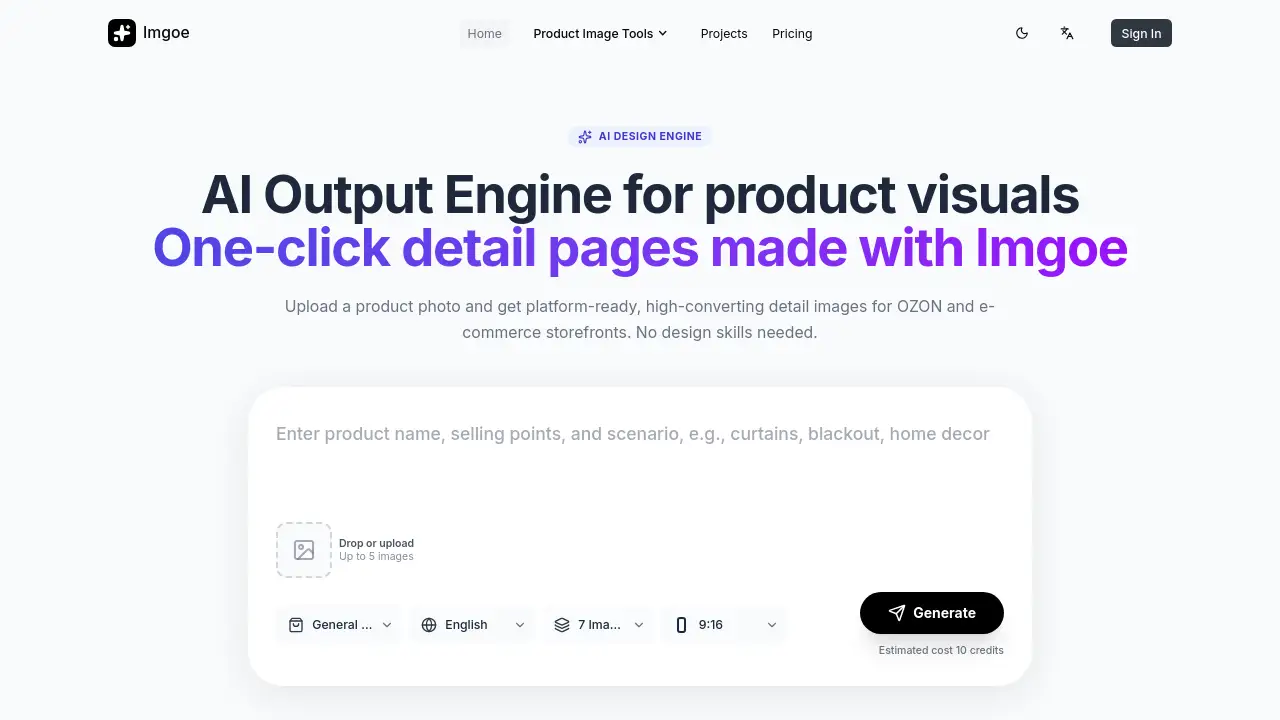
Imgoe is an AI-powered tool that generates high-converting product detail images for e-commerce in minutes.
What is Imgoe?
Imgoe, or Imgoe AI e-commerce product image generator, is a specialized design tool built to create platform-ready product visuals. It addresses a common challenge for online sellers: the time-consuming and often costly process of producing professional, consistent product detail pages and marketing assets. By using AI, Imgoe allows users to upload a simple product photo and receive a complete set of styled, high-converting images suitable for marketplaces like OZON and other e-commerce storefronts. This tool is particularly suitable for brand owners, e-commerce operators, designers, and small to medium-sized businesses that need to scale their visual content production without requiring deep design expertise or large budgets.
Key Features of Imgoe
Template-First AI Design Engine
The platform operates on a template-first workflow, allowing users to select a visual style that aligns with their brand before generating images, ensuring consistency and a professional look.
One-Click Detail Page Generation
Users can upload a product photo and get a complete set of high-converting product detail images generated automatically, significantly speeding up the asset creation process.
Multi-Variant & Multi-Language Asset Creation
The tool can quickly produce several marketplace-ready visual sets from a single product, accommodating different product variants and language requirements for cross-border e-commerce.
Iterative Editing Workspace
Unlike random image generators, Imgoe functions as a visual production workspace, offering reference points and iterative edit capabilities for real, usable design work.
Production Line for Page Assets
Teams can use Imgoe to systematically create a sequence of assets, such as hero images, selling-point pages, and scene pages, lowering the iteration cost compared to traditional design workflows.
Use Cases for Imgoe
Scaling E-commerce Visual Production
E-commerce teams can generate dozens of product page images quickly, enabling faster launches for new products or collections across multiple platforms.
Ensuring Brand Consistency
Brands can maintain a coherent visual identity across all product detail pages, model shots, and promotional posters by starting from a single reference template.
Supporting Cross-Border Sales Operations
Businesses selling internationally can efficiently create multi-language and region-specific visual assets for different marketplaces from one central product image.
Empowering Small Teams and Solo Entrepreneurs
Founders and small teams without dedicated designers can bypass lengthy briefing processes and create launch-ready, professional product visuals independently.
How to Use Imgoe
Using Imgoe to create product images is a straightforward process designed for efficiency.
- Select a Template: Browse and choose a design template that matches the desired style for your product detail page.
- Upload Your Product Photo: Drag and drop or upload up to five images of your product. The AI will use these as the base.
- Generate Images: Initiate the generation process. The Imgoe AI design engine will process the input and create a set of platform-ready visuals.
- Review and Edit: Inspect the generated images within the workspace. Use the iterative editing tools to make any necessary adjustments to color, layout, or text.
- Download Assets: Once satisfied, download the final high-converting product detail images for use on your e-commerce site or marketplace listings.
Target Audience for Imgoe
- E-commerce brand owners and founders
- Cross-border e-commerce operations leads and managers
- In-house marketing and design teams at retail companies
- Freelance visual designers and content creators specializing in e-commerce
- DTC (Direct-to-Consumer) growth consultants and agencies
- Small business owners and solo entrepreneurs selling products online
Is Imgoe Free?
Imgoe operates on a credit-based system. The reference information indicates that generating a set of images has an "Estimated cost 10 credits," suggesting users purchase credits to use the service. Specific pricing tiers and the cost of credit packs are not detailed on the provided homepage content. For accurate and current pricing plans, including any free trial options, users should visit the official Imgoe pricing page.
Imgoe's Pros and Cons
| Aspect | Pros | Cons |
|---|---|---|
| Speed & Efficiency | Dramatically reduces time-to-market for product visuals with one-click generation. | Output quality is dependent on the quality of the input product photo. |
| Consistency | Template-first workflow ensures visual coherence across all product pages and assets. | Creative flexibility may be somewhat constrained by the available template library. |
| Accessibility | Makes professional product imagery accessible to users without graphic design skills. | A credit-based system requires budget management and may have a learning curve for cost estimation. |
| Scalability | Excellent for teams needing to produce high volumes of multi-variant or multi-language assets. | May be less cost-effective for individual sellers who only need a handful of images infrequently. |
Frequently Asked Questions about Imgoe
What kind of images can the Imgoe AI e-commerce product image generator create?
Imgoe is specialized for creating product detail page visuals. This includes hero images, feature breakdown graphics, scene shots, and other assets designed to showcase a product's selling points directly on e-commerce platforms like OZON.
Do I need design experience to use Imgoe?
No, one of the core benefits of Imgoe is that it requires no design skills. The AI design engine and pre-built templates handle the complex layout and styling work, allowing anyone to create professional results by simply uploading a product photo.
How does the template system work?
Users first select a visual template that defines the style, color scheme, and layout. This template then guides the AI as it generates the final images, ensuring all outputs for that product share a consistent, branded look and feel.
What marketplaces are Imgoe images optimized for?
The platform explicitly mentions OZON, a major marketplace, indicating its assets are formatted and styled for such platforms. The generated high-converting product detail images are generally suitable for any e-commerce storefront or marketplace that uses standard image dimensions and detail-oriented visuals.
Can I edit the images after they are generated?
Yes, Imgoe is described as a "visual production workspace" that supports iterative edits. This means users can review the AI-generated images and make adjustments to fine-tune the results before finalizing and downloading them.
What is the credit system for generation?
Imgoe uses a credit system to operate. Each image generation job consumes a certain number of credits (e.g., an estimated 10 credits for a set). Users typically purchase packs of credits, and the cost per generation varies based on the complexity or number of images produced.
Imgoe Tags
Imgoe, AI e-commerce product image generator, high-converting product detail images, OZON product images, AI design engine, one-click product visuals, e-commerce image generator, product detail page template, cross-border e-commerce assets, brand visual consistency, template-first workflow, no design skills needed, product photo to professional images, marketplace-ready visuals