Introduction
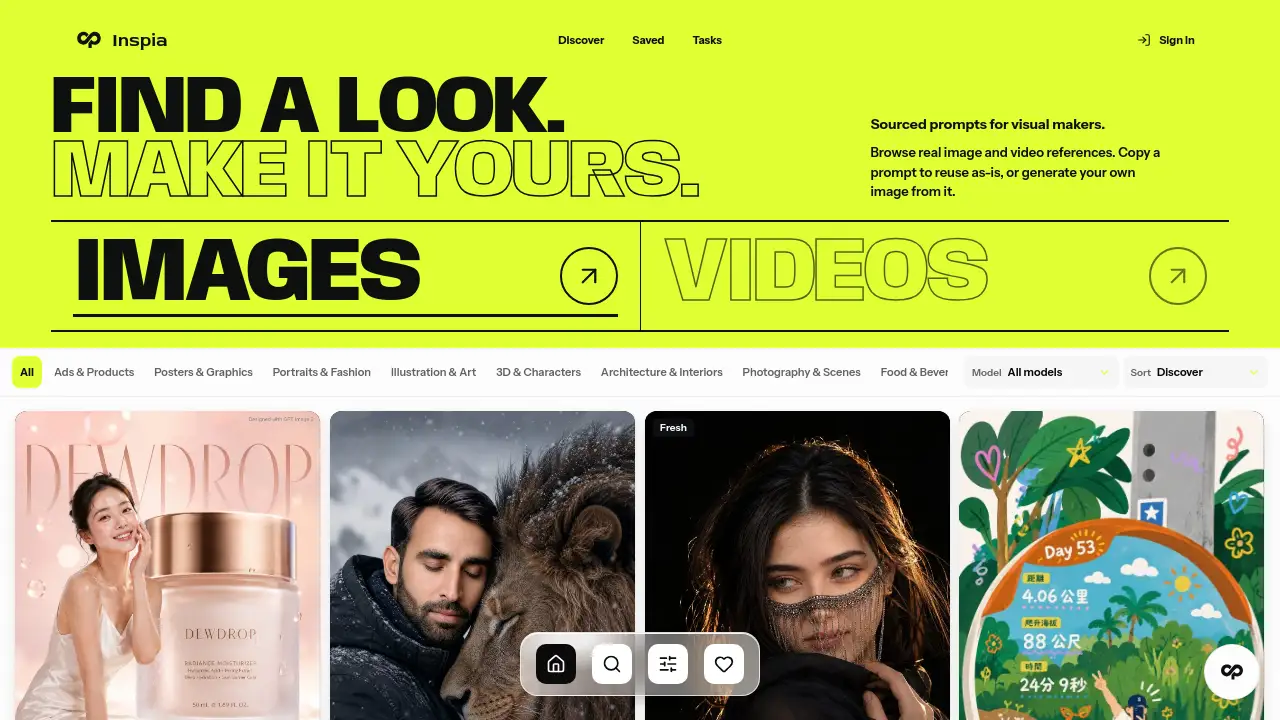
Inspia is an AI prompt library for anyone who wants ready-to-use image and video prompts. It shows real output examples, credits the original creators, and provides copy-ready text for tools like GPT Image, Nano Banana, Midjourney, and Seedance. This review examines how Inspia works and who can benefit from it.
What is Inspia?
Inspia is a curated prompt platform. It helps users avoid the guesswork of writing AI prompts from scratch. Instead of testing dozens of phrases, users can explore an AI prompt library that contains proven prompts with real results. Each prompt is paired with the final image or video, so users know what to expect before copying the text.
The homepage displays many creative examples, from minimalist fashion editorials to dark fantasy portraits. Users can see how different prompt styles affect the output. Inspia also gives creator attribution, so prompt makers are recognized. This is useful for anyone searching for AI image prompts with clear sourcing.
Inspia matters because AI tools are powerful but hard to control. A good prompt can make a big difference. With Inspia, users get an AI prompt library that supports Midjourney prompts, GPT Image prompts, Nano Banana prompts, Seedance prompts, and more. It reduces trial and error.
Key Features of Inspia
Curated Prompt Collection
Inspia organizes prompts into a visual library. Every entry is selected based on its output quality. Users can browse categories such as fashion, travel, food, character portraits, and advertising.
Real Result Previews
Each prompt on Inspia comes with an actual generated image or video. This is a major advantage because users can see what the text produces before using it. It also makes this AI prompt library feel more trustworthy.
Creator Attribution
Inspia gives credit to the prompt authors. This supports prompt creators and helps users find more work from the same person. Attribution is a useful feature for those who value transparency in an AI prompt library.
Copy-Ready Prompt Text
Inspia provides clean, ready-to-copy prompt text. Users do not need to rewrite or reformat. This is helpful for people who want quick AI image prompts without extra editing.
Multi-Platform Support
Inspia covers a wide range of tools, including GPT Image, Midjourney, Seedance, Nano Banana, Grok, and Gemini. A single prompt library can serve users across different workflows.
Broad Style Coverage
The homepage includes many styles, such as minimalist commercial ads, vintage portraits, cinematic stills, and playful illustrations. This makes Inspia a useful place for visual inspiration.
Use Cases for Inspia
Social Media Content Creation
Creators can find prompts for eye-catching posts, stories, and reels. Using proven AI image prompts from Inspia helps maintain a consistent visual style.
Advertising and Product Concepts
Marketers can explore prompt examples for oversized product ads, luxury packaging, and commercial photography. These AI image prompts can serve as starting points for campaign ideas.
Portrait and Editorial Projects
Photographers and designers can discover prompts for cinematic portraits, fashion editorials, and makeup analysis graphics. Inspia makes it easy to generate polished portrait visuals.
Video Prompt Exploration
Video prompts are also part of the library. Users can find AI video prompts for cinematic sequences and animated concepts, making Inspia useful for short-form video projects.
Learning Prompt Engineering
Beginners can study how prompts are structured. Inspia works as a practical guide because it pairs AI prompt text with real results. This helps users understand what works.
How to Use Inspia
Using Inspia is straightforward.
- Visit the Inspia website.
- Browse or search for a prompt style that fits the project.
- Open a prompt to see the real result and prompt text.
- Copy the ready-to-use text.
- Paste it into the desired AI tool, such as ChatGPT, Midjourney, or Seedance.
The process is simple, even for users who are new to an AI prompt library. There is no need to learn advanced prompt engineering before getting useful results.
Target Audience for Inspia
These groups will find value in Inspia's curated approach:
- Social media managers
- Digital marketers
- Graphic and UI designers
- AI art hobbyists
- Photographers and retouchers
- Content creators on YouTube, TikTok, and Instagram
- Brand owners who need fast visuals
- Anyone looking for a dependable AI prompt library
Is Inspia Free?
The public homepage for Inspia does not show a complete pricing table. Some prompts may be free to browse, while a paid plan may unlock more features. Since the reference material does not include exact prices, users should visit the official Inspia website for current subscription details.
| Plan | Price | Features |
|---|---|---|
| Free | Not confirmed | Access to selected prompts and examples |
| Pro | Not confirmed | Full prompt library, advanced search, additional tools |
This table should not be treated as a final price list. It is based on what is visible in the reference information.
Inspia's Pros and Cons
| Aspect | Pros | Cons |
|---|---|---|
| Prompt Library | Curated AI prompt library with visual examples | Some styles may not match every project |
| Attribution | Gives credit to original creators | Attribution options may vary by prompt |
| Platform Support | Works with GPT Image, Midjourney, Nano Banana, Seedance, and others | Users still need subscriptions to those AI tools |
| Ease of Use | Copy-ready text saves time | Limited guidance for troubleshooting failed generations |
| Pricing | Simple to start browsing | Exact pricing is not clear from the homepage |
Frequently Asked Questions about Inspia
What AI tools does Inspia support?
Inspia supports prompts for popular tools like GPT Image, Midjourney, Seedance, Nano Banana, Grok, and Gemini. The prompt text can be copied and pasted into these platforms.
Are the prompt examples on Inspia real?
Yes, the homepage displays prompts alongside real generated results. This is one of the main advantages of using Inspia as an AI prompt library, because users can see exactly what the text produces.
Can I use Inspia prompts for commercial projects?
Inspia is designed to help creators and marketers generate visuals for real projects. However, users should check the original prompt creator’s attribution and the terms of the AI tool they use before publishing anything commercially.
Do I need prompt engineering experience to use Inspia?
No. Inspia is useful for beginners because it provides copy-ready prompt text. Users can learn by comparing the AI prompt library entries with the output images and videos.
Does Inspia include video prompts?
Yes. Inspia offers both AI image prompts and AI video prompts. The homepage includes examples that work with video generation tools like Seedance.
Is Inspia free?
Exact pricing is not listed in the reference information. Some prompts appear to be open for browsing, but users should check the official Inspia website for the latest free and paid plan details.
Inspia Tags
AI prompt library, Inspia, AI image prompts, AI video prompts, Midjourney prompts, GPT Image prompts, Nano Banana prompts, Seedance prompts, AI art inspiration, prompt examples, creator attribution, copy-ready prompts