Introduction
An AI-powered platform for instant landing page testing with simulated customers.
What is Kewise?
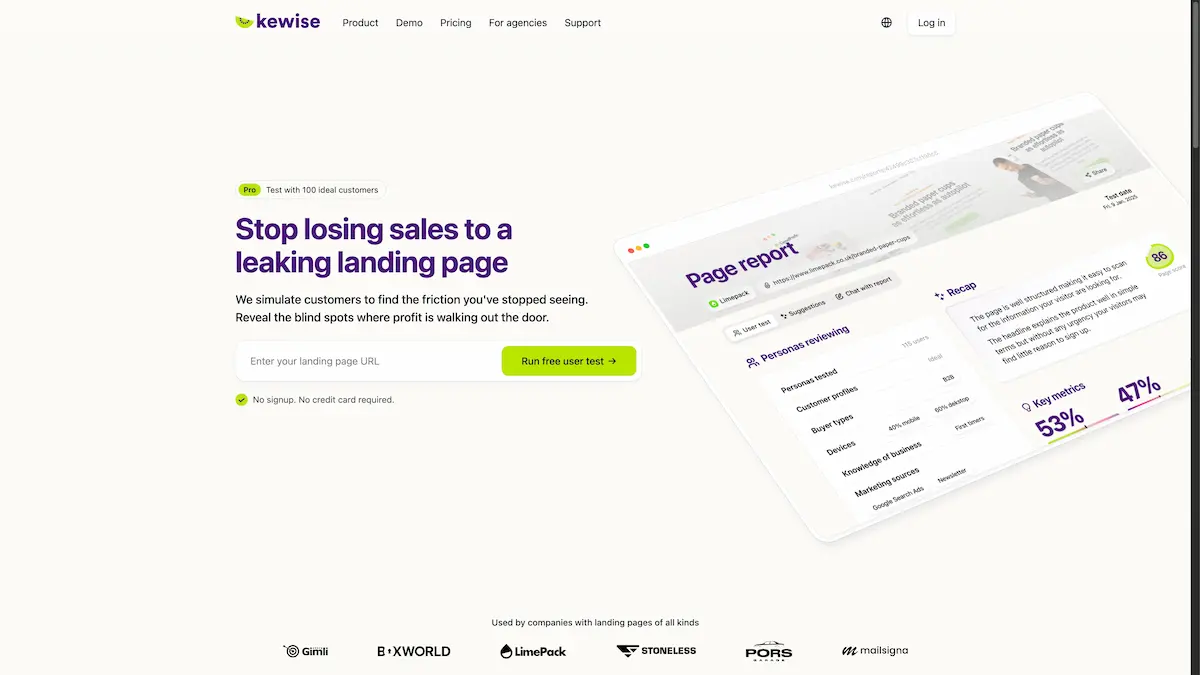
Kewise is an AI-driven user testing tool designed to help businesses identify and fix conversion problems on their landing pages. The core problem it addresses is the difficulty and expense of traditional user testing, which can involve recruiting people, coordinating schedules, and analyzing results over weeks. Kewise solves this by simulating visits from 100 AI versions of a business's ideal customers, generating an interactive report with heatmaps and drop-off data in just 15 minutes. This tool is particularly suitable for small to medium businesses, marketers, founders, and agencies who need objective, data-backed insights to improve their landing page performance without requiring large traffic volumes or budgets. It matters because it allows teams to move beyond guesswork and intuition, revealing the "blind spots" where potential customers are lost.
Key Features of Kewise
Instant AI Customer Simulation
Kewise quickly generates 100 AI profiles based on your target audience to simulate customer interactions with your landing page, providing immediate feedback without human recruiters.
Fast, Objective Insights
The platform delivers a detailed, interactive report within 15 minutes, highlighting exactly where users hesitate, get confused, or drop off, offering clear data instead of subjective opinions.
No-Code, Hassle-Free Setup
Testing requires no installation of tracking code or snippets; users simply paste their landing page URL, select traffic sources, and confirm their ideal customer profile to start a simulation.
Free Tier for Initial Discovery
Kewise offers a free user test that simulates 5 general customer profiles, allowing anyone to experience the core value and identify major friction points without any commitment.
Actionable "Aha-Moment" Reports
The generated reports are designed to provide clear, actionable insights and ready-to-implement solutions, serving as concrete evidence to guide design changes and convince stakeholders.
Use Cases for Kewise
Validating New Landing Page Designs
Before launching a new page, businesses can use Kewise to test its clarity and conversion path, ensuring the messaging resonates with the intended audience and no critical flaws exist.
Diagnosing Poor Conversion Rates
For pages with underwhelming performance, Kewise pinpoints specific friction points—like unclear value propositions or complex sign-up forms—that are causing visitors to leave.
Providing Evidence for Client or Team Decisions
Marketers and designers can use Kewise's objective data and heatmaps to support their recommendations, moving discussions away from personal preferences and toward data-driven decisions.
Rapid Iteration for Agencies
Marketing agencies can efficiently test multiple client landing pages, offering a high-value, data-backed service that identifies improvement opportunities quickly and credibly.
How to Use Kewise
Using Kewise involves a straightforward three-step process:
- Paste Your URL: Copy and paste the URL of the landing page you want to test into the Kewise platform.
- Define Your Audience: Select the relevant traffic sources and spend a couple of minutes confirming the details of your ideal customer profile (ICP).
- Review the Report: Launch the test. Within 15 minutes, you will receive an interactive report showing simulated customer behavior, complete with heatmaps and identified drop-off points.
Target Audience for Kewise
- Startup Founders and Small Business Owners who need to maximize every visitor but lack the budget for expensive consultants.
- Marketing Managers and Digital Marketers responsible for conversion rate optimization (CRO) and landing page performance.
- Web Designers and UX Professionals who require objective user feedback to validate their designs and improve user experience.
- Marketing and Web Design Agencies looking for a scalable tool to provide added value and data-driven insights to their clients.
- Product Managers launching new features or products and needing to validate landing page effectiveness quickly.
Is Kewise Free?
Kewise operates on a freemium model with clear, pay-as-you-go pricing. The details from the homepage are summarized below:
| Plan | Price | Key Features |
|---|---|---|
| Free | $0 | Test with 5 general customer profiles. Run up to 3 tests per day. |
| One | Single Purchase | Purchase a single, in-depth test. |
| Pro | Pack Purchase | Run a test with 100 ideal customer simulations. |
| Ultra | Custom | For businesses scaling fast and requiring extensive testing. |
For the most current and detailed pricing, users should visit the official Kewise pricing page.
Kewise's Pros and Cons
| Aspect | Pros | Cons |
|---|---|---|
| Speed & Accessibility | Delivers actionable user testing insights in minutes, not weeks. No need for live traffic. | Relies on AI simulation, which may not capture every nuance of real human emotion. |
| Ease of Use | Extremely simple, three-step process with no code installation required. | The quality of insights depends on how accurately the ideal customer profile is defined by the user. |
| Cost-Effectiveness | Free tier available. Pay-as-you-go pricing is more accessible than hiring testers or consultants. | For very small teams or individuals, the Pro pack may represent a significant one-time cost. |
| Output Utility | Generates objective, visual data (heatmaps, drop-off reports) perfect for convincing teams or clients. | The focus is solely on the landing page; it doesn't replace full-funnel or usability testing for complete websites. |
Frequently Asked Questions about Kewise
What do I get in the free test?
The free test provides a rapid simulation using 5 general customer profiles. It is designed to deliver a quick "Aha-moment" by identifying the most obvious friction points and conversion leaks on your landing page.
Can I test landing pages in any language?
Yes. While the Kewise platform interface is currently only in English, you can test any landing page URL regardless of the language the page is written in.
What are "Ideal Customers" in the Pro version?
In the Pro version, "Ideal Customers" refers to AI profiles built specifically based on your Ideal Customer Profile (ICP). This means the simulated visitors will have characteristics, interests, and intents that match your actual target audience, leading to more relevant and accurate feedback.
How can the data be used with clients or a team?
Kewise reports are built to provide "ammunition" for discussions. They replace subjective debates with objective data, such as heatmaps and drop-off percentages, making it easier to align teams and convince clients about necessary changes to improve conversion rates.
Is there a money-back guarantee?
Kewise offers a clarity guarantee. If a Pro simulation does not reveal at least one actionable friction point or blind spot on your landing page, they will refund your credits with no questions asked.
Do I need to install any code on my website?
No installation is required. Kewise uses AI simulation technology that does not need to track your real website visitors. You simply provide the URL, and the analysis is conducted without adding any code snippets to your site.
Kewise Tags
landing page testing, AI user testing, conversion rate optimization, CRO tool, landing page analysis, simulate customers, user feedback tool, heatmap analysis, marketing agency tool, fix conversion leaks, ideal customer profile, UX testing