Introduction
Kling 4.0 creates AI videos from text or images.
What is Kling 4.0?
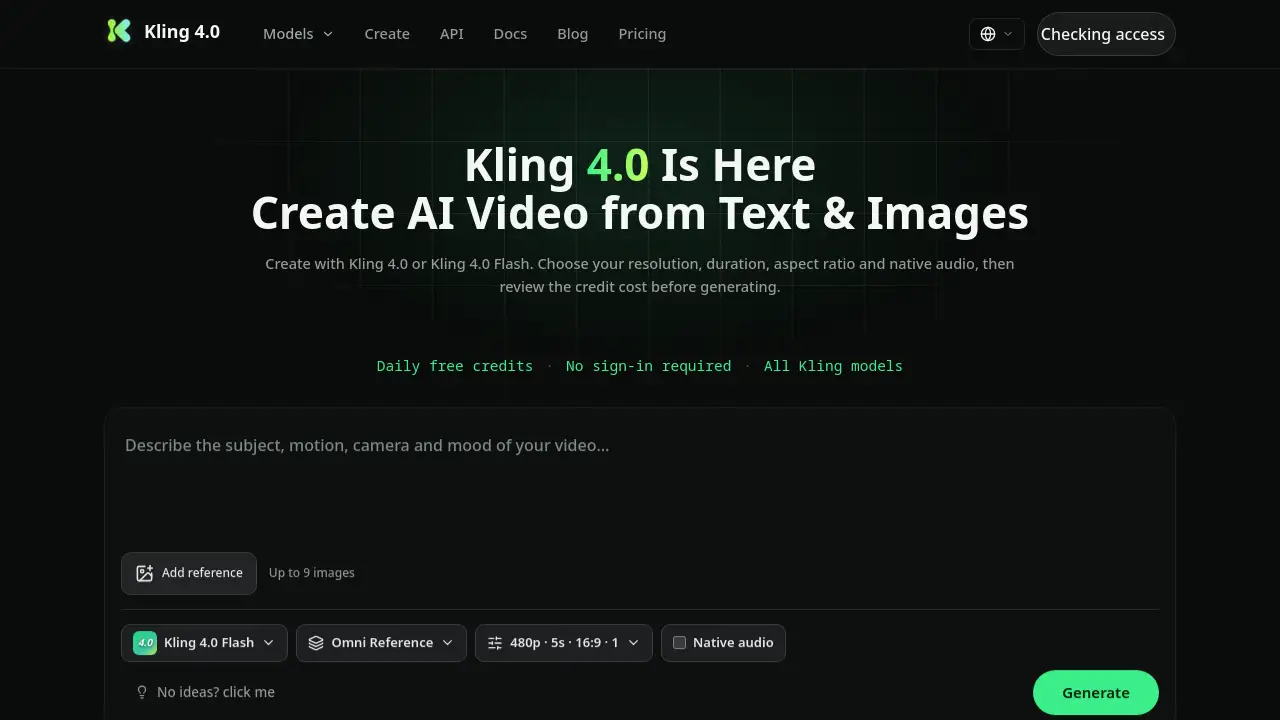
Kling 4.0 is an AI video generator available on kling-4.ai. It is presented as a next-generation AI video model in the Kling AI family, following Kling 3.0. The Kling 4.0 platform lets users create AI videos from text prompts or reference images. Before generating, users can choose supported resolution, duration, aspect ratio, and audio settings. The homepage also lists Kling 4.0 Flash for faster or lighter video creation.
The tool addresses a common production problem: turning an idea into a watchable clip without a full camera crew, editing suite, or complex animation pipeline. Kling 4.0 is suitable for short films, ads, e-commerce product videos, social media clips, and experimental AI video creation. Its reported features include long single-take generation, multimodal references, native audio, and 4K 60fps output. Because some Kling 4.0 specifications come from leaks and internal notes, final details may change. The current website offers daily free credits for eligible visitors and does not require sign-in for basic access. Kling 4.0 users can review the credit cost before generating, which helps control spending.
Key Features of Kling 4.0
Text-to-Video and Image-to-Video Creation
Turn a written prompt or a reference image into an AI video clip. Kling 4.0 lets users choose resolution, duration, aspect ratio, and audio before submitting the job.
Kling 4.0 Flash
Select Kling 4.0 Flash for shorter 720p clips, currently listed at 5–15 seconds. It offers a simpler option for quick previews or lightweight AI video creation.
Native Audio and Lip-Sync
Add native audio, phoneme-accurate lip-sync, custom voice references, and scene-matched sound or BGM. This supports dialogue-driven videos in multiple languages.
Long Single-Take Narrative
A reported Kling 4.0 mode can generate up to 120 seconds in one continuous take. Scene memory is designed to keep light, wardrobe, and props consistent across the shot.
80-Reference Multimodal System
The reported Kling 4.0 system accepts images, video, audio, and 3D references in one project. Layered weight controls aim to reduce face and brand drift across cuts.
4K 60fps Cinema Output
Kling 4.0 is reported to support native 4K 60fps output without upscaling or interpolation. World-model physics aim to make fabric, fluid, and motion look natural.
Visible Credit Cost
Review the credit cost for each supported configuration before generating. This makes AI video generation more predictable for users with limited credits.
Developer API Workflow
The site provides an API guide with job creation, job status, and sync endpoints. Supported workspace models may vary, and future public API access is not promised.
Use Cases for Kling 4.0
AI Short Films and Drama
Create narrative scenes or mini-episodes with long takes and character consistency. Kling 4.0 can help storytellers test ideas without a full production crew.
Ads and TVC Production
Generate cinematic product spots with locked brand elements and 4K output. The reference system can help keep logos, products, and style boards consistent.
E-commerce Product Video
Turn product images and descriptions into listing videos or marketplace creative. Native audio and consistent product details can reduce manual editing work.
Social Media Content
Make vertical-first clips for TikTok, Reels, and Shorts. Use text-to-video or image-to-video prompts to test multiple hooks and aspect ratios quickly.
Developer and API Projects
Use the documented API workflow to connect AI video generation into a product, dashboard, or internal tool. Availability depends on access requirements and supported models.
How to Use Kling 4.0
- Open the kling-4.ai homepage and find the generator.
- Choose Kling 4.0 or Kling 4.0 Flash as the AI video model.
- Enter a text prompt or upload a reference image.
- Select supported resolution, duration, aspect ratio, and audio settings.
- Review the credit cost, then click generate and wait for the result.
Target Audience for Kling 4.0
- Filmmakers and short-form storytellers
- Marketing, ad, and TVC teams
- E-commerce sellers and product marketers
- Social media creators and influencers
- Developers building AI video workflows
- AI enthusiasts exploring text-to-video and image-to-video tools
Is Kling 4.0 Free?
Kling 4.0 offers free access options. The homepage states that eligible visitors can claim daily free credits, and no sign-in is required. Each video uses the credit amount shown before submission. Paid membership details are not fully listed in the reference information. Active monthly and yearly members can reportedly select two, three, or four outputs, with each output treated as a separate generation and credit cost.
| Plan | Price | Features |
|---|---|---|
| Free | $0 | Daily free credits for eligible visitors; no sign-in required; all Kling models; credit cost shown before generation |
| Paid | Not listed | Active monthly or yearly members can select multiple outputs; each output has its own credit cost |
For exact pricing and membership terms, users should check the official platform directly, as plans and credit rules may change.
Kling 4.0's Pros and Cons
| Aspect | Pros | Cons |
|---|---|---|
| Pricing | Daily free credits and visible credit cost | Full paid pricing is not clearly listed |
| Features | Text-to-video, image-to-video, Flash mode, native audio, long takes, 4K output | Some Kling 4.0 specs are reported and may change |
| Ease of Use | Simple settings and no sign-in required for basic access | Advanced reference and editing controls may take time to learn |
| Output | Supports multiple resolutions, durations, aspect ratios, and audio options | Not every feature is available for every model or credit balance |
| Developer Access | API documentation and job workflow are provided | Future public API access is not promised |
Frequently Asked Questions about Kling 4.0
What is Kling 4.0?
Kling 4.0 is an AI video generator for creating videos from text prompts or reference images. It is available on kling-4.ai and offers settings for resolution, duration, aspect ratio, and audio.
Is Kling 4.0 free to use?
Eligible visitors can claim daily free credits, and no sign-in is required for basic access. Each Kling 4.0 generation uses the credit cost shown before submission, so users can check the required credits first.
What is the difference between Kling 4.0 and Kling 4.0 Flash?
Kling 4.0 is the main AI video model with more reported features and settings. Kling 4.0 Flash is a lighter option, currently listed as supporting 720p video for 5–15 seconds.
Can Kling 4.0 create videos from reference images?
Yes. The Kling 4.0 platform supports creating AI videos from text or reference images. Users can upload image references and then choose supported video settings before generating.
How long can Kling 4.0 videos be?
The current Kling 4.0 option supports 5–30 seconds at 720p or 1080p, plus a separate 4K option for 4–15 seconds. A reported 120-second experimental mode may be available, but final specifications can change.
Does Kling 4.0 support native audio and lip-sync?
The product description and homepage mention native audio settings. Reported Kling 4.0 features include phoneme-accurate lip-sync in multiple languages and custom voice references, though available options depend on the selected model and settings.
Kling 4.0 Tags
Kling 4.0, Kling 4.0 AI video generator, AI video generator, text to video, image to video, Kling 4.0 Flash, native audio AI video, 4K 60fps AI video, AI video creation, reference image video, Kling API, AI short film generator