Introduction
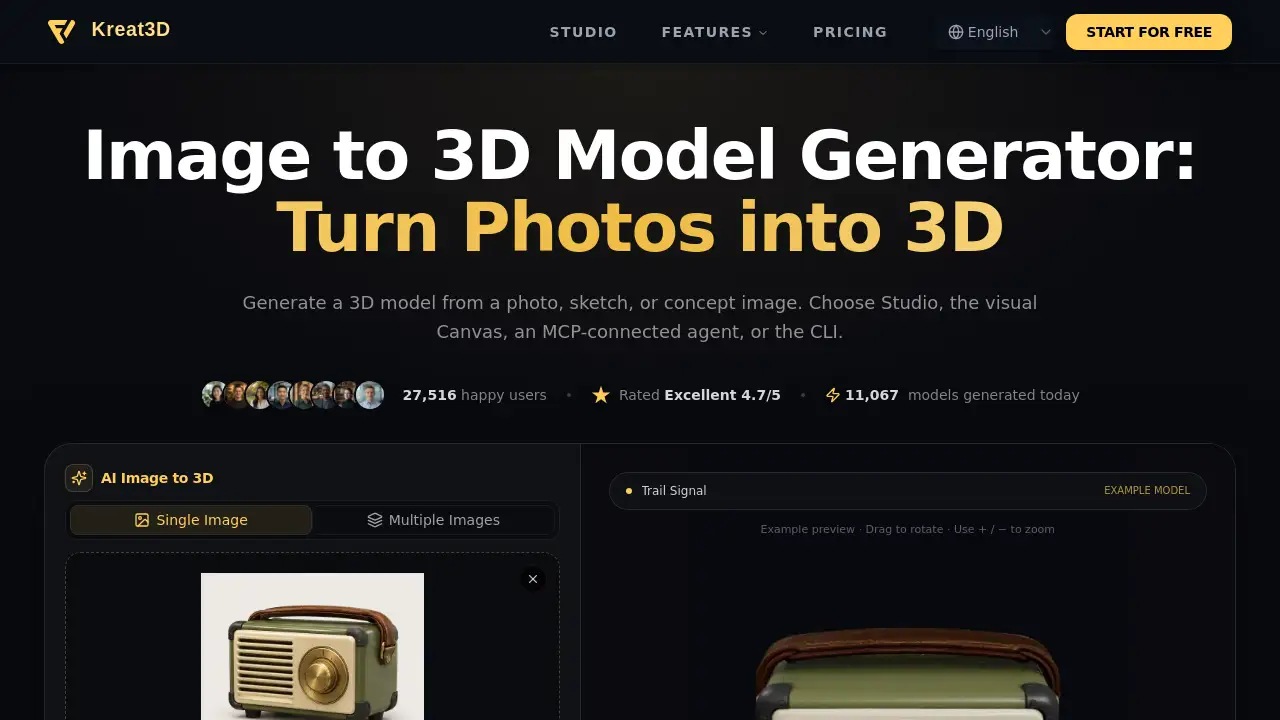
The Image to 3D Model Generator from Kreat3D turns a photo, sketch, or concept image into a 3D model. It supports browser Studio, Canvas, MCP, and CLI workflows. This review covers features, use cases, pricing, and FAQs.
What is Image to 3D Model Generator?
Image to 3D Model Generator is an online tool that creates 3D geometry from a 2D reference image. It is designed for people who want to generate a 3D model from an image without starting from scratch in traditional modeling software. The tool accepts photos, JPG, PNG, WebP files, sketches, and concept art. Because a single image does not show every side of an object, the AI infers hidden surfaces, so the result may need review and refinement.
The platform offers several ways to work: Studio for a guided browser workflow, Canvas for connected visual steps, MCP for AI agents, and CLI for terminal or script use. This makes the image to 3D workflow flexible for artists, developers, designers, and technical users. The product page reports 39,803 happy users, an Excellent 4.7/5 rating, and 16,013 models generated today. These numbers suggest active use, but they are not a guarantee of output quality for every project.
The main value is speed and accessibility. Users can upload an image, choose a generation model, inspect the result, and move toward a textured 3D model or geometry-only asset. It is not a replacement for professional modeling, but it can be a useful starting point for prototyping, visualization, and 3D printing preparation.
Key Features of Image to 3D Model Generator
Guided Studio Workflow
Use Studio to upload a reference, select settings, and submit a generation task in the browser. Studio shows progress while the image to 3D model is created.
Multiple Input Types
Turn a photo, JPG, PNG, WebP, sketch, or concept image into a 3D model. Clear images with one complete subject usually give the AI more useful visual information.
Multi-View Image Support
Generate one 3D model from multiple consistent views. The front view is required, while back, left, and right views are optional. This feature depends on a compatible model and an eligible subscription.
Geometry or Textured Output
Choose geometry only or a supported textured 3D model option. Texture quality, PBR materials, and geometry controls vary by model.
Canvas Visual Workflow
Connect an image to Image to 3D, pass the model to Texture, and re-run only the relevant nodes. The Canvas keeps reference, model, and material steps together.
MCP and CLI Access
MCP lets a connected AI agent call Kreat3D tools, follow task progress, and retrieve available output files. The CLI provides direct terminal or script access for repeatable image to 3D tasks.
Export to Common Formats
Export generated models to GLB, OBJ, FBX, or STL where supported. Download access requires a paid account, and format availability varies by model.
Use Cases for Image to 3D Model Generator
Game Development
Turn character art and prop concepts into assets for prototyping. Review topology, optimize the mesh, and add rigging where the game needs it.
Product Design
Explore form and proportions from product references before a review. Use the 3D model for visualization, then develop precise dimensions in design tools.
3D Printing
Start a figurine or object from a clear image. Check scale, wall thickness, and mesh integrity in preparation tools before slicing.
E-commerce and AR
Explore interactive product presentation with 3D assets. Check material accuracy and optimize file size for a viewer or AR platform.
Animation and VFX
Move a visual concept into scene development. Retopologize, rig, and refine materials in an animation package when a shot requires it.
Education and Training
Turn visual references into objects learners can explore from different angles. Review accuracy before using models to explain technical subjects.
How to Use Image to 3D Model Generator
- Choose a photo, sketch, or concept image with one complete subject. For multi-view, use consistent front, back, left, and right views if the selected model supports it.
- Open the Image to 3D Model Generator in Studio. Upload the reference and select a generation model.
- Review the model’s options and credit cost, then submit the task. Studio displays progress while the image to 3D task runs.
- Rotate the generated model to check its silhouette and inferred surfaces.
- With an eligible paid account, download an available format or continue refining the asset.
Target Audience for Image to 3D Model Generator
- 3D artists and modelers who need quick concept assets
- Game developers prototyping characters, props, and environments
- Product designers exploring form and proportions
- 3D printing hobbyists and professionals preparing objects
- E-commerce and AR teams building interactive product views
- Educators and trainers creating explorable visual references
- AI agent and CLI users who want scripted image to 3D workflows
Is Image to 3D Model Generator Free?
New accounts receive starter credits to try supported generation options without entering card details. Each task’s credit cost appears in the editor. Starter credits do not unlock every model, multi-view mode, or generated-model downloads. Pricing details are not fully listed in the reference content, so users should check the official pricing page.
| Plan | Price | Features |
|---|---|---|
| Free starter credits | $0 | Try supported generation options; no card required; limited model access and no generated-model downloads |
| Paid account | Not listed | Download available formats; access eligible subscription features such as multi-view where supported |
For current plans and credit costs, visit the official pricing page: https://kreat3d.io/pricing.
Image to 3D Model Generator's Pros and Cons
| Aspect | Pros | Cons |
|---|---|---|
| Access | Browser-based Studio, Canvas, MCP, and CLI options | Some workflows may require setup or technical knowledge |
| Inputs | Supports photos, sketches, JPG, PNG, WebP, and concept images | One image cannot show every surface, so refinement may be needed |
| Output | Can generate geometry or textured 3D models | Texture and PBR options vary by model |
| Export | Supports GLB, OBJ, FBX, and STL where available | Downloads require a paid account; format availability varies |
| Trial | Free starter credits with no card required | Starter credits do not unlock every model, multi-view, or downloads |
Frequently Asked Questions about Image to 3D Model Generator
How does an image to 3D model generator turn a 2D image into 3D?
It creates 3D geometry and, with a supported option, textures from a 2D reference image. Because one image does not show every surface, the AI infers hidden areas and the result may need refinement.
Can I turn a photo, JPG, PNG, WebP, or sketch into a 3D model?
Yes. Use a clear photo, JPG, PNG, WebP, sketch, or concept image with one complete subject. A simple background, visible edges, even lighting, and readable depth give the generator more useful visual information.
Can I generate one 3D model from multiple images?
Yes. Multiple Images combines consistent views of one object. The front is required; back, left, and right views are optional. It requires a compatible model and eligible subscription.
Will the generated 3D model include textures?
Choose a supported textured option when surface color with the mesh is needed. Geometry-only output is untextured, and texture quality and PBR options vary by model.
Can I export the generated model as STL, GLB, OBJ, or FBX?
Export paths include GLB, OBJ, FBX, and STL where supported, but availability varies by model. After import, check scale, topology, and materials for Blender or game use. For 3D printing, also check dimensions, wall thickness, closed surfaces, orientation, and supports.
Can I try the image to 3D model generator for free?
New accounts receive starter credits to try supported generation options. No card is required to try, but generated-model downloads require a paid account.
Image to 3D Model Generator Tags
image to 3D model generator, image to 3D, generate 3D model from image, AI image to 3D, 3D model from photo, photo to 3D model, textured 3D model, GLB OBJ FBX STL export, Kreat3D, online 3D model generator, sketch to 3D, 3D printing model generator