Introduction
A modern HTTP and API load testing tool for teams that need fast, reliable performance checks.
What is LoadTester?
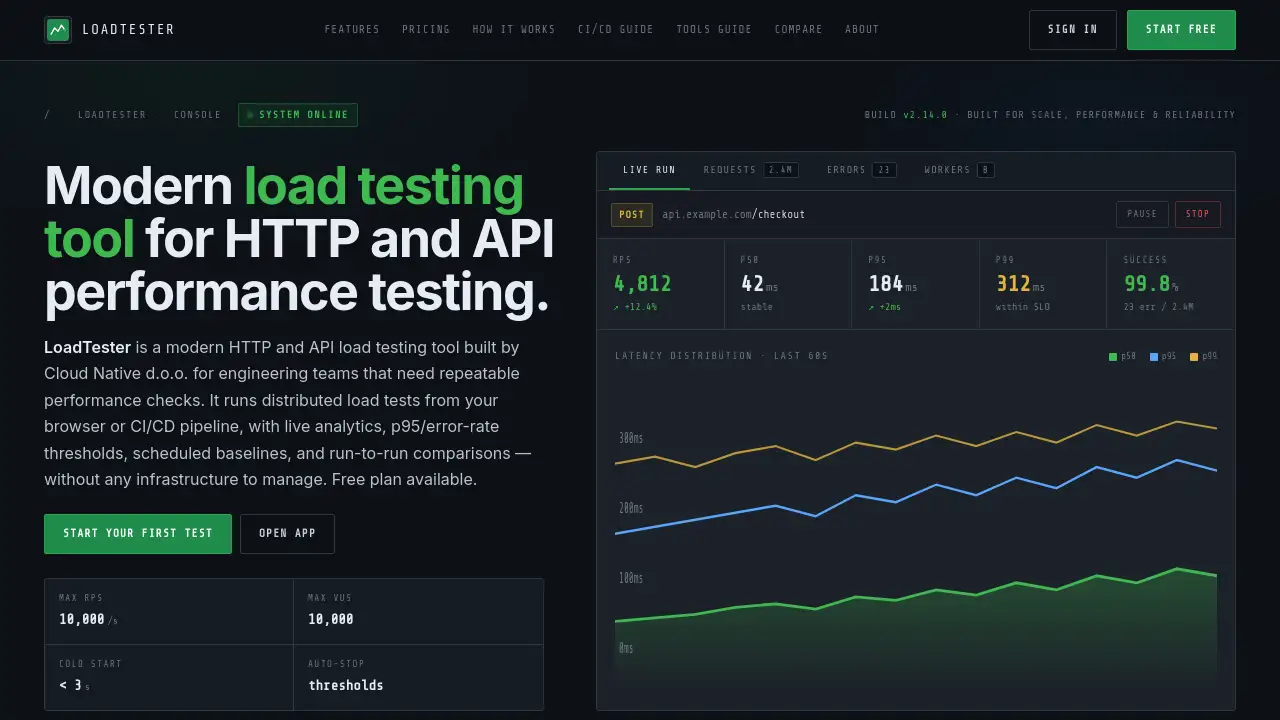
LoadTester is a modern HTTP and API load testing tool designed for engineering teams. It solves the problem of complex, infrastructure-heavy performance testing by providing a cloud-native platform that runs distributed load tests directly from a web browser or CI/CD pipeline. The tool allows teams to validate application performance before releases, campaigns, or traffic spikes with live analytics and automated thresholds. It is suitable for developers, QA engineers, and DevOps teams who require repeatable, actionable performance insights without managing their own load testing infrastructure. The availability of a free plan makes it accessible for initial website performance testing and API load testing experiments.
Key Features of LoadTester
Instant Distributed Execution
Tests launch in under 3 seconds with automated worker scaling, requiring zero infrastructure setup or management from the user, which streamlines the load testing workflow.
Live Analytics Dashboard
Monitor key performance indicators like requests per second (RPS), p50/p95/p99 latency, and error rates in real-time through streaming charts while the test is running.
Smart Auto-Stop Thresholds
Configure performance guardrails such as maximum latency or error rate; the test will automatically stop if these thresholds are breached, preventing wasted resources.
CI/CD and Automation Ready
Integrate load testing directly into deployment pipelines using API tokens, with support for scheduled tests, webhook triggers, and alerts to platforms like Slack and email.
Comprehensive Scenario Testing
Create tests for real-world HTTP flows including APIs, websites, authentication, checkout processes, and GraphQL endpoints with custom headers, bodies, and ramp-up configurations.
Regression Detection & Comparison
Automatically compare test runs against established baselines to detect performance regressions, helping teams maintain application performance standards across releases.
Use Cases for LoadTester
Release Validation
Run a quick performance check before a software deployment to catch latency or error rate regressions while the change is still easy to fix or roll back.
API Confidence and Scaling
Load test critical API endpoints, authentication flows, and user journeys to ensure they can handle expected traffic, which is essential for API load testing before a product launch.
Team Performance Visibility
Share live result dashboards and reports in chat or tickets, giving engineering and product teams a unified, actionable view of application performance.
Launch Preparedness
Validate that web applications and backend services can scale under simulated load to identify bottlenecks before a major marketing campaign or feature launch.
How to Use LoadTester
Using LoadTester involves a straightforward process focused on configuration and observation.
- Create a Test: In the dashboard, define a new test. Specify the target URL (e.g., an API endpoint), HTTP method, and configure the load pattern using Virtual Users (VUs) or a target Requests Per Second (RPS) rate and test duration.
- Launch the Test: Start the test with one click. LoadTester automatically dispatches workers and begins generating load, typically in less than 3 seconds.
- Monitor Live Data: Watch the live analytics dashboard to track throughput, latency percentiles (p95, p99), and success rates as the test executes.
- Set and Use Thresholds: Define auto-stop thresholds for metrics like p95 latency or error rate. The test can halt automatically if these are breached, or you can use them as pass/fail criteria for CI/CD gates.
- Analyze and Share: Review the final results, compare them to previous baselines to check for regressions, and export reports (PDF/CSV) or share dashboard links with the team.
Target Audience for LoadTester
- Software Development Teams needing to validate performance before releases.
- DevOps and Site Reliability Engineering (SRE) Teams implementing performance gates in CI/CD pipelines.
- QA and Performance Engineers responsible for conducting routine application performance testing.
- Product Teams and Engineering Managers who require clear, shared visibility into system performance under load.
Is LoadTester Free?
LoadTester offers a free forever plan with basic capabilities, suitable for small-scale testing. For teams requiring higher scale and advanced features, a paid Premium plan is available.
| Plan | Price | Key Features |
|---|---|---|
| Free | $0 / forever | 10 Virtual Users, 50 RPS, 1-minute max test, 1 concurrent test, live charts. |
| Premium | $94.99 / month | 10,000 Virtual Users, 10,000 RPS, 10-minute max test, 2 concurrent tests, API/CI/CD integration, scheduled tests, Slack/email alerts, regression detection, priority support. |
LoadTester's Pros and Cons
| Aspect | Pros | Cons |
|---|---|---|
| Ease of Use | No infrastructure to manage; tests start in seconds with a simple UI. | Advanced scenario configuration may have a learning curve for complex user journeys. |
| Features & Power | Live analytics, smart auto-stop, and CI/CD integration cover essential modern load testing needs. | Maximum test duration on the Premium plan is capped at 10 minutes, which may not suit very long endurance tests. |
| Pricing & Value | Generous free plan for getting started; transparent, feature-based pricing for the Premium tier. | The Premium plan might be costly for very small teams or individual developers needing high-scale tests infrequently. |
| Performance | Can scale to 10,000 VUs and RPS, which is sufficient for many website performance testing and API load testing scenarios. | Maximum scale is fixed per plan; organizations needing beyond 10,000 RPS would need to explore enterprise options. |
Frequently Asked Questions about LoadTester
Why use a load testing tool instead of building it yourself?
A dedicated load testing tool saves significant time and removes infrastructure overhead. It provides immediate live analytics, supports CI/CD workflows natively, and ensures tests are repeatable and comparable. This allows teams to focus on acting on results rather than building and maintaining custom scripts and dashboards.
Do I need to manage any infrastructure for LoadTester?
No. LoadTester is a fully managed service. It handles all execution infrastructure, worker scaling, and coordination automatically. Users only need to configure and launch their tests from the browser or API.
Can LoadTester be used for both API and website load testing?
Yes. LoadTester is designed as a modern HTTP and API load testing tool. It can be used to test API endpoints, full website user flows, authentication sequences, checkout processes, webhooks, and GraphQL services.
How does LoadTester integrate with CI/CD pipelines?
LoadTester provides API tokens that allow you to trigger tests programmatically from tools like GitHub Actions, Jenkins, or GitLab CI. You can configure thresholds to act as pass/fail gates, automatically catching performance regressions before a release is deployed.
What is the "auto-stop" feature?
The auto-stop feature allows you to set thresholds for key metrics like p95 latency or error rate. If the live test results breach these configured limits, the test will automatically stop. This prevents consuming resources on a failing test and allows for immediate investigation.
Is LoadTester suitable for small teams or individual developers?
Absolutely. The simplicity and free plan make it accessible for small teams or individual developers who need quick performance checks. Its power and automation features also scale to meet the needs of larger engineering organizations.
LoadTester Tags
load testing tool, API load testing, HTTP load testing, website performance testing, application performance testing, performance check, load test, CI/CD testing, automated testing, performance regression, distributed load testing, cloud native testing